

How to Fix “No Agents Available” Error in VICIdial (2026 Guide)
VICIdial No Agents Available is one of the most common issues that disrupts outbound calling operations. This guide gives you a complete, practical Vicidial solution to fix it quickly and permanently.
Whether your agents are logged in but not receiving calls or campaigns suddenly stop dialing, this guide will help you identify the root cause and restore your system performance without guesswork.
With over 14+ years of experience, 900+ contact centers served, and 2,000+ successful deployments, DialerKing engineers have resolved this issue across multiple industries and environments.
Key Takeaways
- The VICIdial No Agents Available error is usually caused by agent, campaign, or dialer misconfiguration
- Most issues can be fixed by checking agent status, campaign settings, and dial method
- Real-time reports and logs are critical for accurate troubleshooting
- Predictive dialer settings directly impact agent availability detection
- Proper configuration improves agent productivity, call center automation, and dialing efficiency
Understanding the VICIdial No Agents Available Error
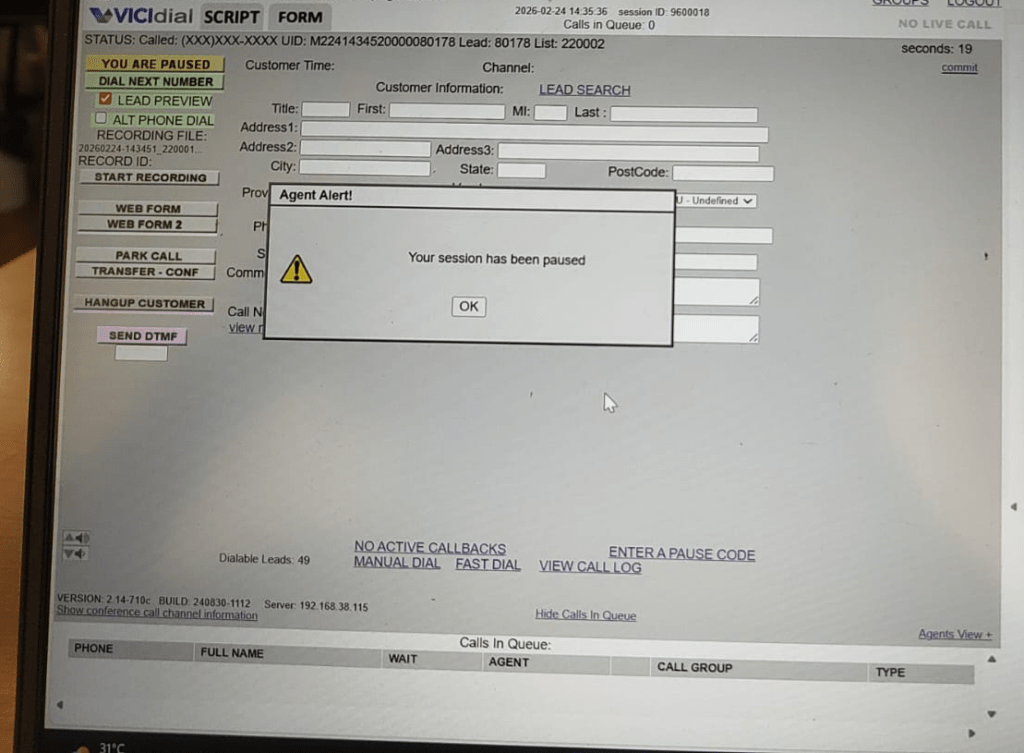
The VICIdial No Agents Available error occurs when the system cannot detect any active agents ready to receive calls within a campaign. Even if agents are logged in, the dialer may still treat them as unavailable due to misaligned configurations.
This directly affects:
- Outbound dialer performance
- Agent productivity
- Call center automation flow
In predictive dialing environments, this issue can completely halt call generation.
Common Causes of the Error
1. Agents Not in READY State
Agents may be logged in but not set to READY, which makes them invisible to the dialer.
2. Campaign Not Assigned Properly
Agents must be assigned to the correct campaign. A mismatch leads to zero available agents.
3. Incorrect Dial Method
If the dial method (Manual, Ratio, Adaptive) is misconfigured, the system may not trigger calls.
4. Pause Codes and Status Issues
Agents stuck in pause codes or wrong statuses are excluded from dialing.
5. Server Load or Cron Issues
Background processes (like cron jobs) may fail, preventing agent detection.
Step-by-Step Fix for VICIdial No Agents Available
Follow these steps carefully to resolve the issue:
Step 1: Verify Agent Login Status
- Go to Admin → Realtime Agent Status
- Ensure agents are logged in
- Check if status is READY, not PAUSED
Step 2: Check Campaign Assignment
- Navigate to Admin → Campaigns
- Open your campaign
- Verify agents are assigned correctly
Step 3: Confirm Dial Method Settings
- Set dial method to:
- Ratio or Adaptive (recommended)
- Ensure auto-dial level is configured properly
For optimized dialing performance, explore our predictive dialer solution that improves agent utilization and reduces idle time.
Step 4: Validate Inbound/Outbound Balance
- Check if agents are stuck handling inbound calls
- Adjust call routing settings if needed
- List Item
Step 5: Review Pause Codes
- Go to Admin → Pause Codes
- Ensure agents are not stuck in inactive states
Step 6: Restart Cron Services
Run:
/usr/share/astguiclient/AST_cron_run.plRestart services if needed:
service httpd restart
service asterisk restartStep 7: Check Real-Time Reports
- Monitor
- Agents Waiting
- Calls in Queue
- Ensure system recognizes active agents
Advanced Troubleshooting Techniques
Check VICIdial Logs
Logs provide deeper insights:
/var/log/astguiclient
/var/log/asterisk/messagesLook for:
- Agent timeout errors
- Campaign misconfiguration warnings
Database Verification
Run queries to check agent status:
SELECT * FROM vicidial_live_agents;Asterisk Dialplan Issues
If using an Asterisk dialer, confirm dialplan routing is working correctly.
Real-World Use Case
A mid-sized BPO handling insurance campaigns faced the VICIdial No Agents Available issue during peak hours. Despite having 40+ agents logged in, calls were not being initiated.
Problem Identified:
- Agents were in READY state
- Campaign dial level was set too low (0.5)
Solution:
- Increased dial level to 2.0
- Enabled adaptive dialing
Result:
- 65% increase in call connection rate
- Improved agent productivity
- Reduced idle time significantly
Best Practices to Prevent the Issue
Use Predictive Dialing for Consistent Agent Engagement
Predictive dialing plays a critical role in eliminating the chances of the VICIdial No Agents Available error. When your outbound dialer is configured with the right dialing ratio and logic, it automatically adjusts call flow based on agent availability and answer rates. This ensures that agents are always engaged without being overloaded.
A well-optimized predictive dialing setup reduces idle time, increases connection rates, and maintains a steady workflow across campaigns. Businesses that rely on manual or poorly configured dialing methods often face inconsistent performance, while predictive dialing brings stability and scalability to call center operations.
Monitor Real-Time Dashboards for Immediate Visibility
Real-time monitoring is essential for maintaining control over your contact center environment. VICIdial provides live dashboards that display agent status, calls in queue, and campaign performance. By actively monitoring these dashboards, supervisors can quickly identify when agents are not in READY state or when campaigns are not distributing calls properly.
This immediate visibility allows for quick intervention before small issues turn into major disruptions. Consistent monitoring also helps in understanding trends, such as peak calling hours and agent performance patterns, which can be used to optimize future operations.
Perform Regular System Audits to Avoid Configuration Drift
Over time, even a well-configured system can develop inconsistencies due to updates, new campaigns, or changes in agent groups. Regular system audits help ensure that all configurations remain aligned with operational goals. These audits should include a detailed review of campaign settings, agent assignments, dialing ratios, and pause codes.
By conducting weekly or bi-weekly checks, you can identify mismatches or outdated configurations that may lead to agent availability issues. A proactive audit approach not only prevents errors but also improves overall system efficiency and reliability.
Optimize VICIdial Setup for Long-Term Stability
A properly Optimized Vicidial Setup forms the backbone of a high-performing contact center. Many issues, including the VICIdial No Agents Available error, originate from incomplete or incorrect initial configurations. Ensuring that your system is set up with the right campaign structures, dial methods, server capacity, and routing logic is essential for long-term stability.
A professionally managed setup aligns technical configurations with business requirements, resulting in smoother operations and fewer interruptions. Investing in optimization at the setup stage significantly reduces troubleshooting efforts later.
Implement Smart Call Routing for Balanced Workload Distribution
Smart call routing ensures that calls are distributed evenly among available agents based on predefined rules such as skill level, availability, and campaign priority. Without proper routing, some agents may become overloaded while others remain idle, leading to inefficiencies and potential system errors. Balanced routing improves agent productivity and enhances customer experience by reducing wait times.
It also ensures that the system always has a clear understanding of agent availability, which minimizes the risk of triggering the VICIdial No Agents Available error. A well-designed routing strategy creates harmony between call volume and agent capacity, resulting in a more efficient and reliable contact center operation.
Frequently Asked Questions
Conclusion
The VICIdial No Agents Available error can severely impact your call center operations, but it is almost always fixable with the right approach. By checking agent status, campaign configuration, and dialer settings, you can quickly restore normal operations and improve overall efficiency.
If you want a stable, optimized system without recurring issues, DialerKing offers expert Vicidial solutions tailored to your business. With deep experience in call center automation, Asterisk dialer systems, and agent productivity optimization, we ensure your dialer runs at peak performance.
Get in touch with DialerKing or explore our live demo at demo.DialerKing.com to see a fully optimized VICIdial environment in action.

 Email: dialer@dialerking.com
  Phone: +91 940 820 7777
  WhatsApp: +1 (202) 249-5906
  Microsoft Teams
: dialerking1@gmail.com
Microsoft Teams
: dialerking1@gmail.com 




 Find Your Perfect Role