- Why VPS is the Right Infrastructure for VICIdial in 2026
- Step-by-Step VICIdial VPS Installation Process
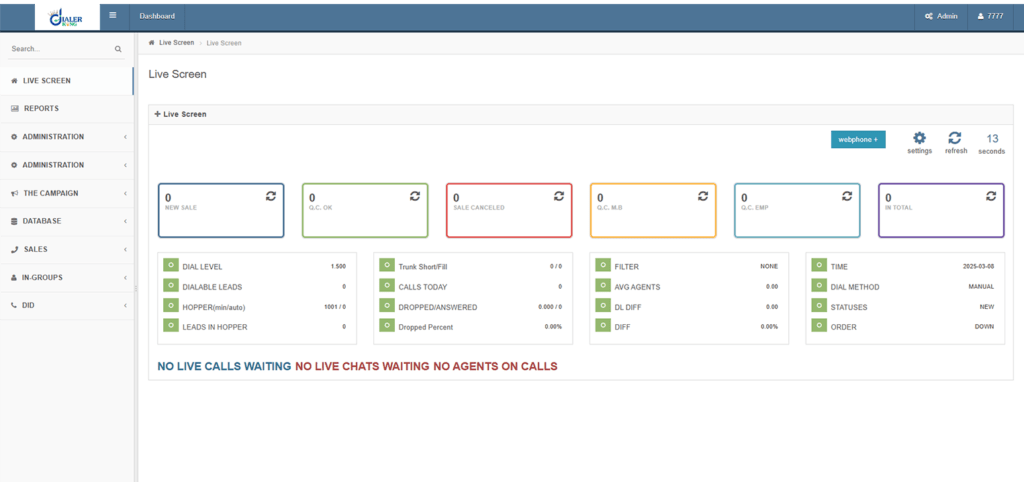
- White Label Admin Panel – Custom Branding Applied
- Deploying a Modern Agent Interface
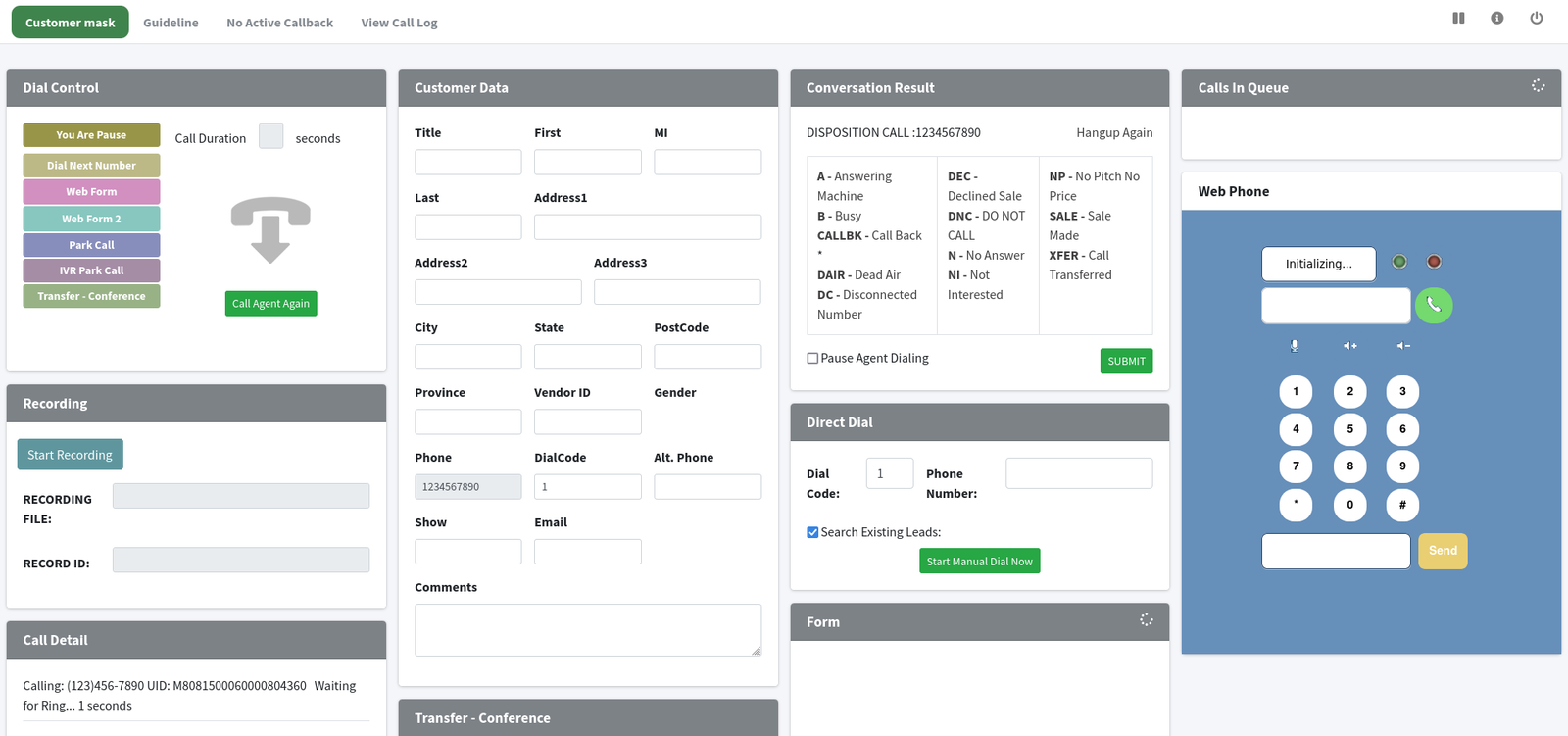
- Modern Agent Interface — WebRTC + Embedded CRM View
- Real-World Use Case: BPO White-Label Deployment
- Frequently Asked Questions
- Conclusion
VICIdial VPS installation is the fastest, most cost-effective way to stand up a production-grade, open-source Vicidial contact center in 2026, but doing it right means more than running a one-line install script. This guide walks you through every critical phase: VPS provisioning, OS hardening, VICIdial stack deployment, white label customization, and launching a modern agent interface that your team will actually enjoy using.
Whether you are an IT manager setting up an in-house dialer or a reseller building a branded solution for clients, you will leave this page with a clear, actionable deployment plan.
Why VPS is the Right Infrastructure for VICIdial in 2026
The contact center landscape has shifted decisively toward cloud-native and hybrid deployments. A Virtual Private Server (VPS) sits at the sweet spot between bare-metal cost and managed-cloud convenience, you get dedicated resources, root access for custom Asterisk PBX tuning, and the ability to scale vertically as your agent headcount grows, all without the six-figure outlay of a dedicated server farm.
VICIdial itself is built on a LAMP stack layered over Asterisk, which means it inherits Asterisk’s sensitivity to network latency and CPU scheduling. A VPS from a provider with low-latency data centers (DigitalOcean, Vultr, Hetzner, AWS Lightsail) eliminates the jitter issues that plague shared hosting deployments and gives you the kernel-level control that SIP trunk optimization demands.
VICIdial is one of the most widely deployed open-source contact center platforms globally, powering everything from 5-seat inside sales teams to 500-seat outsourcing operations. Its flexibility is its strength, and a well-configured VPS deployment is the foundation everything else rests on.
System Requirements & VPS Specifications
Before touching a terminal, confirm your infrastructure meets these minimums. Under-provisioning a VICIdial server is the single most common cause of failed deployments we encounter at DialerKing.
Firewall note: Before installation, open ports 80, 443, 8080 (VICIdial admin), 5060/UDP (SIP), and the RTP range 10000–20000/UDP. Blocking any of these will silently break call audio even when registration appears successful.
Step-by-Step VICIdial VPS Installation Process
The following process covers a full production deployment on Ubuntu 22.04 LTS. Each step assumes root or sudo access. Work through these in sequence, skipping steps is the primary cause of partial installs that are notoriously difficult to debug.
Provision and harden the VPS
Spin up a fresh Ubuntu 22.04 LTS instance. Update all packages immediately: apt update && apt upgrade -y. Set the hostname, configure a non-root sudo user, and enable UFW with the required ports. Disable password authentication and enforce SSH key login. Set the system timezone to match your primary call center region:
timedatectl set-timezone America/New_York.Install required dependencies
VICIdial requires Apache 2, PHP 7.4 (or 8.0 for newer builds), MySQL 5.7+ (or MariaDB 10.5+), and several PERL modules. Install the LAMP base: apt install apache2 mariadb-server php7.4 libapache2-mod-php7.4 -y. Then install the extended PERL and PHP dependency list from the official VICIdial install documentation.
Install and compile Asterisk PBX
VICIdial is tightly coupled to specific Asterisk versions. For stability in 2026, use Asterisk 16 LTS or 18 LTS. Download the source tarball, run ./configure, select your modules using make menuselect (enable chan_sip, app_queue, res_musiconhold), then compile with make && make install && make samples. Enable Asterisk as a systemd service.
Download and deploy VICIdial
Pull the latest stable release from the official SVN repository: svn checkout
svn://svn.eflo.net/VICIDIAL_2.x-HEAD/trunk. Run the included database import scripts to create the VICIdial schema:
mysql -u root -p < /path/to/MySQL_AST_CREATE_tables.sql. Copy web files to/var/www/html/vicidial/ and set correct Apache virtual host configuration
Configure crontab and background daemons
VICIdial’s auto-dialing engine runs as a set of background Perl scripts managed via cron. Add the required entries to /etc/crontab for AST_manager_send.pl, AST_VDsendagentlogoff.pl, and the campaign management daemon. These are non-negotiable — the dialer will not place outbound calls without them.
Initial admin configuration
Navigate to http://your-server-ip/vicidial/admin.php. Log in with default credentials and immediately change them. Create your first carrier (SIP trunk), configure a dial plan in Asterisk’s extensions.conf, and set up at least one inbound and one outbound campaign to validate end-to-end call routing before customizing anything else.
Install SSL and configure HTTPS
Use Certbot to issue a Let’s Encrypt certificate for your domain: certbot –apache -d yourdomain.com.
Update Apache VirtualHost to force HTTPS and configure the WebRTC agent interface to use wss:// (secure WebSockets). Agent audio will not work through modern browsers without HTTPS in 2026.
Run post-install validation
Check that all cron processes are running with crontab -l and verify Asterisk is connected to VICIdial’s AMI interface by reviewing /var/log/asterisk/full . Place a test call from the agent interface to confirm the SIP trunk routes correctly, audio flows both ways, and call records are written to the MySQL database
Configuring White Label Branding
One of the most underutilized aspects of open-source call center software is its complete brandability. White label configuration transforms a stock VICIdial VPS installation into a product that looks and feels like your own platform, essential for resellers, BPOs serving branded campaigns, and enterprises with strict corporate identity guidelines.
White Label Admin Panel – Custom Branding Applied
A full white label deployment replaces: the admin panel logo, the agent interface header and favicon, all “VICIdial” references in UI strings (modifiable via the language file at /var/www/html/vicidial/lang/) , the browser tab title, email templates, and report headers. The result is a system where end users never see the underlying open-source platform name.
Core White Label Configuration Steps
Start with the Vicidial admin panel (admin.php). Open /var/www/html/vicidial/conf.php and set the $VD_logo_image variable to point to your branded logo asset (PNG, max 250×60px for optimal display). Next, edit the language file to replace string references.
For a full white label, you will also want to patch the login page template at /var/www/html/vicidial/vicidial_helpdesk.php to display your brand name, support contact, and color palette.
Replace default logo in conf.php $VD_logo_image = ‘/img/your-brand-logo.png’; $VD_login_logo = ‘/img/your-brand-login.png’
Update page title across admin templates $page_title = ‘YourBrand Contact Platform’; $browser_title = ‘YourBrand Admin’
Flush Apache cache after changes systemctl restart apache2‘
For multi-tenant white label deployments, where different clients see different branding, use a subdomain-based routing strategy with separate Apache VirtualHosts pointing to branded theme directories. DialerKing has implemented this pattern across hundreds of multi-client BPO environments.
Deploying a Modern Agent Interface
The stock VICIdial agent screen was designed in an era of Internet Explorer compatibility requirements. In 2026, agent experience directly impacts handle time, wrap-up rates, and attrition, so a modern UI is not cosmetic, it is operational. There are two practical paths: deploying a community-built skin, or commissioning a custom React/Vue-based agent portal that consumes VICIdial’s REST API.
Option A: Community UI Skins
The VICIdial community maintains several open-source skins, including the responsive “Agent Portal 2.0” theme which brings card-based layouts, real-time call counters in the header, and mobile-friendly breakpoints. Deploy by overlaying the skin directory into /var/www/html/vicidial/ and updating the agent interface pointer in the admin panel under System Settings → Agent Screen URL.
Option B: Custom-Built Modern Interface
For contact centers with 50+ agents or specific CRM integration requirements, a custom Vicidial interface built on VICIdial’s AMI/REST API delivers the best outcome. The VICIdial AGI and API layers expose agent state, call controls, disposition codes, and script rendering, all the building blocks for a React frontend with a WebRTC softphone embedded directly in the browser tab. This eliminates the separate phone client that frustrates agents in legacy deployments.
Modern Agent Interface — WebRTC + Embedded CRM View
Asterisk PBX deployment and IVR configuration are where most self-service VICIdial installs fall short. Getting these right during initial setup prevents 80% of the support tickets we see from new deployments.
SIP Trunk Configuration
Define your carrier in /etc/asterisk/sip.conf.
Set qualify=yes for all peer definitions to enable real-time latency monitoring. Use directmedia=no if your VPS is behind NAT, this forces all audio through the Asterisk media server rather than attempting a direct RTP path between carrier and agent that often fails in cloud VPS environments.
IVR Build Best Practices
VICIdial’s built-in IVR builder (accessible via Admin → IVR) supports multi-level DTMF menus, time-based routing, queue overflow rules, and call recording toggle points. For complex IVR configuration, use AGI scripts (PHP or Python) to implement dynamic logic like account lookups, real-time queue depth checks, or language selection that persists through transfer. Always record IVR prompts at 8kHz, mono, 16-bit PCM WAV — any other format will introduce audio quality issues that are frustrating to diagnose post-launch.
Real-World Use Case: BPO White-Label Deployment
A 120-agent BPO based in the Philippines needed to serve three enterprise clients, each with distinct branding, separate pools, and isolated reporting. Using a VICIdial VPS installation with database-level tenant segmentation and subdomain-routed white label theming, the team deployed all three client environments on a two-node VPS cluster within 72 hours. Each client sees their own logo, color palette, and support contact.
Agents log into client-specific URLs. Call recordings are stored in isolated S3-compatible buckets per client. Monthly license cost: zero (open-source stack). Infrastructure cost: ~$180/month. This configuration now handles over 40,000 calls per day across the three tenants with 99.96% uptime, verified over 18 months of production operation.
Frequently Asked Questions
Conclusion
A successful VICIdial VPS installation in 2026 is a multi-phase engineering exercise, not a one-command deployment. From selecting the right VPS tier and hardening the OS, through compiling the correct Asterisk version, deploying the VICIdial stack, applying white label branding, and wrapping it in a modern agent UI, each layer builds on the last.
Get it right, and you have a production-grade contact center platform with zero per-seat licensing cost, complete control over your data, and the flexibility to scale from 5 agents to 500 without changing your fundamental architecture.
The most expensive mistakes in VICIdial deployments are not technical, they are sequencing errors: wrong Asterisk version, under-provisioned VPS, unconfigured NAT, missing cron daemons. This guide addresses all of them. Follow it in order and you will avoid the support spiral that costs most teams two to three weeks of lost productivity.
Ready to Deploy VICIdial the Right Way?
Let DialerKing’s senior engineers handle your VICIdial VPS installation, white label branding, and modern UI setup, delivered in under 24 hours with full documentation. Get a Free Consultation →