

- What Is the VICIdial Unknown User Error?
- Root Causes: Why This Error Occurs
- Diagnostic Tools and Quick Checks
- Step-by-Step Fix: Resolving the VICIdial Unknown User Error
- Real-World Use Case: Outbound Contact Center Recovery
- Advanced Scenarios and Edge Cases
- Prevention: Keeping the Error from Returning
- Frequently Asked Questions
- Conclusion
Contact Center & VICIdial Solutions
15+ Years Deployment Experience
Updated: April 2026
The VICIdial Unknown User Error is one of the most disruptive faults a contact center operator can encounter, agents pick up their phones, attempt to log in or dial out, and are met with silence or an immediate “Unknown User” rejection from the ViciDial Asterisk engine underneath.
This guide gives you a precise, field-tested path to diagnosing and resolving every variant of this error, based on over 15 years of hands-on VICIdial deployment and support work across high-volume outbound call centers. Whether you are managing a fresh installation or maintaining a production system that has suddenly stopped working, you will find the exact steps to restore service here.
What Is the VICIdial Unknown User Error?
VICIdial operates on top of Asterisk, the open-source telephony engine. When a SIP device, an agent softphone, a physical desk phone, or a WebRTC client, attempts to register with Asterisk or make a call through it, Asterisk must match the inbound SIP INVITE or REGISTER packet to a defined peer or user in its configuration.
If no matching entry is found, Asterisk returns a 401 Unauthorized or a 403 Forbidden response, and the VICIdial interface reports this as an “Unknown User” condition.
From the agent’s perspective, the symptom is usually one of the following: the phone displays “Unregistered,” calls to the agent extension fail silently, or the agent is unable to log into the VICIdial agent interface because the system cannot confirm the phone line is active. From the server side, the Asterisk full log will contain entries like Registration from ‘agent/1000’ failed for ‘192.168.1.x’, No matching peer found.
This is distinct from a “Wrong Password” error, the Unknown User error means Asterisk cannot even locate the peer definition, before it gets as far as checking credentials. That distinction is critical for narrowing down the fix.
Root Causes: Why This Error Occurs
In production environments, the VICIdial Unknown User Error arises from a consistent set of underlying mismatches. Understanding which category your situation falls into cuts diagnostic time significantly.
Incorrect SIP Username / Extension
The username configured in the agent’s phone does not exactly match the peer name defined in sip.conf or the VICIdial phone setup. Asterisk peer names are case-sensitive.
Peer Not Defined in sip.conf
A new agent extension was added in the VICIdial admin panel but the corresponding peer block was never written to sip.conf, or the file was not reloaded after editing.
Wrong IP Binding or Network Interface
Asterisk is bound to a specific network interface that does not match the subnet the agent phone is registering from, causing all SIP packets to be dropped before peer lookup.
Firewall Blocking UDP 5060
A system-level firewall (iptables, firewalld) or an upstream network device is silently dropping SIP REGISTER packets before they reach Asterisk, so no peer lookup ever occurs.
Stale / Corrupted VICIdial Phone Config
The phone record in the VICIdial MySQL database has become inconsistent with the Asterisk config, often after a failed upgrade, manual database edit, or restore from backup.
PJSIP vs chan_sip Mismatch
In newer Asterisk builds (13+), chan_sip may be disabled by default. If the agent phone is targeting port 5060 but only PJSIP is active on port 5060/5061, no peer will match.
Diagnostic Tools and Quick Checks
Before making any configuration changes, gather diagnostic data from the live system. These commands can be run on the server without affecting production calls.
Check SIP Peer Registration Status
asterisk -rx "sip show peers"
asterisk -rx "sip show registry"
asterisk -rx "pjsip show endpoints"Look for the specific extension number that is failing. If the extension is listed with status UNREACHABLE or is entirely absent from the peer list, this confirms either a registration failure or a missing peer definition.
Enable SIP Debug to Capture the Failing Packet
asterisk -rv
sip set debug onWatch for REGISTER packets from the failing agent’s IP
Check the Asterisk Full Log
tail -f /var/log/asterisk/full | grep -i "unknown\|unregistered\|no matching"Step-by-Step Fix: Resolving the VICIdial Unknown User Error
Work through these steps in sequence. Each step builds on the previous one and rules out an additional failure mode. Do not skip ahead, the most common mistake in troubleshooting this error is jumping to sip.conf before confirming what peer name the phone is actually sending.
Confirm the exact peer name being sent by the agent phone
Enable SIP debug as shown above and attempt a registration from the failing phone. Note the exact value in the From: header of the REGISTER packet, for example From: sip:1001@192.168.1.50. The string 1001 is the peer name Asterisk will attempt to match. Write this down exactly, including cases.
Verify the peer definition exists in sip.conf
Open /etc/asterisk/sip.conf and search for a peer block with that exact name: grep -n “\[1001\]” /etc/asterisk/sip.conf. If the block is missing, the peer needs to be added. If it exists, confirm the type= value is set to friend or peer (not user if the phone is registering dynamically).
Check the VICIdial admin panel phone configuration
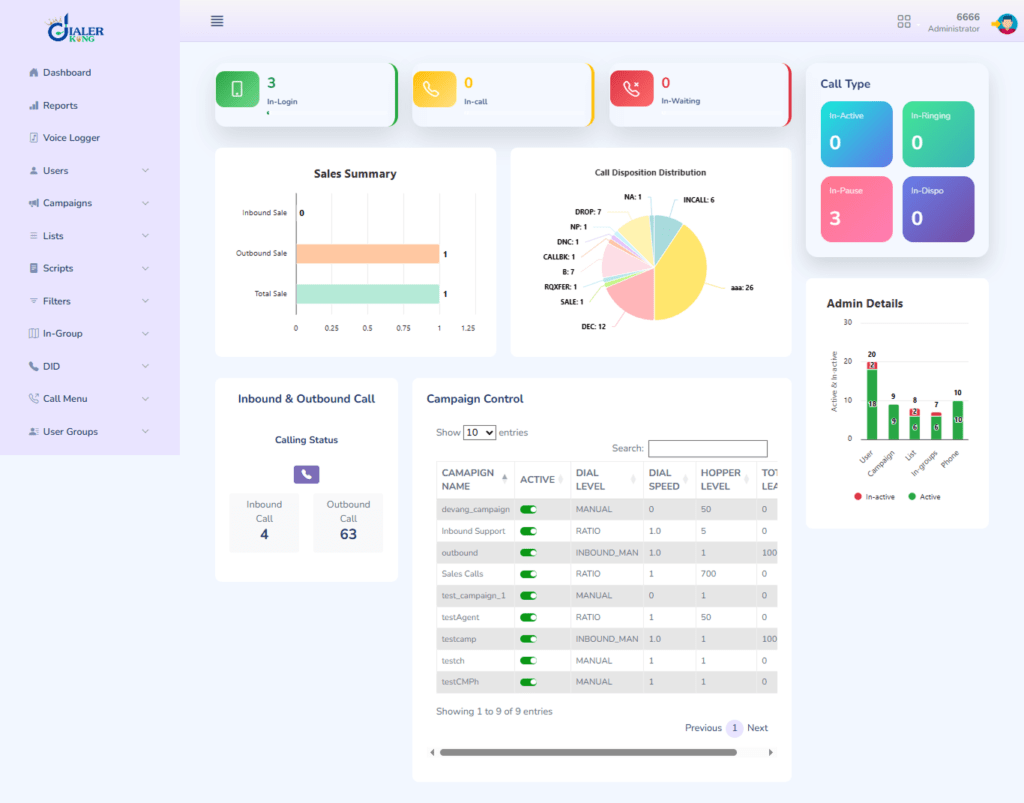
In VICIdial, navigate to Admin → Phones and locate the phone record matching the extension. Confirm that the Extension, Server IP, and Protocol fields match exactly what is in sip.conf. A common issue is the admin panel showing extension 1001 while sip.conf contains agent1001 from an older naming convention.
Reload Asterisk SIP channel driver
After any change to sip.conf, you must reload the module without bouncing calls: asterisk -rx “sip reload “. For PJSIP: asterisk -rx “module reload res_pjsip.so“. Do not restart the full Asterisk service during business hours, a module reload is sufficient and non-disruptive.
Verify firewall rules permit SIP traffic
Check iptables: iptables -L -n | grep 5060. The rule should show ACCEPT for UDP port 5060 from the agent’s subnet. If the rule is missing, add it: iptables -I INPUT -p udp –dport 5060 -j ACCEPT. Also check RTP media ports (typically UDP 10000–20000), blocked RTP causes one-way audio after the “Unknown User” error is resolved.
Confirm network interface binding in sip.conf
In the section of sip.conf, check the bindaddr= and localnet= values. If bindaddr is set to a specific IP that is not reachable from the agent subnet, change it to 0.0.0.0 to listen on all interfaces, then reload.
Re-test agent registration and confirm in peer list
After the reload, have the agent phone re-attempt registration and run asterisk -rx “sip show peers” again. The extension should now appear with status OK (x ms). Log in to VICIdial as the agent and confirm the green phone icon is displayed. Attempt a test call to an internal extension to verify full call path.
Real-World Use Case: Outbound Contact Center Recovery
A client running a 120-seat outbound dialing operation on VICIdial contacted DialerKing after a routine system update left 34 agents unable to register their phones. The agents were seeing “Unknown User” in their softphone clients and the VICIdial interface was displaying all affected extensions as “NOT REGISTERED.”
On inspection, the update had upgraded the Asterisk package from version 16 to version 18, which had disabled chan_sip by default and activated only the PJSIP driver. The agent softphones were all configured to register on port 5060 using the legacy SIP protocol. Since PJSIP uses a different peer definition format (in pjsip.conf rather than sip.conf), and none of the agents had been migrated, Asterisk was receiving valid SIP REGISTER packets but had no matching endpoint definition in PJSIP, hence “Unknown User.”
The resolution involved re-enabling chan_sip as a temporary measure to restore service immediately, followed by a planned migration of all endpoint definitions to pjsip.conf during the following weekend’s maintenance window. All 34 seats were back online within 40 minutes of diagnosis. This case highlights why a pre-upgrade checklist that explicitly covers the SIP channel driver status is essential for VICIdial environments.
Advanced Scenarios and Edge Cases
Error Appears Only on Specific Agents, Not All
When the “Unknown User” error affects only a subset of agents, the problem is almost always in the individual peer definitions rather than a global configuration issue. Compare a working peer block in sip.conf side-by-side with a failing one. Pay close attention to: context= values (must match a valid dialplan context in extensions.conf), host= settings (dynamic vs. static), and nat= options if agents are connecting from outside the office network.
Error Occurs After Trunk Registration, Not Agent Registration
If the “Unknown User” response is coming from the upstream SIP trunk provider rather than from Asterisk itself, the failure is in the outbound trunk authentication configuration. Check the [trunkname] block in sip.conf, specifically the username=, secret=, and fromuser= fields. Many trunk providers require fromuser= to match the DID account username exactly. Run asterisk -rx “sip show registry” and confirm the trunk shows Registered status.
MySQL / Database Inconsistency
VICIdial stores phone and agent configurations in MySQL. If a phone record was manually edited in the database or created through an import script that bypassed the admin panel, the record may be syntactically valid in MySQL but the generated Asterisk config (produced by VICIdial’s cron-driven config scripts) may contain formatting errors.
Review the generated include file at /etc/asterisk/sip_additional.conf , this is the file VICIdial’s automation writes to, and it is the first place to check when admin-panel-managed phones fail to register.
Prevention: Keeping the Error from Returning
Resolving the immediate fault is only half the work. These practices prevent the VICIdial Unknown User Error from recurring in production:
Maintain a pre-upgrade checklist that specifically verifies the SIP channel driver status (chan_sip vs. PJSIP) before and after any Asterisk package update.
Monitor SIP peer registration with a cron-based health check that runs sip show peers every five minutes and alerts operations staff when any configured peer drops to UNREACHABLE.
Using VICIdial’s built-in server monitoring, the Real-Time Report in the admin panel flags unregistered phones in red; configure alert thresholds appropriate to your floor size.
Document your sip.conf peer naming convention and enforce it, inconsistent naming between the admin panel, sip.conf, and the physical phones is the single most common source of Unknown User errors in growing contact centers.
Test in a staging environment before applying Asterisk version upgrades to production. Even minor version bumps (e.g., 18.x to 20.x) have historically changed default SIP driver behavior.
Apply firewall rules persistently using your distribution’s firewall management tool (firewall-cmd for firewalld, netfilter-persistent for iptables), rules added with the raw iptables command do not survive a server reboot.
Frequently Asked Questions
Conclusion
The VICIdial Unknown User Error is a precise signal: Asterisk received a SIP packet from a phone it does not recognize. Every resolution path flows from that single fact, confirm the exact peer name the phone is sending, verify that peer exists in the correct configuration file, ensure the configuration has been reloaded, and rule out network-layer interference at the firewall. The step-by-step process in this guide covers all confirmed root causes, from simple naming mismatches to the more nuanced chan_sip vs. PJSIP driver conflicts introduced by Asterisk upgrades.
For contact centers running VICIdial in production, this error almost always has a low-risk fix once the specific failure mode is identified. The risk is in making uninformed changes, editing the wrong configuration file, restarting Asterisk during peak hours, or missing the database-driven sip_additional.conf layer that VICIdial manages automatically. Follow the diagnostic sequence, use the module reload rather than a full service restart, and document your peer naming convention to prevent recurrence.
If you have worked through every step above and the error persists, the issue may lie in a site-specific Asterisk build, a custom dialplan context, or a database state problem that requires deeper investigation.
Need Expert Help with Your VICIdial System?
DialerKing’s engineers have resolved hundreds of VICIdial configuration issues across contact centers globally. From initial deployment to complex troubleshooting, our team brings 15+ years of hands-on Asterisk and VICIdial experience to every engagement.