VICIdial API documentation is the definitive technical reference every contact center developer needs before building any integration on top of the world’s most widely deployed open-source dialer platform. Whether you are connecting VICIdial to a CRM, syncing real-time agent data to a reporting dashboard, or automating call dispositions from an external application, the API is the operational backbone that makes it possible.
At DialerKing, our engineers have spent years deploying, customizing, and extending VICIdial for global customers, from small outbound sales floors to large-scale multi-site contact center operations. This guide consolidates the knowledge we use daily: how the API is structured, how authentication works, which endpoints matter most, and how to integrate it cleanly regardless of your technology stack.
Agent API vs. Non-Agent API – Understanding the Two Interfaces
VICIdial ships with two distinct API systems. Choosing the right one depends entirely on what you need to automate.
The Agent API
The Agent API is designed for actions performed in the context of an active agent session. It allows external systems to programmatically replicate, or extend, what an agent can do within the VICIdial agent interface. This includes logging in and out, changing agent status, selecting dispositions, transferring calls, and triggering callbacks.
This API is the foundation for building custom agent desktops, softphone integrations, and supervisor tools that need to interact with live agent state.
The Non-Agent API (vicidial_non_agent_api.php)
The Non-Agent API is broader in scope and is accessed through vicidial_non_agent_api.php. It handles system-level operations that do not require an active agent session: managing leads and lists, pulling campaign statistics, updating custom fields, creating callbacks, and executing administrative tasks that would otherwise require direct database access or manual UI work.
This is the interface most third-party integrations, CRM connectors, and reporting tools will call most frequently.
Authentication Methods in VICIdial API
VICIdial API authentication is straightforward but must be configured correctly in the system settings before any API calls will succeed. There are two primary authentication mechanisms:
Plaintext Credential Authentication
The simplest method passes user and pass parameters directly in the query string or POST body. This is suitable for internal server-to-server calls where the request never traverses a public network.
# Example: Non-Agent API call with plaintext auth
GET /vicidial/non_agent_api.php
?source=test
&user=6666
&pass=1234
&function=lead_field_update
&lead_id=1001
&custom_field_label=status_tag
&custom_field_value=qualified
MD5 Hashed AuthenticationFor more secure deployments, VICIdial supports MD5-hashed password tokens. The server computes an expected hash of the password using a seed value, and the client must match it. This prevents raw credential exposure in logs and network captures.
# MD5 token generation (PHP example)
$pass_hash = md5("VICIDIAL" . $password);

# Then pass as:
&pass=$pass_hash&pass_type=MD5Regardless of which method you use, ensure the API user has the correct permissions enabled in VICIdial’s user account settings. API access is disabled by default and must be explicitly turned on per user.
Core API Endpoints Reference
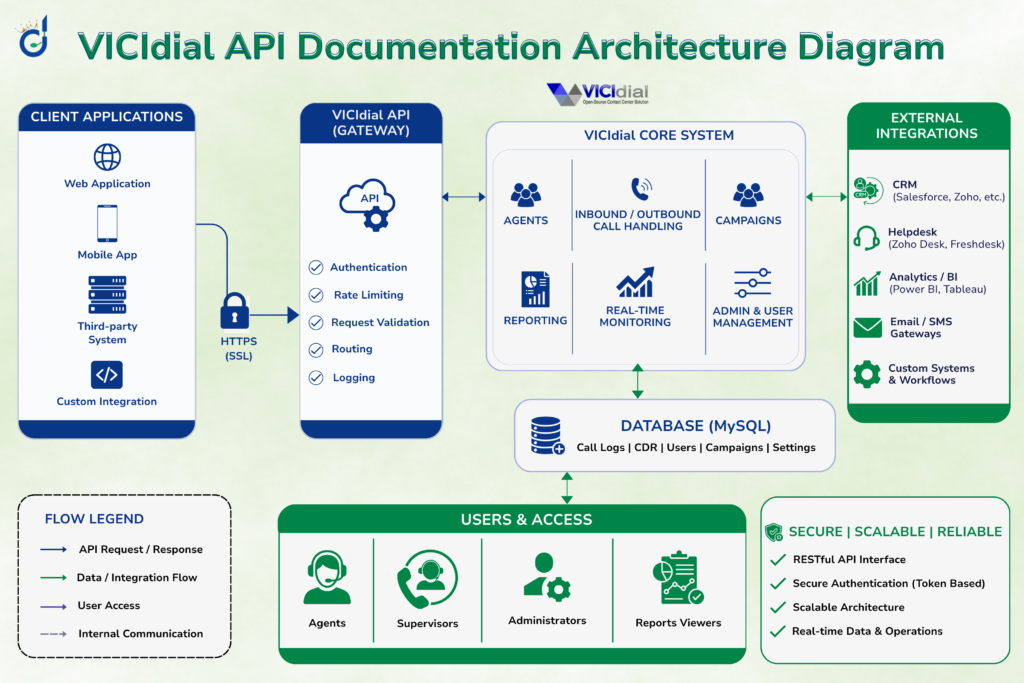
The following table covers the most frequently used endpoints across both the Agent and Non-Agent interfaces. Each is accessed via HTTP GET or POST to the respective script on your VICIdial server.
VICIdial API Access in Any Programming Language
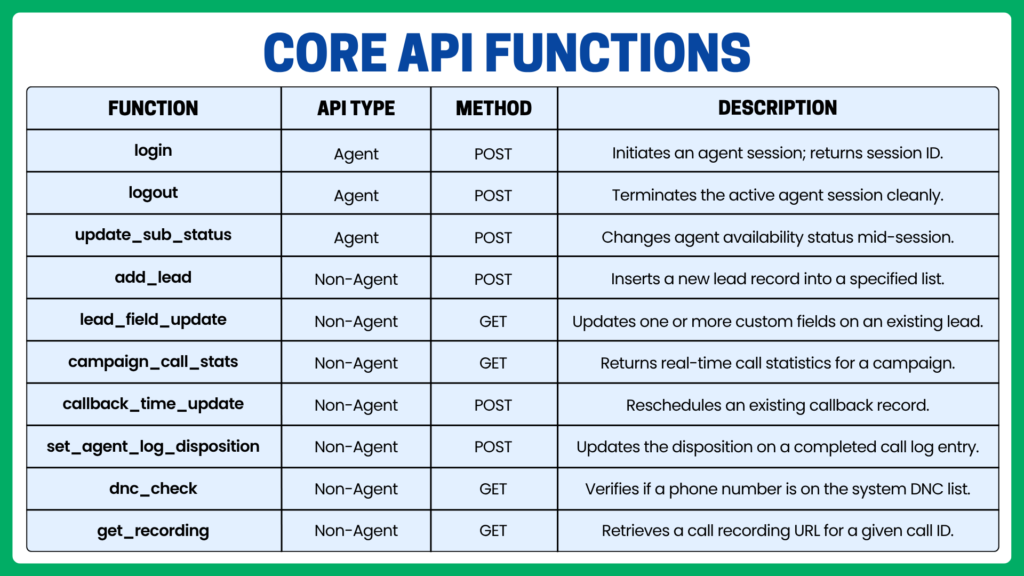
The VICIdial API architecture shown below explains how businesses can integrate CRM software, custom applications, and third-party tools with VICIdial. Through secure API endpoints, requests are processed by the VICIdial core system, enabling real-time lead management, campaign control, reporting, and call automation.
Important Note – Language Flexibility
VICIdial’s API is built on plain HTTP – which means it can be called from any language that can make an HTTP request. At DialerKing, we integrate the VICIdial API in any programming language our clients use: PHP, Python, JavaScript (Node.js), Java, Ruby, Go, C#, Perl, and more. Your existing technology stack is never a barrier to integration.
Because every API call is a standard HTTP GET or POST request with URL-encoded parameters, no proprietary SDK is required. The examples below show the same add_lead call implemented in three common languages.
PHP Example — Add Lead
$url = 'https://your-vicidial-server/vicidial/non_agent_api.php';
$params = http_build_query([
  'source' => 'crm_integration',
  'user' => '6666',
  'pass' => '1234',
  'function' => 'add_lead',
  'phone_number' => '4085551234',
  'list_id' => '1001',
  'first_name' => 'John',
  'last_name' => 'Smith',
]);
$response = file_get_contents("$url?$params");
echo $response; // Returns: SUCCESS: lead_id=10452
Python Example — Add Lead
import requests

params = {
  'source': 'crm_integration',
  'user': '6666',
  'pass': '1234',
  'function': 'add_lead',
  'phone_number': '4085551234',
  'list_id': '1001',
  'first_name': 'John',
  'last_name': 'Smith',
}
r = requests.get('https://your-vicidial-server/vicidial/non_agent_api.php', params=params)
print(r.text) # Returns: SUCCESS: lead_id=10452
Node.js Example — Add Lead
const axios = require('axios');

const params = new URLSearchParams({
  source: 'crm_integration',
  user: '6666',
  pass: '1234',
  function: 'add_lead',
  phone_number: '4085551234',
  list_id: '1001',
  first_name: 'John',
  last_name: 'Smith',
});
const res = await axios.get(`https://your-vicidial-server/vicidial/non_agent_api.php?${params}`);
console.log(res.data); // Returns: SUCCESS: lead_id=10452The same pattern extends to Go, Java, Ruby, C#, and any other language with HTTP support. If you’re building a custom wrapper library or need help with a specific integration, our team at DialerKing has built and maintained API wrappers for clients across multiple technology ecosystems.
Real-World Integration Examples for Contact Centers
A financial services firm using Salesforce as their primary CRM needed new leads created in Salesforce to be automatically pushed into VICIdial calling lists within minutes of creation, without any manual CSV import. Using a Salesforce Flow trigger and a simple Apex HTTP callout to the add_lead Non-Agent API endpoint, every qualified lead is now synchronized in real time.
Agents see the full record, with custom field values from Salesforce mapped into VICIdial’s custom lead fields. Disposition updates from VICIdial are written back to Salesforce via a scheduled polling job using get_call_log.
This is one of the most common patterns we implement at DialerKing. The bidirectional sync approach, push from CRM to VICIdial on lead creation, pull from VICIdial to CRM on disposition, captures the complete call lifecycle without any manual data handling.
Other High-Value Integration Patterns
- Real-time supervisor dashboards: Polling campaign_call_stats every 30 seconds to populate a live operations display with calls in queue, agents available, abandon rates, and ASA.
- Automated callback scheduling: When a customer submits a web form requesting a callback, the form processor calls add_lead with a specific callback time, injecting the lead directly into a priority callback queue.
- Compliance DNC enforcement: Before inserting any lead into a list, a pre-screening script calls dnc_check to verify the number is clean, preventing regulatory violations at the point of data entry rather than at the point of dialing.
- Recording retrieval for QA: Quality assurance platforms call get_recording using agent log IDs to retrieve and archive call recordings for scoring without requiring direct server access.
VICIdial Agent Login API – How It Works in Practice
The Agent Login API is the entry point for any integration that needs to manage agent sessions programmatically. It is exposed via the Agent API script and requires both valid credentials and a defined phone extension or SIP device.
A typical login sequence through the API looks like this:
- POST to the Agent API with function=login, passing user, pass, phone_login, phone_pass, and campaign.
- The server returns a session confirmation string containing the agent’s unique session ID.
- Subsequent API calls in that session include the session ID to maintain state.
- When the work session ends, POST with function=logout to cleanly terminate.
Common Gotcha
Agent API calls must come from an IP address that is either the agent’s phone/client machine or a trusted server. VICIdial validates the source IP in some configurations. If you are building a server-side proxy for agent actions, confirm that IP-based restrictions are correctly configured in your system settings.
Custom agent desktop applications built by DialerKing use this login flow to give agents a branded, streamlined interface, hiding the default VICIdial web UI while still running every action through the native API layer. This preserves all reporting integrity and supervisor visibility while delivering a tailored user experience.
Frequently Asked Questions
Can I use the VICIdial API with any programming language❓
Yes. VICIdial’s API is HTTP-based, meaning any language capable of making a GET or POST request – PHP, Python, Node.js, Java, Ruby, Go, C#Perl can integrate with it. No proprietary SDK is required. DialerKing provides integration services in any language, so your existing development stack is never an obstacle.
How does VICIdial API authentication work❓
VICIdial supports two authentication methods: plaintext credentials passed as URL parameters, and MD5-hashed password tokens for more secure deployments. In both cases, the API user must have API access enabled in their VICIdial account settings. MD5 authentication is recommended for any deployment where requests pass through non-private network segments.
Where can I find official VICIdial API documentation and source code❓
The most accurate API documentation is embedded directly in the source files – particularly vicidial_non_agent_api.php, on your installed server. Official VICIdial downloads are available at vicidial.org. Community wrappers and examples can be found on GitHub, though these should be validated against your installed version before use in production.
Can I integrate VICIdial with a third-party CRM using the API❓
Absolutely. VICIdial’s Non-Agent API is well-suited for CRM integration. Common approaches include pushing new leads via add_lead, updating lead fields via lead_field_update, and retrieving call log data for disposition write-back. DialerKing has delivered CRM integrations with Salesforce, HubSpot, Zoho, and custom-built systems for clients globally.
Final Thoughts
VICIdial API documentation is not just a developer reference, it is the gateway to building a truly automated, connected contact center operation. From agent session management to real-time lead injection and CRM synchronization, the API’s breadth covers almost every integration scenario a modern contact center requires.
The key points to carry forward: understand which API surface (Agent vs. Non-Agent) fits your use case, configures authentication correctly before any other work, and does not let your technology stack be a constraint, the HTTP-based design means every language is a valid integration language.
At DialerKing, our senior engineers bring hands-on deployment experience to every VICIdial integration project, whether that means a simple lead-sync script, a full custom agent desktop, or an enterprise-scale reporting layer. If you are planning a VICIdial API documentation and want to get it right the first time, we are ready to help.
Contact DialerKing for Integration Support →