
- Understanding What Actually Freezes – and Why
- Why Active Calls Lock the System
- Asterisk Call Freeze Issue on Ubuntu
- Asterisk Call Freeze Issue on FreePBX and PBX Environments
- Why Asterisk Hangs Up After 30 Seconds
- Hangup Cause 16 in FreePBX – What It Actually Means
- Step-by-Step Diagnosis and Proven Fixes for the Asterisk Call Freeze Issue
- Frequently Asked Questions
- Conclusion
The Asterisk call freeze issue is one of the most disruptive problems a contact center operator can encounter: the moment a live call begins, the web interface goes dark, the admin dashboard stops responding, and even an active SSH session drops into silence, only to recover the instant the caller hangs up. If that description matches what your team is experiencing, this Asterisk Development guide was written specifically for you.
We will cover exactly why this happens across Ubuntu, FreePBX, and general PBX environments, walk through a structured diagnostic process, and provide the configuration fixes that permanently eliminate the problem.
Understanding What Actually Freezes – and Why
Most engineers who first encounter this problem assume the call itself is broken. In reality, the call is usually perfectly healthy, it is the management and control plane that seizes up. To understand why, it helps to know how Asterisk allocates resources at a process level.
Asterisk is an event-driven telephony engine. It runs a central event loop that handles SIP signalling, media processing, CLI commands, AMI (Asterisk Manager Interface) sessions, and HTTP-based interfaces all within a shared threading model. When a call becomes active, media threads are spawned to handle RTP streams, and the SIP stack enters a state-tracking loop to manage the dialog lifecycle.
The problem arises when those media and signalling threads consume enough CPU cycles, memory bandwidth, or file descriptors that the threads responsible for the management interface, whether that is the built-in HTTP server, the AMI socket, or the underlying Linux process scheduler – cannot get their turn on the CPU. From the outside, this looks exactly like a freeze: you click the dashboard and nothing responds; you type in SSH and keystrokes buffer for 20 to 30 seconds before appearing; you attempt a Reload in FreePBX and the spinner runs indefinitely.
The Three Layers That Can Freeze
- Web UI and Admin Dashboard – served via the Asterisk HTTP server or a separate web process such as FreePBX’s Apache/nginx front-end that makes AMI calls on the back end.
- SSH Session – handled by the Linux sshd daemon entirely outside of Asterisk, yet still subject to the same CPU and I/O scheduler that Asterisk is consuming.
- Asterisk CLI – accessed via the asterisk -r command, which opens a UNIX socket to the running Asterisk process. If that process is CPU-saturated, the CLI stalls.
Why Active Calls Lock the System
There is rarely a single cause. In most production deployments the freeze results from a combination of factors that are each tolerable individually but together push the system over the edge. Here are the primary contributors:
High-Priority Media Threads Starving Management Threads
Asterisk assigns real-time or near-real-time scheduling priority to its media-handling threads to ensure audio quality. On a server with inadequate CPU resources, those threads can consume every available scheduling slot, leaving nothing for the process threads that serve the AMI, HTTP, or UNIX CLI socket.
File Descriptor Exhaustion
Each active call typically consumes two or more file descriptors – one for the SIP signalling socket and one or more for RTP media ports. On a default Linux installation, the per-process file descriptor limit is 1,024. A contact center running 50 simultaneous channels can exhaust this quickly. Once exhausted, Asterisk cannot accept new connections from the management interface, making the system appear frozen even though calls continue normally.
Check your current limit: Run cat /proc/$(pidof asterisk)/limits | grep ‘Open files’ to see the current per-process hard and soft limits.
Memory Pressure and Swap Thrashing
When physical RAM fills up and the OS starts swapping Asterisk’s working set to disk, latency spikes dramatically across all threads. A single cache miss that would take nanoseconds in RAM can take milliseconds from swap – enough to make the management interface feel completely dead for tens of seconds at a time.
Zombie or Duplicate Asterisk Processes
An improperly restarted Asterisk instance can leave a zombie process or, in worse cases, two competing Asterisk processes trying to bind to the same ports. The result is erratic behaviour that closely mimics a freeze – one process handles the call, the other holds the management socket, and neither can fully communicate with the other.
Check for multiple instances: Run ps aux | grep asterisk and confirm only one non-zombie Asterisk process is listed.
Asterisk Call Freeze Issue on Ubuntu
Ubuntu is the most common deployment OS for open-source telephony stacks, and it ships with a specific set of default configurations that frequently contribute to this freeze behaviour.
Default systemd File Descriptor Limits
Even if you have edited /etc/security/limits.conf to raise the file descriptor ceiling, systemd services use their own limit configuration. If Asterisk is managed via a systemd unit file – the default on Ubuntu 20.04 and later — the limits.conf changes have no effect unless you also update the unit file.
Add or modify the following in your Asterisk systemd unit file, typically at /etc/systemd/system/asterisk.service:
[Service] LimitNOFILE=65536 LimitNPROC=65536
After editing, run: sudo systemctl daemon-reload && sudo systemctl restart asterisk
IRQ Affinity and CPU SchedulingOn multi-core Ubuntu systems running Asterisk without explicit CPU affinity settings, the kernel may schedule media threads across cores in a way that causes cache-thrashing. Setting taskset to pin Asterisk to a specific core group, or enabling the realtime scheduling option inside Asterisk’s configuration using the rtpriority option in asterisk.conf, can significantly reduce the probability of management-thread starvation.
Network Interface Interrupt Rates
High RTP packet rates (common with many simultaneous channels) can cause the network interface card to generate so many hardware interrupts that the kernel IRQ handler competes directly with application threads. Installing irqbalance on Ubuntu and ensuring interrupt coalescing is correctly tuned on your NIC helps substantially:
sudo apt install irqbalance && sudo systemctl enable irqbalanceAsterisk Call Freeze Issue on FreePBX and PBX Environments
FreePBX adds a PHP-based web front-end, an Asterisk Manager Interface bridge, and a module framework on top of bare Asterisk. Each of these layers introduces additional resource consumption and additional potential freeze points.
The AMI Connection Pool
FreePBX communicates with Asterisk exclusively through the AMI. Every dashboard widget, every active-calls panel, and every configuration reload opens or reuses an AMI connection. Under high call load, the AMI queue can fill up, causing the FreePBX web interface to stall while waiting for AMI responses that Asterisk is too busy to generate. The visual symptom is a spinning loader on the dashboard – it is not an Apache or PHP problem, it is an AMI backlog problem.
Tuning recommendation: In /etc/asterisk/manager.conf, review the displayconnects, debug, and timestampevents settings. Disabling verbose event flooding on production systems reduces AMI queue pressure substantially.
Apache and PHP-FPM Timeout Mismatches
If Apache or PHP-FPM has a shorter execution timeout than the time it takes for a busy Asterisk instance to respond to an AMI query, the web request simply dies – which looks like a page freeze or a blank dashboard. Increase the PHP max_execution_time and the Apache ProxyTimeout value to at least 60 seconds on busy systems.
FreePBX Module Hooks During Active Calls
Some FreePBX modules, particularly third-party call recording, reporting, and CRM integration modules, register AGI or dialplan hooks that run synchronously during a call. If the code in those hooks makes external HTTP calls, the Asterisk thread handling that call blocks, and system-wide thread availability degrades.
Diagnostic step: Temporarily disable custom modules via the FreePBX Module Admin panel and observe whether the freeze behaviour changes. If it disappears, re-enable modules one at a time to isolate the offending one.
Why Asterisk Hangs Up After 30 Seconds
If your problem is not a frozen interface but a call that drops precisely at the 30-second mark, the root cause is almost certainly RFC 4028 – the SIP Session Timer extension.
SIP Session Timers are a keep-alive mechanism. After a call is established, the SIP stack sends periodic re-INVITE or UPDATE requests to confirm both endpoints are still alive. If the far end does not respond to a session refresh within the configured timeout, Asterisk terminates the call with a BYE.
The 30-second hang-up pattern emerges when:
- The SIP provider or far-end device does not support session timers and fails to respond to the refresh request.
- A NAT device or firewall between Asterisk and the remote party blocks re-INVITE packets, making the refresh appear to fail even when both endpoints are reachable.
- The session timer interval is configured too aggressively short – some provider-specific channel drivers can request intervals as low as 30 seconds.
Fixing the 30-Second Hang-Up in sip.conf
For chan_sip, in the general section or the specific peer block in /etc/asterisk/sip.conf:
session-timers=refuse ; or, if your provider requires session timers: session-timers=originate session-minse=90 session-expires=1800
Fixing the 30-Second Hang-Up in pjsip.conf
For chan_pjsip, under the relevant endpoint section in /etc/asterisk/pjsip.conf:
timers=no ; or, if timers are required by the carrier: timers=yes timers_min_se=90 timers_sess_expires=1800Hangup Cause 16 in FreePBX – What It Actually Means
Hangup Cause 16 is the ISDN Q.850 cause code for Normal Call Clearing, meaning the call ended in a technically protocol-compliant manner. In FreePBX logs and CDR records, seeing Cause 16 does not by itself indicate an error – it simply means one side sent a BYE and the other acknowledged it cleanly.
However, when Cause 16 appears at unexpected times – immediately after answer, precisely at the 30-second mark, or mid-call without any agent action, it indicates that the normal clearing was triggered by a timer or session management event rather than a deliberate hang-up. Common causes:
- Session timer expiry: the SIP stack decided the session was dead and issued a BYE.
- Carrier-side maximum call duration limits: some SIP trunks enforce a hard cap and terminate with Cause 16 when it is reached.
- Dialplan HANGUP application triggered by a logic condition such as a queue timeout or an unanswered IVR branch.
- Firewall stateful session timeout: the firewall drops the RTP or signalling session, breaking the call, and Asterisk generates a BYE when it detects the media stream has gone silent.
Debugging tip: Enable SIP debug logging with the CLI command sip set debug on (chan_sip) or pjsip set logger on (chan_pjsip) and reproduce the hang-up. Identify which side sends the BYE message – that immediately narrows the cause to your Asterisk server, the carrier, or an in-path network device.
Step-by-Step Diagnosis and Proven Fixes for the Asterisk Call Freeze Issue
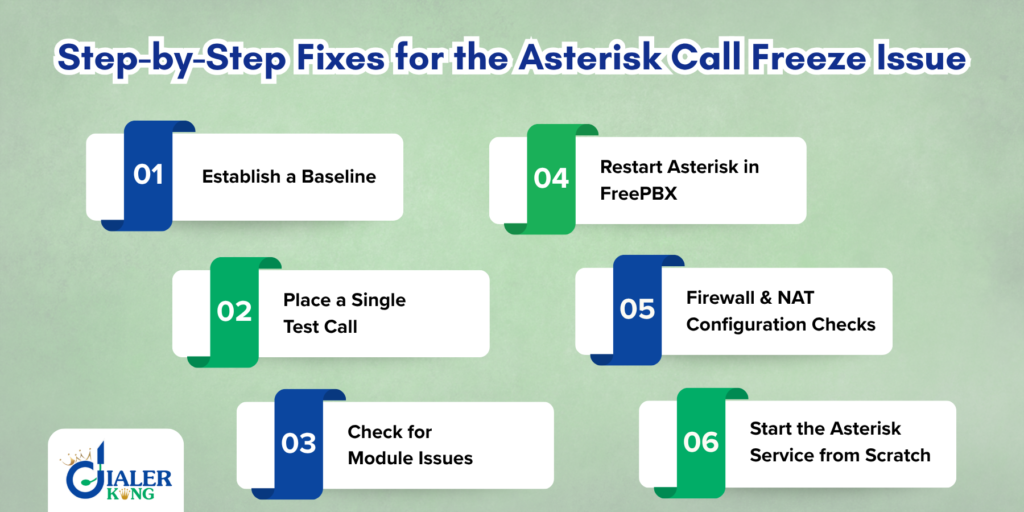
Step 1 – Establish a Baseline Before Any Call
Before placing a test call, capture the system’s idle state:
- 1. Run top or htop and note CPU idle percentage and load average.
- 2. Run free -m and record available RAM and current swap usage.
- 3. Run ulimit -n inside the Asterisk process context to confirm the effective file descriptor limit.
- 4. Run netstat -anp | grep asterisk | wc -l to count currently open sockets.
Step 2 – Place a Single Test Call and Observe
With your monitoring commands still running in a separate SSH window, place a single inbound or outbound call and keep it active. Watch for:
- CPU load – does the load average spike above the number of available cores? If so, you have a CPU starvation scenario.
- RAM – does available memory drop sharply? If so, look for memory leaks in loaded Asterisk modules.
- Open sockets – verify the count does not approach your file descriptor limit.
In a third window, attempt to open a new SSH session while the call is active. A delay of more than 2 to 3 seconds confirms OS-level thread starvation, not just an Asterisk management issue.
Step 3 – Check for Zombie Processes and Module Issues
asterisk -rx 'module show' | grep -i loaded asterisk -rx 'core show channels' asterisk -rx 'core show uptime'An unusually long channel list for a single test call may indicate zombie channels from previous sessions that were not cleaned up correctly.
Step 4 – Restart Asterisk in FreePBX Safely
Never use kill -9 on the Asterisk process unless absolutely necessary. A forced kill can corrupt active call state and leave orphaned lock files that cause problems on the next startup.
Graceful restart options in order of preference:
- FreePBX web UI: Admin > System Admin > Restart Asterisk – applies pending configuration changes and reloads cleanly.
- CLI graceful: asterisk -rx ‘core restart gracefully’ – allows calls in progress to finish, then restarts.
- CLI convenient: asterisk -rx ‘core restart when convenient’ – waits until call volume naturally drops to zero.
- CLI immediate: asterisk -rx ‘core restart now’ – restarts immediately, dropping active calls. Use only in an emergency.
- OS shell: sudo systemctl restart asterisk – use this if the Asterisk process itself is completely unresponsive and the CLI cannot connect.
Step 5 – Start the Asterisk Service from Scratch
If Asterisk is not running at all, use these commands:
# Check current status sudo systemctl status asterisk
# Start the service sudo systemctl start asterisk
# Enable automatic start on boot sudo systemctl enable asterisk
# Verify the process is running correctly asterisk -rx ‘core show version’
If Asterisk starts but immediately exits, check /var/log/asterisk/full for startup errors. The most common causes are a port conflict on 5060 or a corrupt configuration file introduced by a recent module update.
Step 6 – Verify Firewall Rules and NAT Configuration
Firewall and NAT misconfigurations are a frequently overlooked cause of the Asterisk call freeze issue. If the firewall permits SIP signalling on port 5060 but blocks the RTP media port range (typically UDP 10000–20000, defined in rtp.conf), the call connects but the audio stream dies mid-session, causing Asterisk to stall while waiting for packets that never arrive – a stall that cascades into management thread saturation.
Confirm the RTP range is open on both inbound and outbound rules, set the correct externip and localnet (or external_media_address for pjsip) so Asterisk advertises the right address behind NAT, and raise the firewall’s UDP connection-tracking timeout above the default 30 seconds, since that default is the exact reason many freezes and drops occur at the 30-second mark.
Run tcpdump on the RTP range during a test call – a one-sided stream confirms a NAT or firewall block as the root cause.
Frequently Asked Questions
How do I restart Asterisk in FreePBX without interrupting active calls❓
Use asterisk -rx ‘core restart gracefully’ from the CLI. This tells Asterisk to wait until all current channels are idle before performing the restart, so no live sessions are interrupted. The ‘core restart when convenient’ option is even more conservative, queuing the restart until call volume drops to zero naturally. Reserve ‘core restart now’ and systemctl restart for situations where the process is completely unresponsive.
What is an Asterisk dialer and how does it relate to this freeze issue❓
An Asterisk dialer is a telephony application – such as VICIdial or a custom predictive dialing solution – built on the Asterisk open-source PBX engine. It uses Asterisk to originate, route, and manage outbound and inbound calls at scale. Because dialers maintain dozens or hundreds of simultaneous channels, they amplify any underlying Asterisk resource problem, making freeze events more frequent and more severe than they would be on a lower-volume system.
Why does Asterisk hang up automatically after exactly 30 seconds❓
The 30-second hang-up almost always points to SIP Session Timer behaviour as defined in RFC 4028. Asterisk sends a keep-alive re-INVITE mid-call, and if the far-end device or carrier does not respond – often due to NAT or a firewall blocking the re-INVITE packet – Asterisk concludes the session is dead and sends a BYE. Setting session-timers=refuse or increasing session-mines to 90 seconds in sip.conf or pjsip.conf resolves this in the vast majority of deployments.
What does Hangup Cause 16 mean in FreePBX CDR records❓
Cause 16 is the Q.850 code for Normal Call Clearing, confirming the call ended via a standard protocol BYE exchange rather than an error condition. When it appears unexpectedly – at call answer, at exactly 30 seconds, or mid-call – it means a timer, dialplan logic, or a carrier-side rule triggered the BYE rather than a human hanging up. Enable SIP debug logging and identify which endpoint sent the BYE to pinpoint the exact source.
Conclusion
The Asterisk call freeze issue is not a single bug – it is a symptom of resource contention that surfaces differently depending on your OS configuration, Asterisk version, and deployment scale. The thread starvation and file descriptor exhaustion patterns described in this guide account for the majority of freeze events seen across Ubuntu, PBX, and FreePBX environments.
The core principle to carry forward is this: Asterisk’s media engine is designed to protect call audio quality above all else. When resources grow scarce, it will preserve the audio path at the expense of every other subsystem – including the management interfaces your team depends on. The job of the systems engineer is to provision the server generously enough that the control plane always retains sufficient resources to remain responsive.
Still experiencing the Asterisk call freeze issue on your deployment?
DialerKing’s engineering team has deployed and optimised Asterisk-based contact center systems across dozens of countries and enterprise environments. Whether you are dealing with a freeze on a 10-seat PBX or a 500-channel predictive dialing cluster, our team can diagnose and resolve the issue at the configuration level.
Contact DialerKing today for a no-obligation technical consultation.