
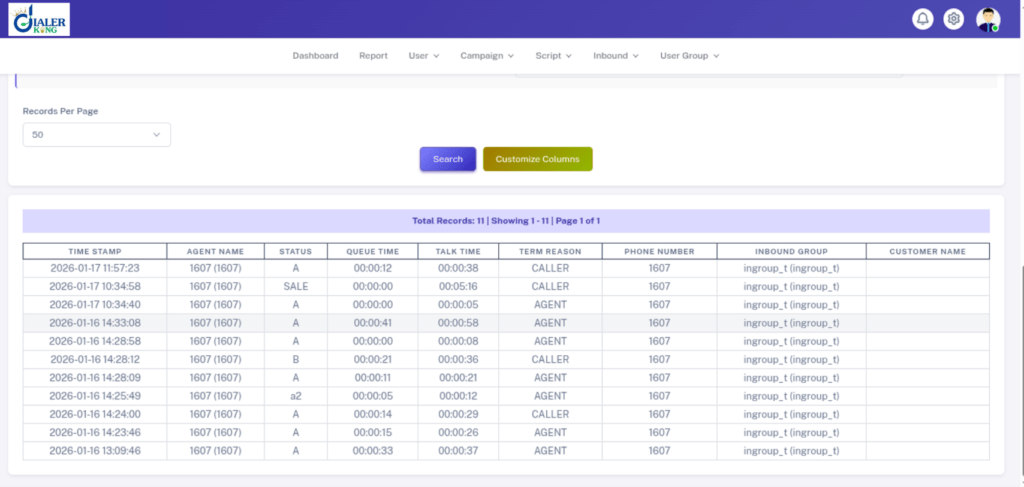
The VICIdial inbound report time issue is one of the most frustrating problems contact center supervisors run into after a fresh deployment or server migration, timestamps in the Inbound Summary Report or the Call Detail Report (CDR) are off by a fixed number of hours, making it impossible to measure agent performance accurately, reconcile SLA windows, or audit after-hours calls. VICIdial is a deeply integrated platform: the web interface (PHP), the database (MySQL/MariaDB), the telephony engine (Asterisk), and the underlying Linux OS each maintain their own sense of time.
When those four layers are not perfectly aligned to the same timezone, the timestamps recorded in the database and surfaced in reports will be wrong, consistently wrong by the same offset, which makes it look like a configuration gap rather than a random bug. It is.
This guide covers every layer of that stack with exact commands, admin screenshots, and verification steps. By the end you will have accurate timestamps in every inbound report your team generates.
The Five Layers Where Time Goes Wrong
Before running a single command, you need to understand which layer is responsible for which timestamp. Fixing one layer without checking the others is the most common reason the problem returns after a reboot.
Linux OS Timezone
The OS timezone is the root source of truth. If this is wrong, every other layer inherits the error. A server provisioned in a US data center but deployed for an India-based contact center will typically boot with UTC or America/New_York, both wrong if your reports need IST timestamps.
MySQL / MariaDB Timezone
MySQL has its own timezone variable (global.time_zone) that is independent of the OS. Even if Linux is set correctly, if MySQL is still on UTC, every INSERT with NOW() will record the wrong time. The VICIdial CDR table uses DATETIME columns populated at call-connection time; those values come directly from MySQL’s NOW().
PHP Date Timezone
The VICIdial admin panel and report pages run under PHP. If date.timezone in php.ini is not set (or is set to UTC by default), PHP functions like date() and strtotime() will format timestamps incorrectly when rendering report pages, even if the raw database values are correct.
VICIdial Campaign Timezone
Each campaign in VICIdial has its own timezone field under campaign settings. This controls when the campaign considers itself within its calling hours. An incorrect campaign timezone means agents may be blocked from calling at the right times and the calling-hours log will show wrong start/end entries.
Cron Jobs and vicidial_cron_settings
VICIdial’s maintenance scripts run on cron. If the cron environment does not inherit the corrected OS timezone (a common Linux edge case), any report generated by a cron-triggered PHP script will use the old timezone for timestamp calculations.
Step-by-Step Fix: From Linux to VICIdial Admin
Work through these steps in order. Do not skip to the VICIdial admin panel without first confirming the layers beneath it are correct.
Step 1 — Correct the Linux OS Timezone
Log in as root or a sudo user and run:
# Check current timezone
timedatectl status

# List available timezones (use grep to filter)
timedatectl list-timezones | grep Asia

# Set your timezone (example: India Standard Time)
timedatectl set-timezone Asia/Kolkata

# Verify
timedatectl status
DateFor older CentOS 6 / RHEL 6 servers (which some VICIdial deployments still run on):
# CentOS 6 / RHEL 6 (no timedatectl)
ln -sf /usr/share/zoneinfo/Asia/Kolkata /etc/localtime
echo 'ZONE="Asia/Kolkata"' > /etc/sysconfig/clock
echo 'UTC=false' >> /etc/sysconfig/clockStep 2 — Sync the Hardware Clock and Enable NTP
A server whose hardware clock drifts will gradually shift timestamps even after a correct timezone is set. Enable time synchronisation:
# CentOS 7 / Rocky 8 / AlmaLinux (uses chronyd)
systemctl enable chronyd --now
chronyc tracking

# Confirm synchronisation source
chronyc sources -v

# Force immediate sync if needed
chronyc makestepStep 3 — Fix MySQL / MariaDB Timezone
Connect to MySQL and check the current timezone setting:
mysql -u root -p

-- Inside MySQL:
SELECT @@global.time_zone, @@session.time_zone;
-- If both return 'SYSTEM', MySQL is using the OS timezone
-- (good if Step 1 is done). If they return 'UTC' explicitly, fix it:

SET GLOBAL time_zone = 'Asia/Kolkata';

-- To persist across restarts, edit /etc/my.cnf or /etc/mysql/my.cnf
-- and add under [mysqld]:
-- default-time-zone = 'Asia/Kolkata'

-- Then restart:
-- systemctl restart mariadbLoad them with:
mysql_tzinfo_to_sql /usr/share/zoneinfo | mysql -u root -p mysql
systemctl restart mariadbStep 4 — Fix PHP Timezone
Find the active php.ini file:
php -i | grep 'php.ini'
# Typical path: /etc/php.ini  or  /etc/php/8.1/apache2/php.ini

# Edit php.ini
nano /etc/php.ini

# Find the date.timezone line and set it:
date.timezone = "Asia/Kolkata"

# Restart the web server
systemctl restart httpd     # Apache
# or
systemctl restart nginx && systemctl restart php-fpmStep 5 — Fix the VICIdial Campaign Timezone
Log into the VICIdial Admin panel (typically http://your-server/vicidial/admin.php) and:
- Navigate to Admin > Campaigns and click the campaign name.
- Scroll to the Timezone section.
- Set the Campaign Timezone field to match your operating region.
- Set the Local Call Time field to the correct calling-hours window for that timezone.
- Click Submit to save. Repeat for all active campaigns.
Step 6 — Fix the VICIdial System Timezone Setting
- VICIdial also stores a global system timezone in the database. Access it via:
- Admin > System Settings
- Find the Server Timezone or Default Timezone field
- Set it to match your region (e.g. America/New_York, Asia/Kolkata)
- Save and log out, then log back in to flush the PHP session
Step 7 — Verify Cron Timezone Inheritance
Cron does not always inherit the shell environment. Add an explicit timezone export at the top of the VICIdial crontab:
# Edit the root crontab
crontab -e

# Add this line at the very top (before any job entries):
TZ=Asia/Kolkata

# Save and exit. Verify with:
crontab -l | head -5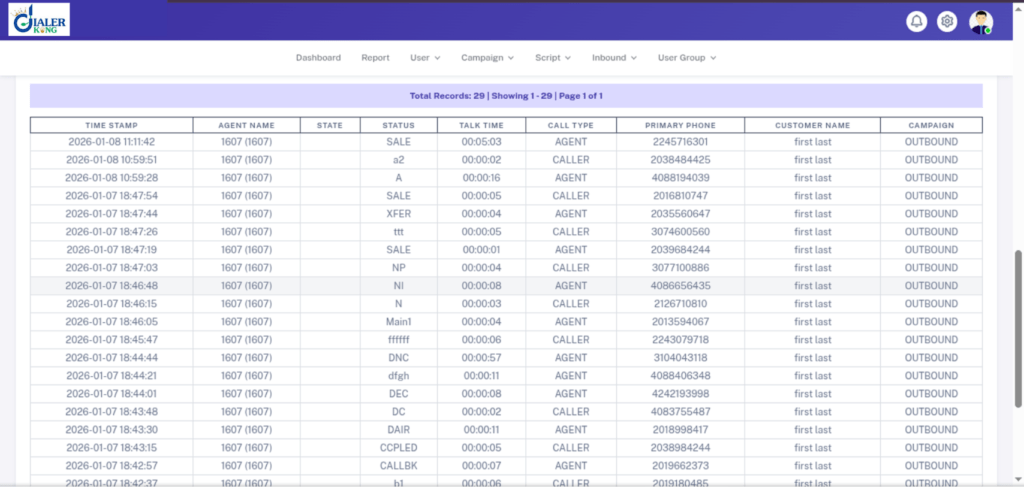
Real-World Scenario: A 24/7 Contact Center With a +5:30 Offset
A business process outsourcing firm running a 24/7 inbound queue noticed that their VICIdial Inbound Summary Report was showing all calls as arriving between 6:30 PM and 7:00 AM when in reality those calls came in during the morning shift (9:00 AM to 3:30 PM IST). The offset was exactly 5 hours and 30 minutes, the difference between UTC and IST.
Root cause diagnosis revealed:
- Linux OS was set to UTC (default after a bare-metal install).
- MySQL global.time_zone was SYSTEM, which meant it was also UTC.
- php.ini had date.timezone commented out, defaulting PHP to UTC.
- VICIdial campaign timezone was set to Asia/Kolkata correctly, the only layer that was right.
Because the campaign timezone was correct, agents could make and receive calls within the right hours, but every timestamp written to the database by MySQL used UTC. The PHP report engine then displayed those UTC timestamps without converting them, so every call appeared 5.5 hours earlier than it actually occurred.
After applying Steps 1 through 4 from this guide (Linux, MySQL, PHP, and cron TZ), all historical data remained in UTC (as expected for a database migration), but new calls from that point forward recorded correctly in IST. The team then used a MySQL offset query to retrospectively adjust the historical report view:
-- Adjust historical CDR display for IST offset
SELECT call_date,
       DATE_ADD(call_date, INTERVAL 330 MINUTE) AS call_date_IST,
       phone_number, length_in_sec
FROM vicidial_log
WHERE call_date BETWEEN '2026-01-01' AND '2026-03-31'; How to Verify the Fix
Do not assume the fix worked. Run these verification steps immediately after completing the configuration changes:
1. Live Test Call Method
Note the exact wall-clock time, make a test inbound call to your campaign DID, let it ring for at least 10 seconds, then hang up. Wait 60 seconds and check:
-- Replace 'your_campaign' with the actual campaign ID
SELECT call_date, phone_number, status, length_in_sec
FROM vicidial_log
WHERE campaign_id = 'your_campaign'
ORDER BY call_date DESC
LIMIT 5;The call_date value should match the wall-clock time you noted within 5–10 seconds.
2. Compare Timezone Across All Layers
# Linux
date

# MySQL
mysql -u root -p -e "SELECT NOW();"

# PHP CLI
php -r "echo date('Y-m-d H:i:s T') . PHP_EOL;"All three outputs should show the same time and the same timezone abbreviation (e.g. IST, EST, CST). Any difference indicates a layer that still needs correction.
3. VICIdial Inbound Report Check
Navigate to Reports > Inbound Summary Report, filter by today’s date, and verify that timestamps for calls you know occurred during business hours are shown within that window.
Common Mistakes That Bring the Problem Back
Fixing PHP but not MySQL, the database writes wrong timestamps even though the report displays them correctly for a moment.
Setting the campaign timezone without fixing the OS, campaign time controls calling hours but does not retroactively fix CDR timestamps.
Forgetting to restart Apache/PHP-FPM after changing php.ini, the change will not take effect until the web server process reloads the configuration.
Omitting the TZ variable in cron, batch report generation will continue using UTC even after all other layers are fixed.
Expecting historical CDR data to change, timezone fixes are only prospective. Records already written to the database will retain their original UTC (or incorrect) timestamps.
Frequently Asked Questions
Will changing the server timezone break existing reports or historical data❓
No. Timezone changes are prospective only. Records already written to the database retain their original timestamp values. The only change is that new records written after the fix will use the correct timezone. If you need to view historical data in the corrected timezone, use a DATE_ADD or CONVERT_TZ query to offset the display values in your report queries.
My VICIdial server is in the US but my contact center agents are in India. Which timezone should I use❓
Set all server-side layers (Linux, MySQL, PHP) to the timezone of the country where the data needs to be reported and audited, in your case, IST (Asia/Kolkata). The physical location of the server hardware is irrelevant to report accuracy. Campaign timezones should reflect the calling region, which may differ from the server timezone if you run multi-region campaigns.
How do I fix the VICIdial inbound report time issue on a server I cannot reboot❓
All the fixes in this guide (timedatectl, MySQL SET GLOBAL, php.ini, crontab) take effect without a full server reboot. The only services you need to restart are MariaDB (systemctl restart mariadb) and your web server (systemctl restart httpd). Asterisk and VICIdial agent sessions do not need to be interrupted.
Does the VICIdial inbound report time issue affect outbound campaigns as well❓
Yes. The same MySQL and PHP timezone layers affect all call types. Outbound CDR timestamps in vicidial_log and vicidial_agent_log will also show the wrong time if MySQL and PHP are not correctly configured. The symptom is identical: a fixed-hour offset on every record. Applying the fixes in this guide corrects both inbound and outbound reporting simultaneously.
Conclusion
The VICIdial inbound report time issue is not a bug, it is a configuration gap that spans four distinct layers of the platform. The fix is methodical: start with the Linux OS timezone, verify NTP synchronisation, align MySQL, update php.ini, set the VICIdial system and campaign timezone fields, and lock in the cron TZ variable. Work through all seven steps, verify with a live test call, and you will have accurate timestamps across every inbound report your team depends on.
Accurate call timestamps are not just a reporting nicety, they are the foundation of SLA compliance, shift-based performance reviews, and after-hours call audits. In a high-volume contact center environment, a five-hour timestamp offset can mean the difference between a compliant record and a regulatory problem.
Need Expert Help With Your VICIdial Deployment?
If you have worked through this guide and the VICIdial inbound report time issue persists, or if you need hands-on help configuring a multi-server VICIdial cluster, custom IVR flows, or Asterisk dial-plan optimisation, the engineering team at DialerKing is here to help.
DialerKing specialises in VICIdial, Asterisk, and IVR solutions for contact centers across industries and geographies. We have deployed and maintained systems ranging from 5-seat inbound queues to 1,000+ seat outbound operations.
Contact us today at www.dialerking.com and let our senior engineers take a look at your configuration.