
- How VICIdial Auto Dial Actually Works
- Why VICIdial Auto Dial Is Not Working – Root Causes
- Fix 1 – Dial Level Is Set to 0
- Fix 2 – SIP Trunk Not Registered or Misconfigured
- Fix 3 – Hopper Is Empty or Not Loading Leads
- Fix 4 – Campaign Is Inactive or Outside Active Hours
- Fix 5 – Agent Status and Seat Count Issues
- Using the VICIdial Non-Agent API to Recover Faster
- Quick Diagnostic Checklist
- Real-World Use Case
- Frequently Asked Questions
- Conclusion
VICIdial auto dial not working is one of the most frustrating scenarios a contact center operator can face, agents are logged in, leads are uploaded, and yet the dialer sits completely idle. The problem is almost never random. In the vast majority of Vicidial deployments, the failure traces back to one of a handful of well-defined causes: a dial level sitting at zero, a SIP trunk that has lost registration, a hopper with no numbers to pull, or a campaign that has quietly gone inactive.
This guide dismantles each layer of the problem systematically so you can restore outbound dialing without guessing.
Whether you manage a 20-seat appointment-setting operation or a multi-server predictive dialing environment, the diagnostic steps below apply directly to your setup. By the end of this article you will know exactly where to look, what to fix, and how to verify that the auto dial is working correctly again.
How VICIdial Auto Dial Actually Works
Before diagnosing a failure it helps to understand the sequence VICIdial follows every time it attempts to launch an outbound call. The system relies on a continuous loop between three components: the campaign configuration, the hopper, and the SIP infrastructure.
When a campaign is active and agents are available, VICIdial’s auto dial script reads the dial level and calculates how many simultaneous calls it should attempt per available agent. It then pulls numbers from the hopper – a pre-loaded buffer of lead records – and instructs Asterisk to originate calls through the configured SIP trunk. If any link in this chain is broken, outbound dialing simply stops.
This architecture means that a single misconfigured parameter can halt the entire dialing operation while the interface shows no obvious error. That is why systematic diagnosis, rather than random trial-and-error changes, is the fastest path to resolution.
Why VICIdial Auto Dial Is Not Working – Root Causes
The following causes account for the overwhelming majority of outbound dialing failures across VICIdial deployments:
- Dial level set to 0.0, preventing the dialer from launching any simultaneous calls
- SIP trunk unregistered, expired credentials, or pointing to an unreachable carrier endpoint
- Hopper empty due to exhausted lead lists, incorrect list filters, or a stalled recycling timer
- Campaign status set to Inactive or paused outside of active campaign hours
- No agents in a Ready state, causing the dial calculation to return zero
- Incorrect server or carrier configuration blocking outbound SIP traffic
- User permission level too low to trigger or view active outbound campaigns
Each of these has a specific fix. Work through them in order, working with the dial level check since it is both the most common cause and the fastest to resolve.
Fix 1 – Dial Level Is Set to 0
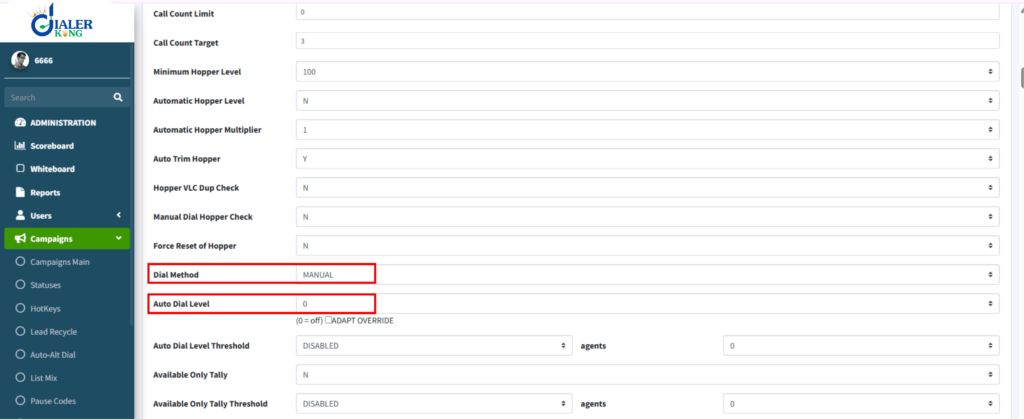
The dial level controls how many outbound call attempts VICIdial places per available agent simultaneously. When this value is 0, the predictive dialer launches exactly zero calls – it is functionally switched off even if everything else is configured correctly.
How to Check and Change the Dial Level
Log into the VICIdial Admin Panel and navigate to:
Admin - Campaigns - [Your Campaign] - Edit CampaignLocate the Dial Level field. If it reads 0.0, change it to 1.0 as a working point. For predictive dialing with multiple agents, values between 1.2 and 2.5 are common depending on average handle time and answer rates.
What Causes the Dial Level to Drop to 0
- Manual adjustment by an administrator during a previous session
- An automated script or API call that reset campaign parameters
- A failed campaign import that overwrote the setting
- The campaign dial method was changed from Predictive to Manual, which resets the dial level
Fix 2 – SIP Trunk Not Registered or Misconfigured
Even with a correct dial level, VICIdial cannot place calls if the SIP trunk is not registered with the carrier or if the trunk configuration contains errors. Asterisk will attempt to originate calls, receive a rejection, and log failures that are often not surfaced prominently in the VICIdial interface.
Verify SIP Trunk Registration
Connect to your server via SSH and run:
asterisk -rx 'sip show peers'Look for your trunk entry. The status column should show OK with a response time in milliseconds. If it shows UNREACHABLE, UNKNOWN, or a 4xx/5xx SIP response code, the trunk is not operational.
Common SIP Trunk Failures and How to Fix Them
Expired SIP credentials – update the username, password, and registration string in sip.conf or via the VICIdial carrier configuration
Incorrect SIP server hostname or IP – verify the carrier’s current registration endpoint, which can change during carrier infrastructure updates
Firewall blocking port 5060 (SIP signalling) or the RTP port range (typically 10000–20000) – check iptables rules on the server
NAT traversal misconfigured – ensure externip and localnet are set correctly in sip.conf for servers behind network address translation
Carrier-side block – if credentials are correct but registration fails, contact the carrier to confirm the account is active and your server IP is permitted
Reload Asterisk After Changes
After modifying sip.conf or updating the carrier configuration in VICIdial, reload the SIP channel driver:
asterisk -rx 'sip reload'Then re-run sip show peers to confirm the trunk registers successfully before testing outbound dialing.
Fix 3 – Hopper Is Empty or Not Loading Leads
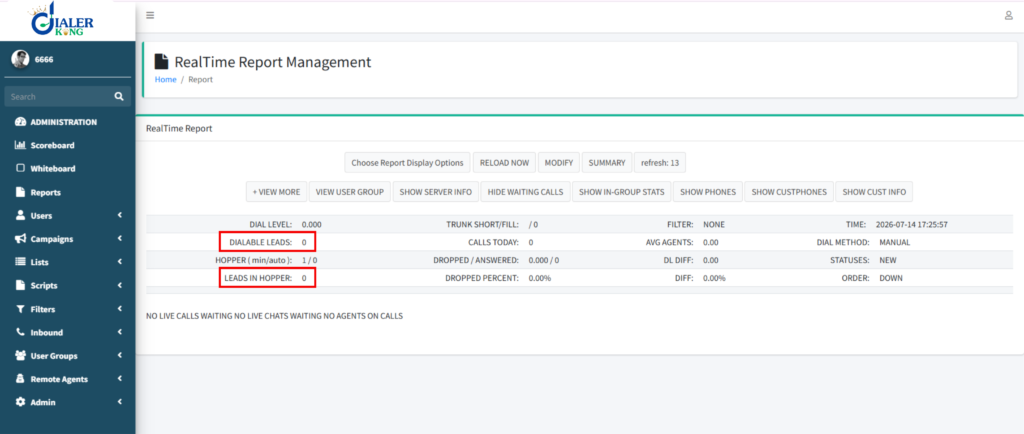
The hopper is a temporary buffer that VICIdial pre-loads with dial-ready lead records before each dialing cycle. If the hopper is empty, the dialer has no numbers to call regardless of dial level or SIP trunk status.
Check the Current Hopper Count
In the VICIdial Admin Panel, go to:
Reports – Real-Time Report
Locate your campaign and check the Hopper Count column. A value of 0 confirms that the hopper is the problem preventing calls from launching.
Why the Hopper Stops Loading
- All leads in the active list have been called and reached a terminal disposition such as Sale, Do Not Call, or Disconnected
- The lead list is set to Inactive – verify under Admin – Lead Lists that the list status is Active and assigned to the correct campaign
- List filter or lead recycling settings are too restrictive, preventing already-called numbers from re-entering the hopper
- The vicidial_hopper.pl cron job is not running – check crontab entries and server logs
- Available leads exist but are scheduled for future callback times that have not yet arrived
How to Reset and Reload Leads
To reset lead statuses and allow VICIdial to re-dial the list, go to:
Admin - Lead Lists - [Your List] - Reset Lead StatusesSelect the dispositions you want to reset back to New and confirm. The hopper will reload those leads on the next cycle. For more targeted control, use the Non-Agent API covered in Section 8 to reset specific status groups without modifying the entire list.
Fix 4 – Campaign Is Inactive or Outside Active Hours
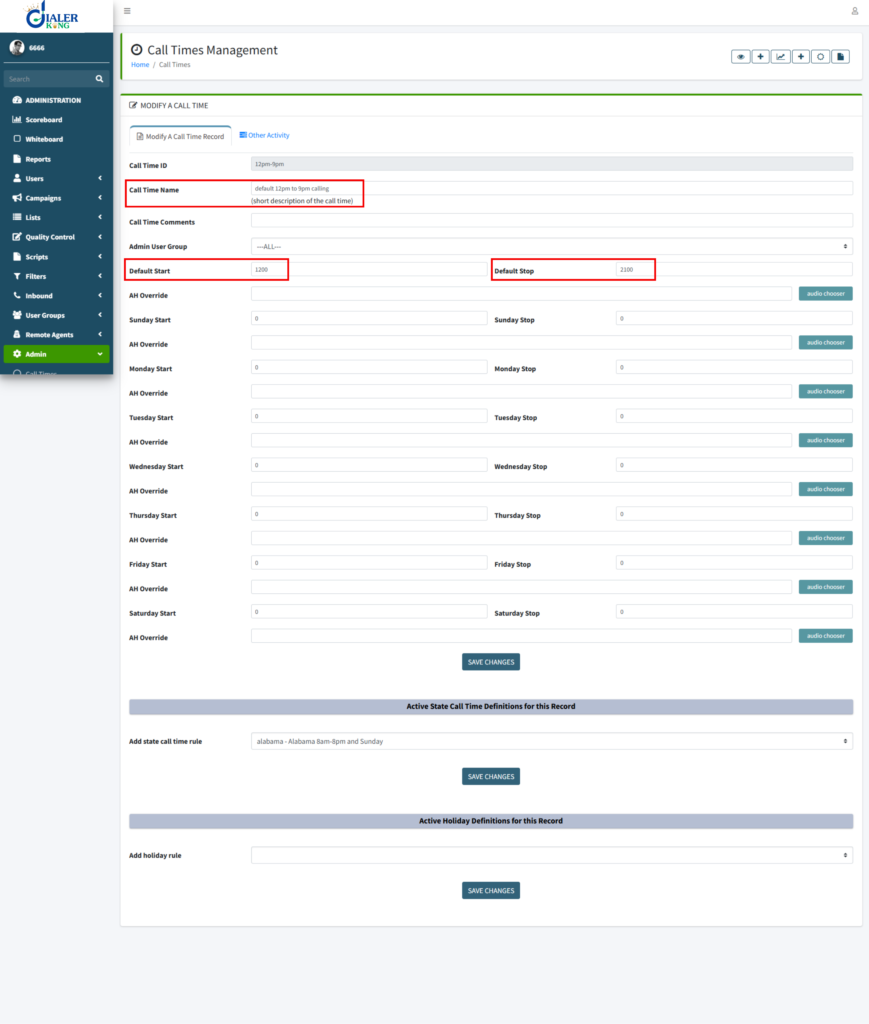
VICIdial campaigns have both an Active/Inactive status flag and a configured set of calling hours. If either condition is not met, the dialer will not place calls even when everything else is correctly configured.
Check Campaign Status
Admin - Campaigns - [Your Campaign] - Active: Y / NConfirm the Active field is set to Y. If it is set to N, update it and save the campaign settings.
Verify Campaign Calling Hours
Within the campaign settings, scroll to the Campaign Calling Hours section and confirm that:
- The current day of the week is included in the active dialing schedule
- The current server time falls within the configured start and end hours
- The server timezone matches the timezone associated with your leads
A timezone mismatch is a frequent cause of campaigns that appear active but will not dial
Fix 5 – Agent Status and Seat Count Issues
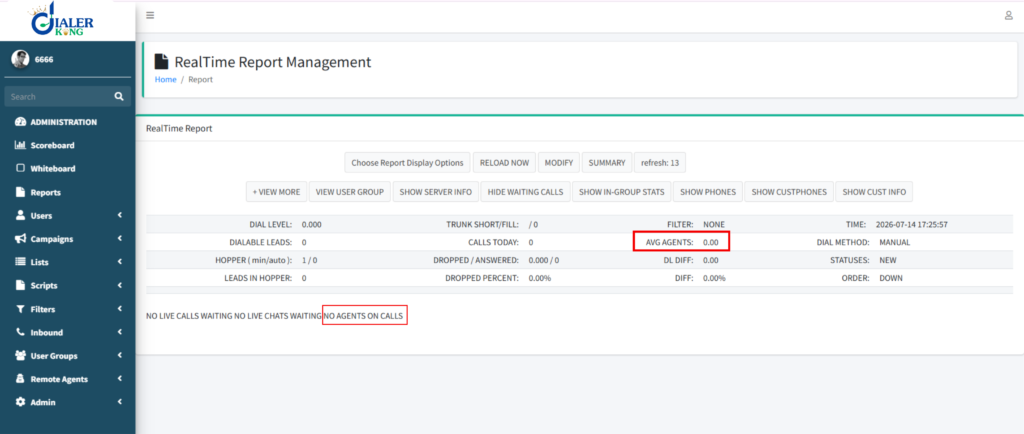
VICIdial’s predictive dialing engine calculates how many calls to launch based on the number of agents currently in a Ready state. If no agents are ready, the calculation returns zero calls regardless of dial level or hopper count.
Verify Agent Readiness
Check the Real-Time Report to see how many agents are logged in and in a Ready or equivalent dialing-eligible status. Common issues include:
- Agents are logged in but sitting in Pause status – they must return to a Ready state for the dialer to count them
- Agents are on a manual call from a previous session and have not yet wrapped up and set their disposition
- The campaign is configured with a minimum agent threshold that has not been met – check the Min Agents setting in campaign configuration
Resolve by having agents return to Ready status, or adjust the minimum agent threshold if the campaign can operate efficiently with fewer seats
Using the VICIdial Non-Agent API to Recover Faster
The VICIdial Non-Agent API is a programmable backend interface that allows external systems and administrators to control the dialing platform without navigating the graphical interface. When troubleshooting outbound dialing failures, the Non-Agent API provides precise, scriptable control that can significantly reduce recovery time.
The API is available at:
http://[YOUR_SERVER_IP]/vicidial/non_agent_api.phpUnlike the Agent API – which requires an active agent session – the Non-Agent API operates at the system level and is suitable for CRM integrations, automated lead injection, status monitoring, and recovery workflows.
Practical Recovery Actions via the Non-Agent API
Inject a high-priority lead directly into the hopper without waiting for the standard load cycle:
?source=external&user=admin&pass=PASSWORD&function=add_lead &list_id=101&phone_number=5551234567&status=NEWCheck the current available lead count for a specific list to confirm whether dialable records exist:
?source=external&user=admin&pass=PASSWORD&function=count_leads &list_id=101Pull real-time campaign statistics to confirm whether the dialer is active and what it is currently processing:
?source=external&user=admin&pass=PASSWORD&function=get_campaign_stats &campaign_id=CAMPAIGN1For teams with CRM integrations or automated lead pipelines, embedding these API calls into your lead management workflow means that hopper failures can trigger automatic recovery without requiring manual administrator intervention.
Quick Diagnostic Checklist
Work through this list top to bottom whenever the VICIdial auto dial is not working. Resolve each item before moving to the next.
- Campaign Active status is set to Y
- Dial level is greater than 0 – start at 1.0 for initial testing
- SIP trunk shows OK status in ‘asterisk -rx sip show peers’
- Hopper count is greater than 0 in the Real-Time Report
- Current server time is within campaign calling hours
- Server timezone matches the timezone of your lead records
- At least one agent is in Ready status
- Lead list status is Active and correctly assigned to the campaign
- The vicidial_hopper.pl cron job is running on schedule
- Outbound port 5060 and the RTP port range are not blocked by the server firewall
Real-World Use Case
A 35-seat outbound sales operation running VICIdial on a dedicated server reported that their morning dialing session was launching zero calls despite agents being logged in and ready. Campaign status was confirmed Active and leads had been uploaded the previous evening.
Initial investigation focused on the dial level, which appeared correct at 1.5. The SIP trunk check revealed the actual problem: the carrier had changed their registration server hostname overnight as part of a planned infrastructure migration, and the VICIdial carrier configuration still pointed to the old endpoint. The trunk showed UNREACHABLE in the sip show peers output.
After updating the SIP registration string in the carrier configuration and running ‘asterisk -rx sip reload’, the trunk registered successfully within 30 seconds. Outbound dialing resumed immediately without any changes to campaign settings, lead lists, or agent configuration.
The diagnostic time from problem report to resolution was under 15 minutes because the team followed a systematic order – dial level, then SIP trunk, then hopper – rather than making simultaneous changes across multiple configuration areas.
Frequently Asked Questions
What is the dial level on VICIdial and what should I set it to❓
The dial level controls how many simultaneous outbound call attempts VICIdial places per available ready agent. A value of 0 means no calls are launched at all. For predictive dialing, start at 1.0 and increase gradually – values between 1.2 and 2.0 are typical for most operations. Higher values improve efficiency but increase the risk of abandoned calls if not carefully managed.
How do I enable the manual dial in VICIdial when the auto dial is not working❓
In the campaign settings, change the Dial Method from Predictive or Power to Manual. Agents will then see a dial button in their interface and can originate calls individually. This is a useful temporary workaround while resolving the underlying auto dial issue, particularly when the SIP trunk is functional but hopper or configuration problems are blocking automated dialing.
How do I reset leads in VICIdial so they can be dialed again❓
Navigate to Admin – Lead Lists, open the relevant list, and use the Reset Lead Statuses option. Select the dispositions you want to reset back to New or another dialable status and confirm. You can also use the Non-Agent API with the update_lead or update_list functions to reset records programmatically from an external system without accessing the admin interface directly.
How do I fix a SIP trunk auto dial problem in VICIdial❓
Run ‘asterisk -rx sip show peers’ via SSH to check trunk registration status. If the status shows UNREACHABLE or UNKNOWN, verify carrier credentials, the SIP server hostname, and firewall rules for port 5060 and the RTP range. After correcting the configuration, run ‘asterisk -rx sip reload’ and re-confirm peer status before resuming dialing.
Conclusion
VICIdial auto dial not working is a solvable problem in virtually every case – the challenge is knowing where to look first. The five root causes covered in this guide – dial level at zero, SIP trunk failure, empty hopper, inactive campaign status, and agent readiness – account for the overwhelming majority of outbound dialing failures across deployments of all sizes.
The fastest diagnostic path is always systematic: confirm the dial level, verify SIP trunk registration, check hopper count, validate campaign status and calling hours, then review agent readiness. Jumping to complex server-level investigation before confirming these basics wastes time and can introduce new problems into a configuration that was otherwise correct.
For teams managing high-volume outbound operations, embedding the VICIdial Non-Agent API into your lead pipeline and monitoring workflows provides an important layer of automated recovery – reducing downtime from hours to minutes when standard configurations drift.
If you are working through a VICIdial outbound dialing issue that does not match the scenarios in this guide, or if you need expert assistance with SIP trunk configuration, campaign architecture, or custom dialer development, the DialerKing team is available to help. Contact us through our website to discuss your specific environment and requirements.
Written by the DialerKing senior engineering team based on hands-on deployment and troubleshooting experience across VICIdial installations serving contact centers in multiple regions. All configuration examples reflect standard VICIdial administration practices as of the current stable release.