The default VICIdial agent screen was built for function over form. Custom VICIdial theme development addresses all the issues at the interface layer. Every control an agent could need appears on one dense page, sized for monitors that have long since been replaced. For a team of four people running a single campaign, that matters very little.
For a Sydney or Melbourne BPO running thirty seats across four campaigns with rotating shifts, it starts costing money in ways that show up in reports.
Agents scanning a crowded screen for the correct disposition button take a few extra seconds per record. Multiply that across 200 records per agent per day and the arithmetic gets uncomfortable.
New starters take longer to reach competency because the interface offers no visual hierarchy between the three controls they use constantly and the twenty they use monthly. Quality teams end up writing internal cheat sheets that exist purely to explain a screen.
The dialer keeps running exactly as it did. What changes is what the agent looks at for eight hours a day.
What a Custom VICIdial Theme Development actually replaces
A theme project touches the PHP and front-end files that render the browser interface. It does not touch the dialing logic.
The components in scope:
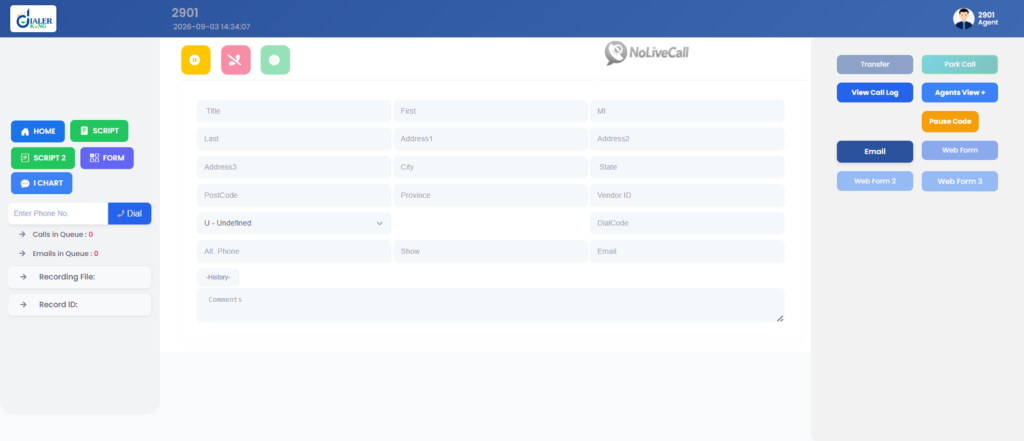
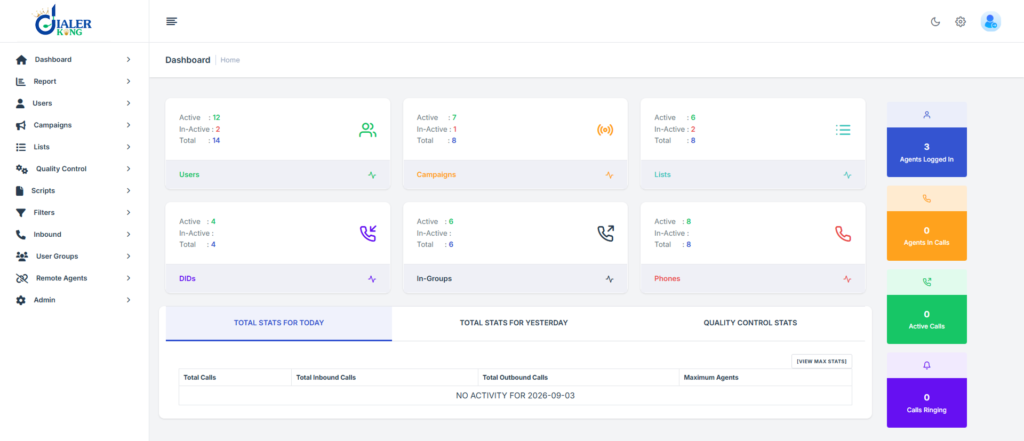
The agent interface, normally served from /vicidial/vicidial.php, renders the live call screen, disposition controls, script pane, and call notes area. The administration panel at /vicidial/admin.php, covering campaign configuration, user management, list handling, and report menus. Supervisor and real-time monitoring screens. The login pages for both agent and administrative users. Stylesheets, layout templates, and any JavaScript controlling the behaviour of the screen.
The components are out of scope, and this distinction matters when scoping a project: Asterisk dialplan execution, the predictive dialing algorithm, hopper loading behaviour, carrier and trunk routing, call recording, and the underlying MariaDB schema. A Custom VICIdial Theme Development cannot make a campaign dial faster. It can make the dialing that already happens easier for a person to work with.
Information required before development starts
DialerKing requests two details before quoting any theme project, and both exist for the same reason.
Your ViciBox version identifies the distribution build your system was installed from, which determines the PHP version, Apache configuration, and directory conventions in use. Your SVN version identifies the exact revision of the VICIdial codebase running on your server. VICIdial’s interface files change between revisions. Form field names get renamed, hidden inputs get added, and JavaScript function signatures shift.
A theme developed against one revision and dropped onto another produces an interface that looks correct and behaves incorrectly.
On a running system, both are visible from the administration panel footer and from the VERSION file in the VICIdial directory.
Two delivery options follow development. Either the source code and installation steps are handed over for your own team to deploy, or server access is provided and the installation and configuration are completed for you. The second route removes the path-mapping and permission errors that account for most self-install support tickets.
Server requirements
Theme work assumes a functioning VICIdial environment. Where a new build is involved:
- AlmaLinux server required from the client side
- Dedicated IP required for setup
- Server access needed for installation
- Installation support provided
Hardware is suggested based on your seat count, campaign type, and recording retention. Multiple Intel and AMD options are available with support for each, and the platform runs across several Linux server environments including Ubuntu.
The development approach
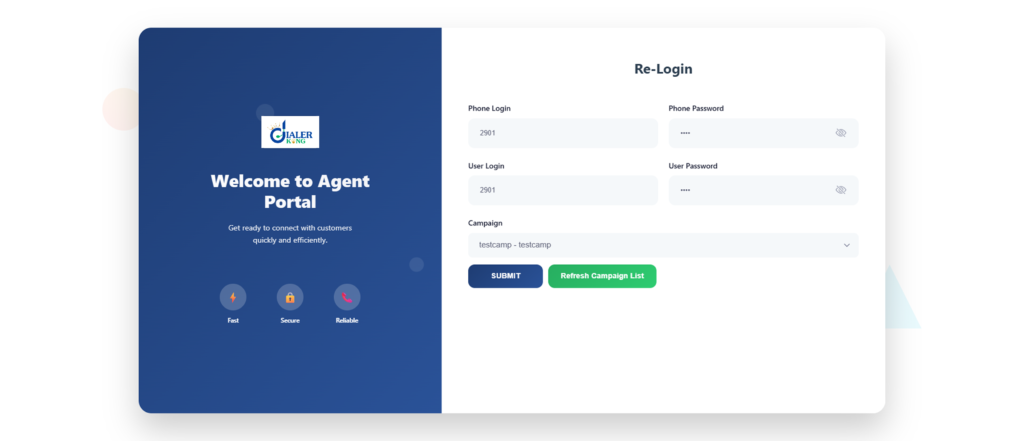
Older theme work amounted to restyled tables. Current builds go further. A modern custom GUI layer uses React for the interface components with Tailwind CSS for styling, sitting over the PHP endpoints that VICIdial already exposes. The browser talks to the same scripts. The agent sees something entirely different.
This opens up work that the stock interface has no room for:
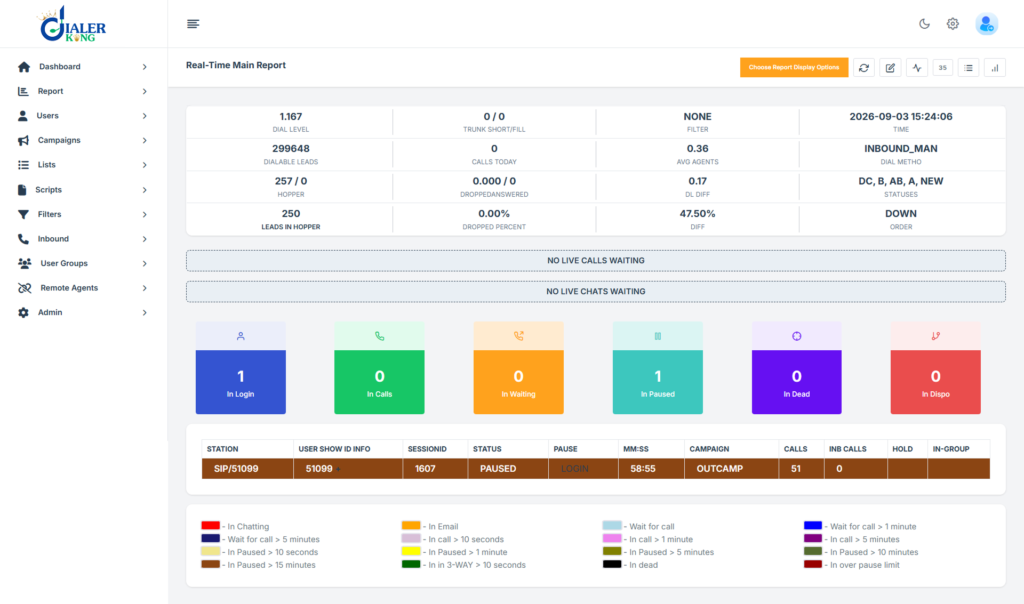
Custom dashboards showing an agent their own contact rate, talk time, and conversion count for the current shift, pulled live rather than read from a report the next morning. Supervisor panels showing queue depth, agent state distribution, and campaign pacing on a single screen. Redesigned disposition flows where the six codes a campaign actually uses are large and reachable, and the remainder sit behind a secondary control.
Script panes that render formatted content with variable substitution instead of a plain text block. Embedded record lookups that query your own database during a live call.
For teams running remote or work-from-home agents, WebRTC browser calling can be built into the same interface, removing the separate softphone entirely.
Path structure on custom deployments
Stock installations use predictable locations:
```
Agent interface:   http://[YOUR_SERVER_IP]/vicidial/vicidial.php
Admin panel:       http://[YOUR_SERVER_IP]/vicidial/admin.php
Non-Agent API:     http://[YOUR_SERVER_IP]/vicidial/non_agent_api.php
```Custom deployments frequently relocate these. A typical DialerKing build serves the agent screen from /agent/agent.php and the administration interface from a path such as https://[YOUR_DOMAIN]/dialer/admin.php. Folder and file naming is configurable to whatever suits your operation.
The authentication mechanism does not change with the path. The same user records, user levels, and user group permissions apply. Only the URL differs, which is worth documenting internally before go-live so agents and supervisors are not bookmarking a path that no longer serves anything.
You can inspect a working custom panel before committing to a build. The DialerKing demo portal exposes several themes.
Permissions inside a custom theme
A common BPO requirement is a supervisor login that sees reporting and nothing else. The Custom VICIdial Theme Development renders the menu, but the permission model behind it is standard VICIdial and must be configured properly.
Create a user group under Administration, User Groups, named something like REPORT_USERS. Open the group and locate the Allowed Reports section, then select only Agent Time Detail and deselect everything else. Create the user under Admin, Users, Add User with User Level 7 or 8, the REPORT_USERS group assigned, and Active set to Y. In the user’s own settings, set View Reports to 1 and every other administrative option to 0: Modify Users, Modify Campaigns, Modify Lists, Delete Users, and Load Leads.
Where team leaders should see only their own team’s figures, the Allowed User Groups field on the user group controls which groups’ report data becomes visible.
Save, then log in as that user and confirm the menu renders only what it should. A theme that hides a menu item visually while the underlying permission remains open is a security finding, not a design choice.
API access from a custom interface
Custom interfaces become considerably more useful when they can read and write data directly. VICIdial exposes two API surfaces.
| API type | Endpoint | Purpose |
|---|---|---|
| Agent API | /agc/api.php | Control active agent sessions |
| Non-Agent API | /vicidial/non_agent_api.php | System-level automation without agent login |The Agent API operates on a logged-in agent session. Click-to-call, pause and resume, disposition setting, and live call control run through it. A custom theme uses it whenever a new control needs to act on the call the agent is currently handling.
The Non-Agent API requires no agent session. It handles lead insertion, lead updates, list tallies, status history retrieval, campaign profile changes, user creation, and direct hopper injection. Custom dashboards and supervisor panels draw on it for figures that do not belong to any single agent session.
REST-style endpoints defined in the integration specification, including Agent Login Status, Live Agent Status, and Originate Call, cover the same ground with structured responses and consistent authentication and error handling, which suits front-end components consuming JSON.
Post-deployment testing: when the dial button does nothing
This is the failure that generates support tickets after a theme goes live, and the diagnosis is worth documenting.
The symptoms: an agent logs in successfully, the interface loads, the Dial Next Number button appears and responds to clicks, and nothing follows. No outbound call, no screen update, no Asterisk originate, no VICIdial action.
The instinct is to blame the Custom VICIdial Theme Development. Check the state first.
```sql
SELECT user, status, campaign_id
FROM vicidial_live_agents;
```A representative result:
```
TEST_AGENT | PAUSED | SAMPLE_CAMPAIGN
```An agent in PAUSED state will not receive or place calls regardless of which interface is rendering the button. If the theme’s resume control does not correctly post the agent back to READY, the session sits in PAUSED indefinitely while the screen looks active.
Then check the campaign:
```
Campaign: SAMPLE_CAMPAIGN
auto_dial_level=0
```With auto_dial_level set to 0, the campaign runs in manual mode. Manual dialing should still work, so a non-functioning button here points at the manual dial path itself: the form action target, the session variable the originate depends on, or a hidden field the theme dropped during the rebuild.
The sequence to work through: confirm agent state in vicidial_live_agents, confirm the campaign’s dial method and auto_dial_level, confirm the session is present in the live agents table at all, then check the Asterisk console for an originate attempt.
If no origin reaches Asterisk, the break is between browser and PHP, which is theme territory. If the originate fires and the call fails, the break is carrier or dialplan, which is not.
Build this check into pre-launch testing. Verify manual dial, predictive dial, transfer, and disposition against a test campaign before a single production agent touches the new interface.
People Also Ask
Will a custom VICIdial theme survive an upgrade❓
Not automatically. Upgrades replace core interface files. Because themes are built against a specific SVN revision, an upgrade requires the theme to be reviewed and reapplied. Support packages cover this, and keeping custom files in a separate directory rather than overwriting stock files makes the process considerably shorter.
Does theme customization affect dialing performance❓
No. Dialing is handled by Asterisk and the VICIdial background processes, neither of which the interface layer touches. A poorly written front end can slow the browser screen, which is why database-backed dashboard components should be queried on a sensible interval rather than on every page refresh.
How long does custom VICIdial theme development take❓
Timeline and cost are quoted after reviewing your ViciBox and SVN versions, since the scope depends on how far the target revision’s interface differs from the design. A restyle of existing screens is a short project. A rebuilt agent workflow with custom dashboards and API-driven panels is a longer one.
Can the admin panel be themed as well as the agent screen❓
Yes. Both are covered, and custom deployments commonly serve the administration interface from a path such as /dialer/admin.php while keeping every standard administrative function intact.
Working with DialerKing
DialerKing builds custom VICIdial interfaces for contact center operations, BPOs, lead generation teams, and appointment-setting agencies across Australia and worldwide.
Services span custom GUI development, React and Tailwind front-end builds, supervisor and real-time monitoring panels, custom reporting and analytics, CRM integration through the API layer, WebRTC browser calling, Asterisk dialplan and AGI development, and performance tuning for large-record environments.
Share your VICIBox version and SVN revision to receive a scoped timeline and cost for your Custom VICIdial Theme Development project.