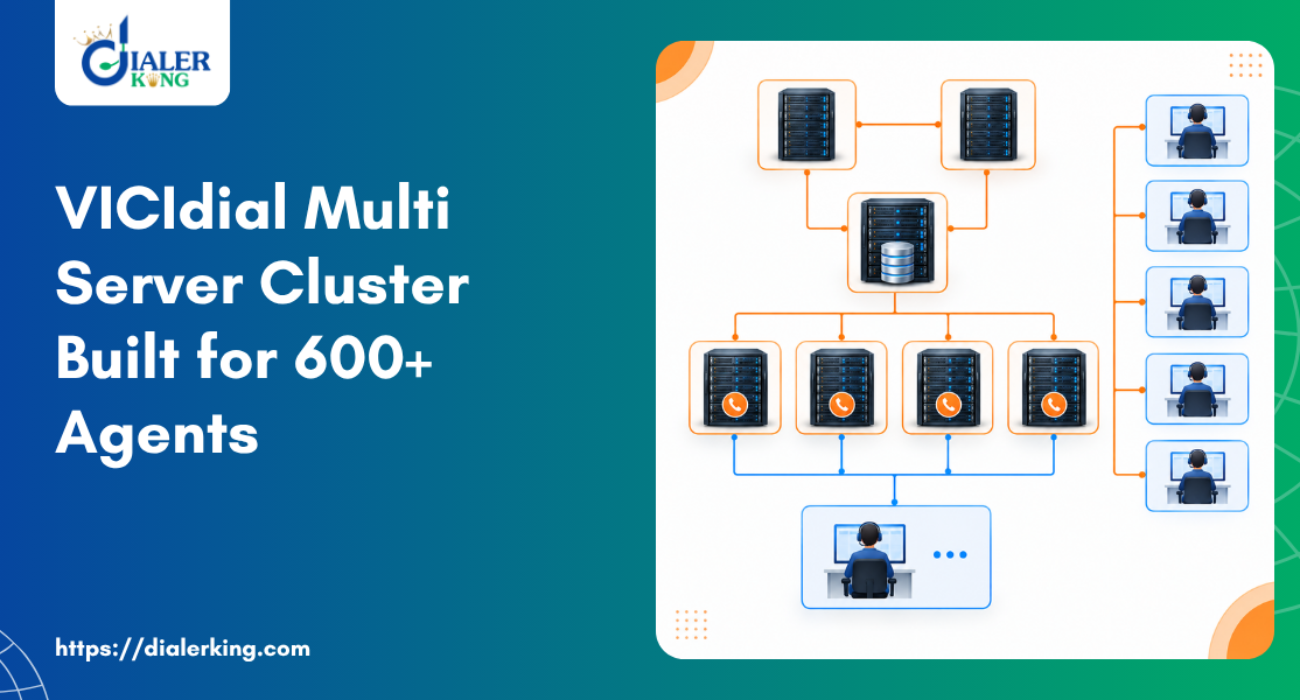
Splitting roles across machines removes the contention. That is the whole point of a VICIdial Multi-Server Cluster Setup. A default single-server VICIdial installation is comfortable up to roughly 100 to 150 concurrent agents, depending on dial ratio, recording settings and how heavy the campaign SQL is. Past that point the failures are predictable.
That is why enterprise deployments in Sydney, Melbourne, Brisbane and Perth almost always arrive at the same architecture.
Asterisk holds two channels for every connected conversation plus every dial attempt that has not yet been answered. At a 3.0 dial level with 600 agents, the platform is carrying somewhere near 1,800 outbound attempts at peak alongside 600 agent sessions. On one machine, that alone saturates the interrupt handling.
At the same time, vicidial_live_agents and vicidial_auto_calls are written to several times per second per agent. The AST_update, AST_send_listen and FastAGI processes all hammer the same tables. When Asterisk competes for the same disk and the same cores, call audio degrades before any dashboard shows a problem.
Cluster architecture for a 600-seat deployment
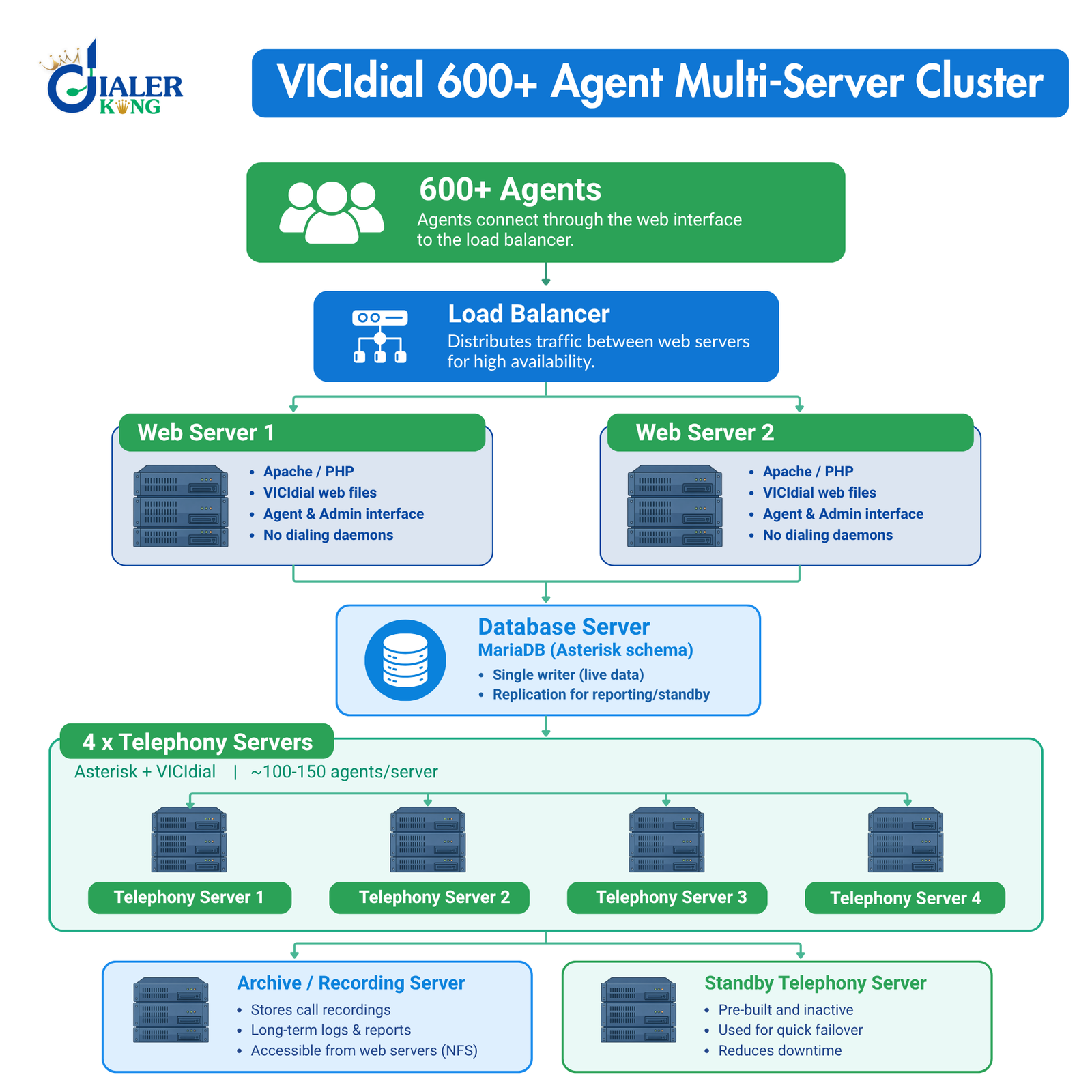
A standard DialerKing build for this size uses five server roles.
Database server.
One MariaDB instance holds the entire asterisk schema. VICIdial does not support multi-master writes for live dialing state, so this box is single-writer by design. Replication is used for reporting and standby, not for splitting load.
Web servers.
These serve admin.php, the agent interface and the API endpoints. Two web servers behind a load balancer let you take one out of rotation for patching without logging 600 people out.
Telephony servers.
Each runs Asterisk plus the VICIdial perl daemons. Budget 100 to 150 agents per telephony server for predictive campaigns with recording enabled. For 600 agents that means four servers minimum, five with failover headroom.
Archive server.
Recordings, long-term logs and report extracts move off the dialers. A busy 600-seat campaign generates 50 GB to 120 GB of audio per day depending on codec and average handle time.
Standby.
One spare telephony server, pre-built and inactive in the servers table, is the difference between a 10-minute incident and a 3-hour one.
We suggest hardware against the actual campaign profile. Both Intel and AMD platforms are supported, and installation plus configuration support is included with the build. For managed deployments we ask the client to provide an AlmaLinux server with a dedicated IP and root access.
Operating system choice
VICIdial runs on Linux-based servers and supports Asterisk-powered contact centre deployments. It is compatible with Ubuntu server environments, and a VICIdial multi server cluster setup on Ubuntu is entirely workable provided you compile Asterisk and the perl dependencies yourself rather than relying on distribution packages.
For production clusters at this scale, our standard is AlmaLinux. The reason is practical rather than religious: the DAHDI, Asterisk and MariaDB versions that VICIdial has been tested against track the RHEL family most closely, and kernel timing behaviour under heavy channel load is better documented there.
Whichever you choose, every node in the cluster must run the same distribution, the same kernel branch and the same Asterisk build. Mixed-version clusters produce faults that are close to impossible to reproduce.
VICIdial Multi-Server Cluster Setup, step by step
1. Plan addressing before you install anything
Assign static internal addresses and matching hostnames for all nodes. Every server needs the following resolvable from every other server, either through DNS or /etc/hosts:
10.10.10.10   db01
10.10.10.20   web01
10.10.10.21   web02
10.10.10.31   ast01
10.10.10.32   ast02
10.10.10.33   ast03
10.10.10.34   ast04
10.10.10.50 arch01Telephony servers also need a public IP for SIP signalling with your carrier, declared separately as the external IP.
2. Build the database server first
Install MariaDB, create the asterisk schema and load the VICIdial SQL. Then grant access from the cluster subnet rather than from a single host:
GRANT ALL PRIVILEGES ON asterisk.* TO 'cron'@'10.10.10.%' IDENTIFIED BY 'strong_password';
GRANT SELECT,INSERT,UPDATE,DELETE ON asterisk.* TO 'custom'@'10.10.10.%' IDENTIFIED BY 'strong_password';
FLUSH PRIVILEGES;Tuning matters more here than anywhere else in the cluster. A starting point for 128 GB of RAM:
innodb_buffer_pool_size = 80G
innodb_buffer_pool_instances = 8
innodb_log_file_size = 2G
innodb_flush_log_at_trx_commit = 2
innodb_flush_method = O_DIRECT
max_connections = 2000
table_open_cache = 8000
query_cache_type = 0
innodb_flush_log_at_trx_commit = 2 trades a one-second durability window for a large write throughput gain. On a dialing platform that is the correct trade, because the live agent state is regenerated continuously anyway.
3. Install the web servers
Install Apache, PHP and the VICIdial web files. In /etc/astguiclient.conf on each web server, point the database entries at db01 and leave the server identity blank of any Asterisk role. Web servers should not run the dialing daemons.
- On a standard installation the administration dashboard sits at
http://[YOUR_SERVER_IP]/vicidial/admin.phpand the agent interface athttp://[YOUR_SERVER_IP]/vicidial/vicidial.php.Custom theme deployments change the path only, not the authentication mechanism.
A typical DialerKing deployment serves the admin interface from https://[YOUR_DOMAIN]/dialer/admin.php and the agent interface from /agent/agent.php.
Change the default administrator credentials at first login. Default credentials are publicly documented and are the single highest-risk exposure in a new deployment. Update both the username and the password under Admin, then Users, then Edit User.
4. Register every telephony VICIdial Multi-Server Cluster Setup server
This is the step most self-managed installations get wrong. Each Asterisk node needs a row in the servers table, created through Admin, then Servers, then Add New Server. Required values are the server ID, the hostname, the internal server_ip, the external IP for SIP, active set to Y, and the correct Asterisk version string.
Verify from the database rather than from the GUI:SELECT server_id, server_ip, active, asterisk_version, max_vicidial_trunks
FROM servers;
The same information is available programmatically through the Server List API at GET /api/v1/system/servers, which returns server ID, hostname, IP, active flag, role, SIP IP and external IP directly from the servers table.
5. Start the keepalive processes
On each telephony server, the ADMIN_keepalive_ALL.pl entry in cron is what actually launches and restarts the dialing daemons. Without it, agents log in successfully and no calls are ever placed. A typical crontab on a dialer node:
* * * * * /usr/share/astguiclient/ADMIN_keepalive_ALL.pl
0 1 * * * /usr/share/astguiclient/ADMIN_restart_if_needed.pl
* * * * * /usr/share/astguiclient/AST_conf_update.plAST_conf_update.pl and AST_update.pl must run on the dialers only. Running them on a web server causes duplicate state writes and produces agent sessions that appear to exist on two servers at once.
6. Distribute agents and trunks
Set max_vicidial_trunks per server to match what the hardware and carrier can carry, not to an arbitrary round number. With four dialers and a 3.0 dial level across 600 agents, roughly 450 to 500 trunks per node is a realistic ceiling.
Carrier registration is per telephony server. Confirm each is registered before going live:
asterisk -rx "sip show registry"
asterisk -rx "core show channels count"The Carrier Status API at GET /api/v1/carriers/{carrierId}/status returns registration state, active calls, CPS, ASR and ACD pulled from Asterisk through AMI, which is the fastest way to catch one node whose trunk has silently dropped.
7. Centralise recordings
Recordings are written locally by Asterisk, then moved. Schedule the compression and transfer scripts to run off-peak and mount the archive over NFS on the web servers so playback works from any node. Recording metadata stays in recording_log and is queryable through GET /api/v1/recordings by agent, lead, phone, campaign or date range.
8. Time, firewall and clock discipline
Every node must run NTP against the same source. VICIdial calculates agent talk time and pause duration from timestamps written by different servers, so a two-second skew between dialers produces reports that do not reconcile. For Australian deployments, set the system zone to Australia/Sydney or the relevant local zone on all nodes and confirm daylight saving transitions are handled identically everywhere.
Firewall the MariaDB port so it is reachable only from the cluster subnet. It should never be exposed publicly.
- Verifying the cluster is actually working
- Log one agent in and check state directly:
- SELECT user, status, campaign_id
- FROM vicidial_live_agents;
A healthy logged-in agent waiting for a call returns something like:
TEST_AGENT | PAUSED | SAMPLE_CAMPAIGN at this point is correct.
PAUSED
It means the session is registered and the agent has not yet resumed. If the row is missing entirely, the agent session never reached the database, which points at the web server’s astguiclient.conf or at network reachability to db01.
For a whole-cluster view, the Cluster Status API at GET /api/v1/system/cluster returns each server with its status and active call count:
{
  "servers": [
    { "server": "AST01", "status": "ONLINE", "activeCalls": 512 },
    { "server": "AST02", "status": "ONLINE", "activeCalls": 487 }
  ]
}Pair it with GET /api/v1/database/health and GET /api/v1/system/statistics for load average and service state per node. If one dialer reports zero active calls while the others are loaded, that node’s keepalive is not running or its carrier registration has dropped.
Manual dialing not working after cluster installation
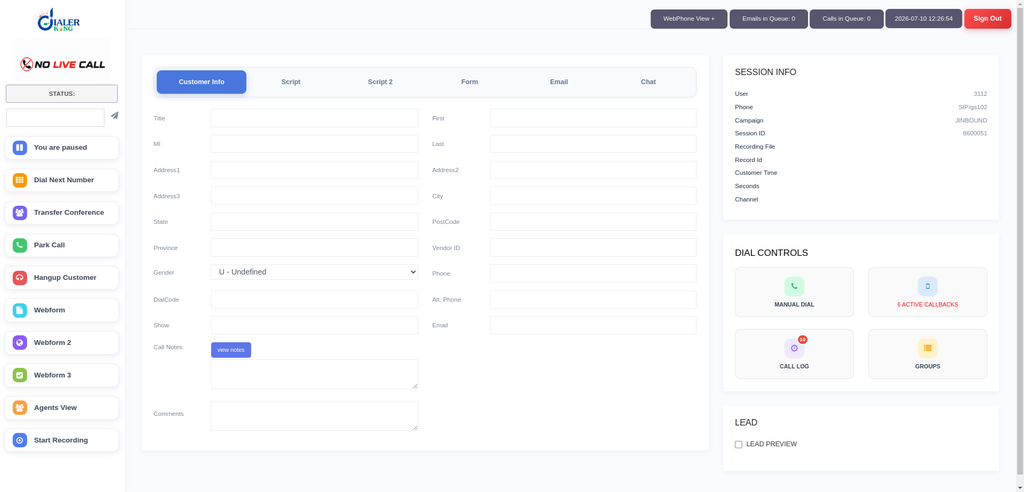
This is the most common post-installation ticket on new clusters, and it looks alarming because nothing errors.
Symptoms. The agent logs in successfully. The agent sees the Dial Next Number button and can click it. Nothing happens.
There is no outbound call, no screen update, no Asterisk originate and no VICIdial action recorded.
Cause. Check the campaign first:
Campaign: SAMPLE_CAMPAIGN
auto_dial_level = 0
With auto_dial_level at 0,the campaign is in manual mode. That by itself is legitimate, but manual mode only dials when the campaign’s manual dial settings, the agent’s user permissions and the assigned telephony server all line up.
On a cluster there is a fourth variable that does not exist on a single box: the web server must resolve the agent’s session to a telephony server that is actually reachable.
Work through it in this order.
- Confirm the agent’s server_ip in vicidial_live_agents matches a live row in servers.
- Confirm that node’s Asterisk is accepting originates: asterisk -rx “manager show connected”.
- Confirm the campaign has a dial method that permits manual dialing and that the lead has a valid, non-blank phone number with the correct country prefix for Australian numbers.
- Check /var/log/astguiclient/ on the dialer for FastAGI errors during the click.
If the AMI connection from the web server to the dialer is missing or the credentials in astguiclient.conf differ between nodes, the click is registered in the browser and dies silently. That mismatch is the single most frequent root cause on a fresh ViciDial cluster installation.
Frequently asked questions
Can I run a VICIdial Multi-Server Cluster Setup on Ubuntu❓
Yes. Ubuntu server environments are compatible with VICIdial and Asterisk deployments Dialerking. Compile Asterisk and the perl modules from source, keep every node on the same release, and expect to maintain the dependency chain yourself.
Does a cluster need more than one database server❓
Not for dialing. VICIdial writes live state to one MariaDB instance. Add replicas for reporting and standby, not for splitting write load
What happens if one telephony server fails❓
Agents on that node are disconnected and must log back in. They will be distributed to the remaining active nodes. Marking the failed server inactive in the servers table stops the dialer from trying to place calls through it.
Can external systems monitor the cluster❓
Yes. The Non-Agent API at http://SERVER_IP/vicidial/non_agent_api.php handles lead and campaign automation without an agent session, and the REST specification adds system-level endpoints for server, cluster, database and storage health.
Deploy a 600-seat VICIdial Multi-Server Cluster Setup with DialerKing
DialerKing builds and supports multi-server VICIdial architectures for contact centre operations across Australia and worldwide, covering hardware sizing, ViciDial cluster installation and optimisation for high-concurrency environments, custom API development and ongoing maintenance.
If you are scaling past a single server, or an existing cluster is showing load or dialing faults, contact DialerKing for an architecture review and a deployment plan matched to your campaign profile.