
Understanding how Asterisk Local Channel CallerID actually behaves, and why caller ID gets lost between their two legs, is the only way to fix the problem permanently instead of patching around it. If you have spent any time writing Asterisk dialplans, you have probably run into this exact complaint from an agent or a client: “the caller ID shows correctly on the first screen, but by the time the call reaches the extension, it is blank, wrong, or replaced with something generic.”
Nine times out of ten, the culprit is a Local Channel. At DialerKing, this is one of the most common tickets we see from teams running their own Asterisk setup, usually described as ‘caller ID worked yesterday, now it shows blank.’
What a Asterisk Local Channel CallerID actually is
A Local Channel in Asterisk is not a physical device and it is not a SIP endpoint. It is a software construct, a way for the dialplan to call itself. Think of it as a bridge between two points inside your own dialplan logic rather than between two real phones.
Every Local Channel is created in pairs, written as Local/extension@context. Internally, Asterisk splits this into two separate channel legs:
- The first leg, often written with the suffix ;1, is the side that originates the call and runs the dialplan logic that created the Local Channel.
- The second leg, written with the suffix ;2, is the side that actually executes whatever extension and context you pointed it at.
Administrators reach for Local Channels constantly because they solve real problems: routing a call through a macro before it reaches its final destination, applying a prefix or trunk selection dynamically, bouncing a call through a different context for business hours logic, or giving an agent interface a way to originate a call without tying up a real device directly. The flexibility is genuine.
The cost is that anything you set on the ;1 leg does not automatically travel to the ;2 leg, and that includes caller ID. We rely on Local Channels constantly in the dialplans we build at DialerKing, precisely because they make this kind of internal routing possible without rewriting the whole call flow.
Why caller ID gets lost on a Local Channel
This is the part that confuses people the first time they see it, because it looks like a bug when it is actually documented behavior. This is the exact behavior our team at DialerKing walks clients through when they open a ticket about caller ID disappearing partway through a call.
The two-leg problem
When you set CALLERID(num) or CALLERID(name) on the originating leg of a Local Channel, that value exists only on that leg’s channel variables. The second leg, ;2, is a distinct channel with its own variable space. Unless you explicitly pass the caller ID across, the ;2 leg starts with whatever caller ID the dialplan on that side would normally generate, which is frequently nothing useful at all.
This is different from how caller ID behaves on a normal SIP-to-SIP call, where the caller ID set early in the dialplan simply rides along with the single channel for its entire life. A Local Channel breaks that single-channel assumption in half.
Local Channel optimization makes it worse
Asterisk has a feature called Local Channel optimization. Once both legs of a Local Channel are bridged and nothing else needs to happen in between, Asterisk Local Channel CallerID tries to be efficient and removes the Local Channel pair from the call path entirely, splicing the two real channels on either side directly together. This saves resources and reduces one extra hop in the audio path.
The problem is timing. If you set caller ID information on the ;1 leg after the point where Asterisk performs this optimization, that information is discarded along with the Local Channel itself. Your Set(CALLERID(…)) line runs, appears to work in the trace, and then vanishes the moment the channel gets optimized away. This is the single most common reason administrators report caller ID “randomly” disappearing on some calls and not others. It is not random. It depends on exactly when optimization happens relative to when you set the variable.
Connected line updates overwrite what you set
A second, less obvious cause is connected line identification. Asterisk Local Channel CallerID exchange CONNECTEDLINE updates automatically as part of normal call signaling. If a device or trunk on either leg sends a connected line update after your dialplan sets caller ID, that update can overwrite the value you just configured, particularly on PJSIP channels where connected line handling is more active by default than it was on the older channel driver.
Put these two causes together and you get the pattern most people report: caller ID is correct in the trace log right after the Set() line, but wrong by the time the destination phone rings.
Where this issue commonly shows up
A few dialplan patterns are especially prone to this problem because they rely on Local Channels by design rather than by accident:
Agent-originated calls, where an interface builds a Local/ channel string to connect an agent’s extension to an outbound number, lose caller ID most often because the agent leg and the outbound leg are two completely separate channel contexts.
Dynamic routing dial plans, where a call passes through a Local Channel to apply trunk selection logic or a dial prefix before reaching the real trunk, lose caller ID when the prefix logic runs after optimization has already collapsed the pair.
Queue and ring group setups that use Local Channels to fan a single inbound call out to multiple extensions often show inconsistent caller ID on each ringing phone, because each ;2 leg can end up with a different starting state.
Follow-me and call forwarding plans that rebuild the call through a Local Channel to add logic before forwarding frequently show the forwarding number instead of the original caller, since nothing told the second leg what the original caller ID actually was.
Agent-originated calls are the single most frequent source of this complaint in the dialplans DialerKing reviews for clients. The fix below reflects the exact sequence our developers at DialerKing apply when a client reports this issue, rather than a generic workaround.
Step by step fix
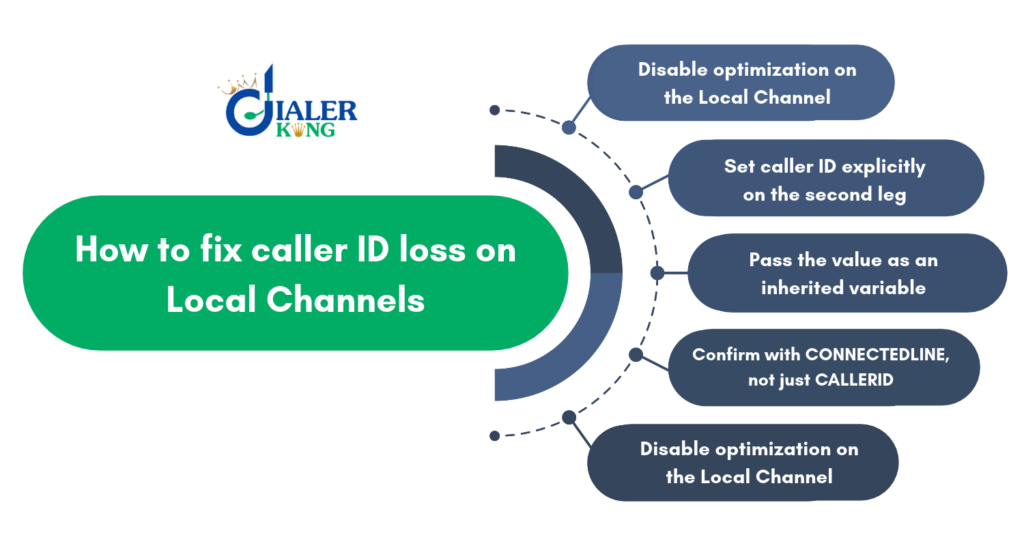
Step 1: disable optimization on the Local Channel
The most reliable fix is to stop Asterisk Local Channel CallerID from optimizing the Local Channel away before your caller ID logic has a chance to apply. You do this with the /n option on the Local Channel string:
Dial(Local/1001@internal/n)The /n flag tells Asterisk not to perform Local Channel optimization for that particular channel pair. This keeps both legs alive for the full duration of the call, which means any caller ID you set continues to apply instead of being discarded mid-call. The small tradeoff is one extra channel in the bridge, which has a negligible effect on resource usage for the vast majority of installations.
Step 2: set caller ID explicitly on the second leg
Do not assume the caller ID set on the ;1 leg will reach ;2. Set it directly using the b() dialplan application option, which runs a Gosub routine on the destination channel before it is dialed:
Dial(Local/1001@internal,,b(macro-set-callerid^s^1))Inside macro-set-callerid, apply the caller ID explicitly:
[macro-set-callerid]
exten => s,1,Set(CALLERID(num)=${ORIGINAL_CALLERID_NUM})
exten => s,n,Set(CALLERID(name)=${ORIGINAL_CALLERID_NAME})
exten => s,n,MacroExit()Make sure ORIGINAL_CALLERID_NUM and ORIGINAL_CALLERID_NAME are captured as channel variables early in the dialplan, before the Local Channel is created, so the value is available to pass across.
Step 3: pass the value as an inherited variable
Asterisk lets you prefix a variable name with an underscore to have it inherit automatically to any channel spawned from the current one, including the ;2 leg of a Local Channel:
Set(__ORIGINAL_CALLERID_NUM=${CALLERID(num)})A double underscore prefix makes the inheritance apply to every subsequent channel spawned down the chain, not just the immediate next one, which is useful when a call passes through several Local Channel hops.
Step 4: confirm with CONNECTEDLINE, not just CALLERID
If the display name or number still looks wrong on the far end phone even after the fix above, check whether a connected line update is overwriting it. Lock the connected line explicitly where needed:
Set(CONNECTEDLINE(num)=${ORIGINAL_CALLERID_NUM})
Set(CONNECTEDLINE(name)=${ORIGINAL_CALLERID_NAME})This matters especially on PJSIP channels, where connected line signaling is more actively exchanged than it was on older channel drivers.
Step 5: verify with live channel tracing
Before assuming the fix worked, confirm it in a live trace rather than by eye alone. From the Asterisk CLI:
core set verbose 5
core set debug channel Local/1001@internalWatch the trace as a test call passes through. You should see the caller ID value persist across the point where the Local Channel would normally be optimized away, and you should see it still present by the time the destination channel answers.
Best practices to avoid this issue going forward
These are the same habits our team enforces across every dialplan DialerKing maintains for clients, specifically to prevent this issue from resurfacing after future changes. A few habits prevent this problem from recurring as new dialplan logic is added later:
Capture the original caller ID into a dedicated variable as early as possible in the dialplan, before any Asterisk Local Channel CallerID is created, rather than relying on CALLERID() still holding the right value several steps later.
Use the /n flag on any Local Channel where caller ID or custom channel variables need to survive the full call, and reserve the optimized (default) behavior only for Local Channels that are genuinely just a routing pass-through with nothing attached to them.
Document which Local Channels in your dialplan are optimization-safe and which are not, since a dialplan maintained by more than one person will eventually have someone re-enable optimization without realizing why it was disabled.
Test caller ID behavior specifically whenever a Local Channel is added or modified, rather than only testing that the call connects and audio works, since a connected call with blank or wrong caller ID still passes a basic functional test.
Frequently asked questions
How do I get my caller ID to show up on my TV❓
This question relates to caller ID display units connected to a television rather than to Asterisk Local Channel CallerID itself. It depends on the specific caller ID box or set-top integration being used and is unrelated to dialplan-level caller ID handling.
What is an asterisk in SIP❓
In this context, Asterisk refers to the open source telephony platform, not the punctuation mark. It is the software that interprets dialplan logic, including the Local Channel behavior discussed above, and routes SIP signaling accordingly.
What does Set(CALLERID) do in Asterisk Local Channel CallerID❓
Set(CALLERID(num)=…) and Set(CALLERID(name)=…) assign the number and name values that a channel presents as its caller ID. On a Local Channel, this must be applied to the correct leg, or explicitly passed across, or it will not reach the far side.
What are Asterisk channel variables❓
Channel variables store data tied to a specific channel during a call, such as caller ID or custom routing flags. They do not cross automatically from one Local Channel leg to another unless passed explicitly or marked for inheritance with an underscore prefix.
Final thoughts
Caller ID disappearing on a Local Channel is one of those Asterisk behaviors that looks like a random glitch the first time you see it and makes complete sense once you understand the two-leg structure underneath. The fix rarely needs more than a dialplan adjustment: disable optimization where it matters, pass the value explicitly, and verify with a live trace rather than guesswork.
Get this right once in your dialplan template and every Local Channel you build afterward inherits the correct behavior automatically. If your Asterisk setup is still showing inconsistent caller ID after trying the steps above, DialerKing’s development team can review the dialplan directly and apply a permanent fix rather than a temporary patch.