- What VICIdial is and what it's used for
- How to set up VICIdial for manual dial campaigns
- VICIdial manual dial configuration table
- Where manual dial fits in multi-mode VICIdial deployments
- DialerKing's VICIdial customization services
- Common issues in VICIdial manual dial and how to address them
- Frequently asked questions
- Why businesses work with DialerKing for VICIdial manual dial deployments
Do you know a scenario where the VICIdial manual dial becomes the right tool? Outbound dialing in a contact center environment is never one-size-fits-all. Some VICIdial campaigns demand speed – hundreds of dials per hour with minimal agent involvement. Others require a more deliberate approach, where agents review a lead, decide it’s worth contacting, and place the call themselves. That second approach is where VICIdial manual dial becomes useful.
This guide breaks down what VICIdial manual dial is, how it fits into the broader VICIdial system, and what goes into configuring it properly for your operation. It also covers how DialerKing approaches VICIdial customization for businesses that need more than the default setup.
What VICIdial is and what it’s used for
Before going deep on manual dialing, it helps to understand the platform itself. VICIdial is an open-source contact center suite built on the Asterisk telephony engine. It handles inbound queues, outbound campaigns, agent management, reporting, and call recording – all from a web-based interface.
If you are asking what VICIdial is used for, the short answer is: it is used for running outbound sales campaigns, inbound customer support queues, appointment-setting operations, lead generation workflows, and blended contact center environments.
Is VICIdial a dialer? Yes – it includes multiple dialing modes, and manual dial is one of them. The others are preview dial, progressive dial, and predictive dial. Each serves a different operational purpose. Manual dial sits at one end of the spectrum: maximum agent control, minimum system-driven automation.
Understanding the VICIdial manual dial mode
VICIdial manual dial means the agent initiates the call. The system does not place the call on the agent’s behalf or move automatically to the next lead. The agent sees the lead information, picks up the phone icon or presses the dial button, and the call goes out.
This approach makes sense in specific situations:
- High-value accounts where agents need to review notes before calling
- Campaigns with strict legal requirements around when and how often contacts can be reached
- Follow-up workflows where agents are working a personal list
- Outbound compliance environments where every dial needs to be deliberate
The VICIdial manual dial mode does not use the system’s predictive algorithm or any server-side pacing logic. It is entirely agent-driven, which gives supervisors and compliance teams confidence that no unattended or abandoned calls are going out.
How to set up VICIdial for manual dial campaigns
How to set up VICIdial for manual dialing involves several layers: the server installation, the campaign configuration, and the agent interface setup. Here is how each piece fits together.
Server installation and base setup
VICIdial runs on a Linux server, typically CentOS or a compatible distribution. The installation involves:
- Setting up the base OS and network configuration
- Installing Asterisk and the VICIdial application layer
- Configuring the database (MariaDB or MySQL)
- Setting up SIP trunks and carrier connections
- Verifying the web interface is accessible to agents and supervisors
For businesses asking about VICIdial manual dial download, the software is available from the official VICIdial.org repository. The VICIdial manual dial installation process involves running the installation scripts, configuring the database credentials, and completing the web-based setup wizard. DialerKing handles full deployments for clients who do not want to manage the installation internally.
Campaign configuration for manual dialing
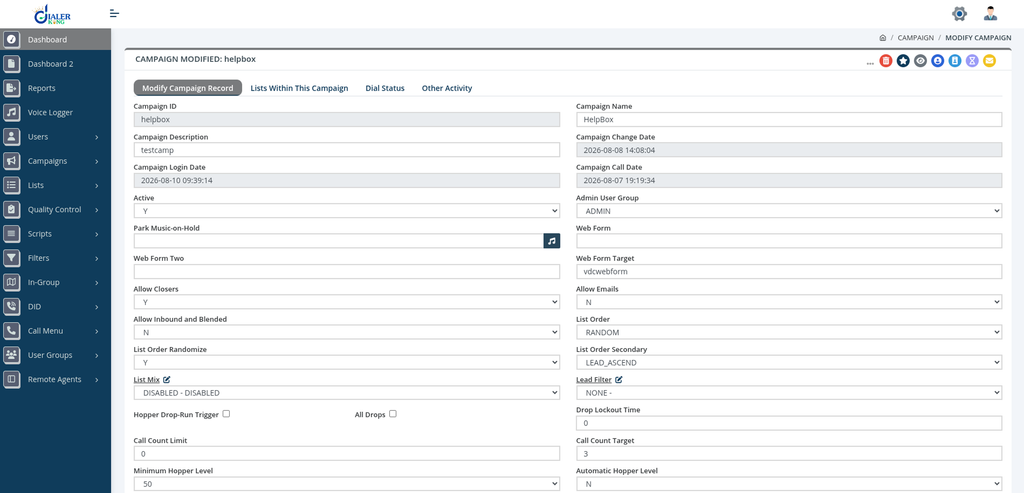
Once the system is running, creating a manual dial campaign involves these steps within the VICIdial admin panel:
- Navigate to Admin > Campaigns and create a new campaign
- Set the dial method to “MANUAL” in the campaign settings
- Configure the inbound and outbound group assignments
- Set up the hopper and lead loading settings
- Assign the campaign to the relevant agent groups
- Configure disposition settings and after-call work timers
The campaign dial method is the critical setting. When set to MANUAL, agents will see leads in their interface but the system will not auto-dial. The agent clicks to call when they are ready.
Agent interface and manual dial controls
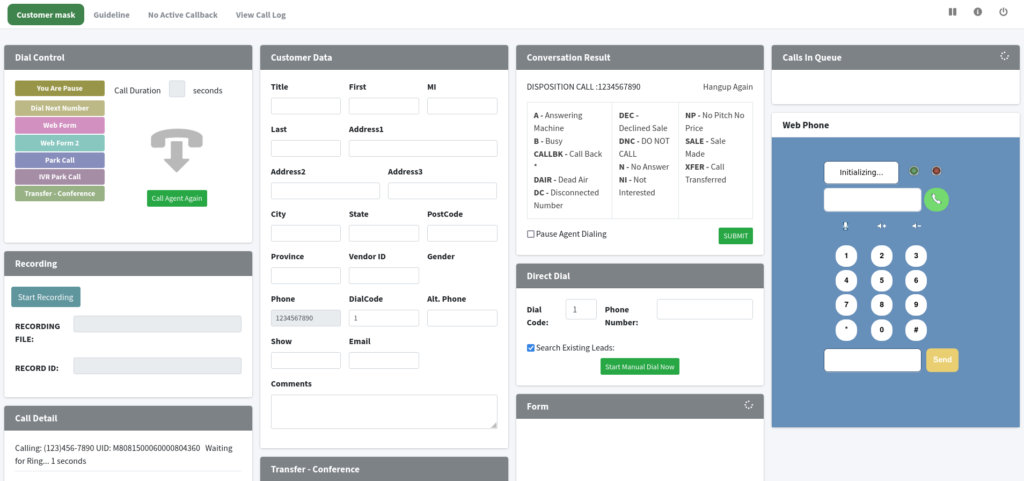
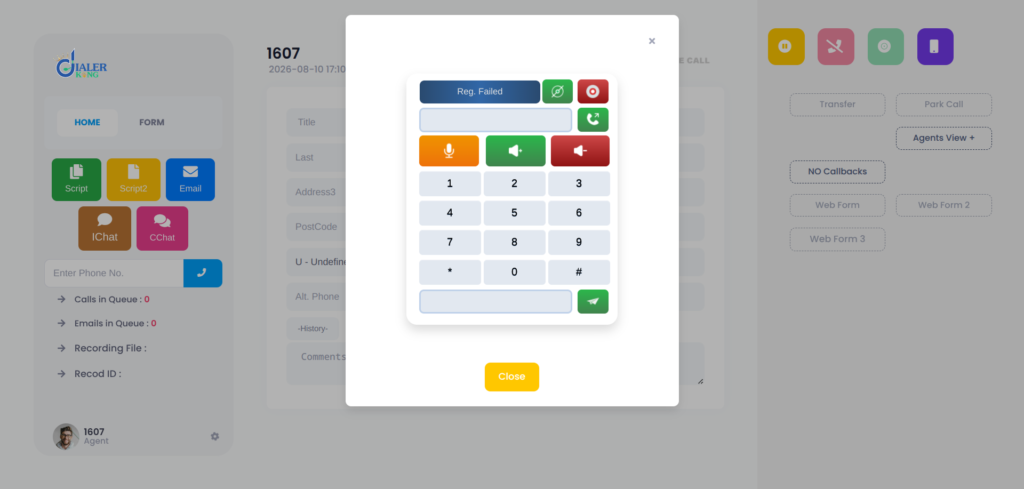
In the standard VICIdial agent interface, manual dial surfaces as a dial button alongside the lead record. Agents on a manual dial campaign can also use the manual dial field to enter a number directly – useful for returning calls or dialing contacts outside the loaded list.
The VICIdial manual dial interface also supports:
- Preview of lead details before dialing
- Call back scheduling
- Disposition logging during and after the call
- Pause code management between calls
VICIdial manual dial configuration table
The table below summarizes the key campaign settings that affect manual dial behavior:
| Setting | Location | Recommended Value for Manual Dial |
|---|---|---|
| Dial method | Campaign > Settings | MANUAL |
| Auto dial level | Campaign > Settings | 0 (disabled) |
| Agent pause after disposition | Campaign > Settings | Configurable; typically 5–30 seconds |
| Manual dial override | Campaign > Settings | NONE (follows user-level manual dial permissions) |
| Hopper level | Campaign > Lead Recycling | Configured based on campaign lead volume and agent requirements |
| Disposition select | Agent screen | Required before next lead loads |
Is VICIdial free for calling?
This question comes up often. Is VICIdial free for calling? The VICIdial software itself is open-source and free to download and use. There are no licensing fees for the application. However, the actual calling costs come from your SIP trunk or telephony carrier – those are separate from the software.
You will also have server costs (hardware or a virtual machine), and if you need custom development, integrations, or ongoing support, that is where a development partner like DialerKing comes in.
The core platform being free is one of the reasons VICIdial has such a large global user base. Businesses of all sizes use it because the base software does not carry per-seat licensing the way proprietary platforms do.
Where manual dial fits in multi-mode VICIdial deployments
Most production VICIdial environments do not run a single dial mode across all campaigns. A common setup involves:
- Predictive or progressive campaigns for high-volume lead lists
- Preview campaigns for warm leads that need agent review
- Manual dial campaigns for compliance-sensitive or relationship-driven outreach
VICIdial supports running all of these simultaneously. Agents can be assigned to specific campaigns based on their role, skill level, or the type of list they are working.
Blending inbound and outbound with manual dial
An agent handling inbound calls can be configured to take manual dial outbound calls during available periods, depending on campaign assignments and inbound call priority settings.
DialerKing’s VICIdial customization services
Out-of-the-box VICIdial manual dial is functional, but most serious operations eventually need something the default interface does not provide. DialerKing specializes in extending VICIdial beyond its standard capabilities.
Custom agent and supervisor interfaces
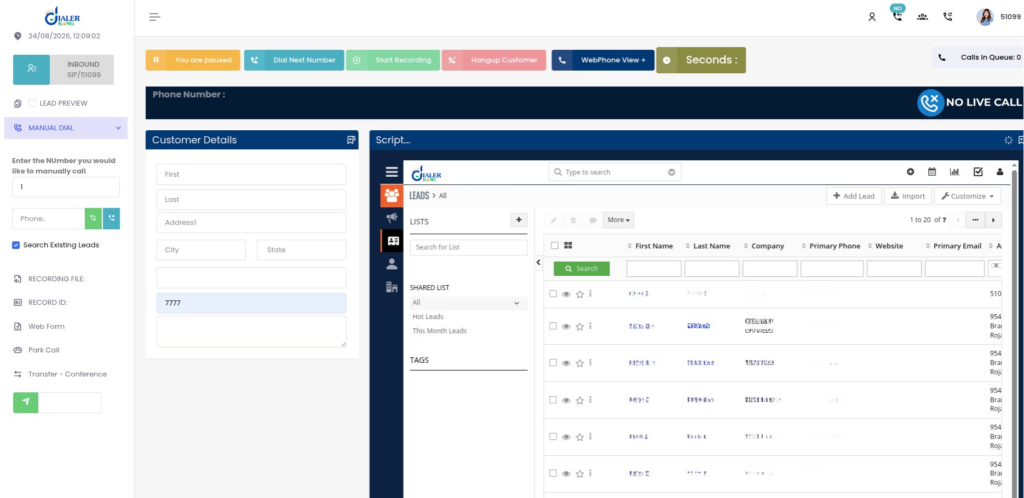
The standard VICIdial agent screen is functional but dated. DialerKing builds modern interfaces that give agents a cleaner experience during manual dial sessions. These custom interfaces can include:
- Larger lead detail panels with full contact history
- One-click disposition options tailored to your campaign
- Integrated notes and callback scheduling
- Supervisor view panels with live agent status
Custom reporting for manual dial campaigns
Standard VICIdial reports cover the basics – call counts, talk time, dispositions. For manual dial campaigns specifically, businesses often need more granular data: how long agents spend reviewing leads before dialing, disposition distribution by agent, callbacks scheduled vs completed, and contact rate by list segment.
DialerKing builds custom reporting modules that go beyond the standard VICIdial reports:
- Agent productivity reports with talk time and pause code analysis
- Lead penetration reports for manual dial lists
- Disposition and conversion tracking
- Real-time operational dashboards for supervisors
- Executive dashboards with KPI monitoring and historical trend data
CRM integration for manual dial workflows
One of the biggest gaps in a standard VICIdial manual dial setup is CRM visibility. Agents often need to see the contact’s history in CRM before placing a call – and after the call they need that activity logged without manual data entry.
DialerKing integrates VICIdial with virtually any CRM platform. For manual dial campaigns, this typically means:
- Screen popups that load the CRM contact record when an agent selects a lead
- Click-to-call from within the CRM
- Automatic call activity logging after disposition
- Appointment and callback synchronization between VICIdial and the CRM
Performance and scalability
Manual dial campaigns generating high lead volumes or running across multiple agent teams require database performance that the default VICIdial configuration does not always deliver. DialerKing handles optimization, query tuning, multi-server architecture, and load balancing for environments handling millions of records.
Common issues in VICIdial manual dial and how to address them
Agents not seeing leads in the hopper
If agents on a manual dial campaign are not getting leads loaded into their interface, the issue is usually in the hopper configuration or lead list status. Check that the campaign’s hopper level is set correctly and that the lead list is active and loaded.
Manual dial field not appearing
The manual dial entry field in the agent interface is controlled by a campaign-level setting. If agents cannot dial numbers manually, verify the “Manual Dial Override” setting is enabled in the campaign configuration.
Disposition not saving correctly
If dispositions are not logging after manual dial calls, the issue is typically in the web server configuration or a session timeout affecting the agent screen. This often requires server-level troubleshooting and in some cases a custom agent interface that handles session management more reliably.
Frequently asked questions
How do I configure the VICIdial manual dial❓
In the VICIdial admin panel, go to Admin > Campaigns, create or edit a campaign, and set the dial method to MANUAL. You will also need to configure the hopper, lead lists, disposition settings, and agent group assignments.
Is VICIdial free❓
The VICIdial software is open-source and free to use. Calling costs come from your SIP carrier, and server and development costs are separate from the application itself.
Can VICIdial run manual dial and predictive dial at the same time❓
Yes. VICIdial supports multiple campaigns with different dial modes running simultaneously. Agents can be assigned to specific campaigns based on their role and the type of outreach they are handling.
What customizations does DialerKing offer for VICIdial manual dial❓
DialerKing offers custom agent interfaces, supervisor dashboards, CRM integrations, custom reporting modules, performance optimization, and full multi-server VICIdial deployments tailored to manual dial and blended campaign environments.
Why businesses work with DialerKing for VICIdial manual dial deployments
DialerKing’s team has years of hands-on experience with VICIdial deployments across contact centers, BPOs, lead generation companies, and appointment-setting agencies. The work covers everything from initial installation and configuration to custom development, CRM integration, performance optimization, and ongoing support.
For manual dial specifically, that means building the campaign configuration correctly from the start, customizing the agent interface so manual dial workflows are fast and clear, and integrating the reporting and CRM tools that make manual dial data actually useful to the business.
Whether the need is a straightforward VICIdial manual dial campaign setup, a custom agent screen, or a full multi-server VICIdial deployment with custom reporting and CRM integration, DialerKing has the development and configuration experience to deliver it.
If you are setting up a VICIdial manual dial environment or need to extend what your current VICIdial deployment can do, DialerKing’s development team can help. Get in touch to discuss your campaign requirements and what a custom VICIdial solution would look like for your operation.