
Published by DialerKing Engineering | Contact Center Dialer Software Solutions | VICIdial & IVR Integration Specialists
VICIdial Non-Agent API integration is the most reliable method for connecting an external system – a CRM, a data pipeline, or a web application, directly to the Custom VICIdial contact center platform without requiring a human agent to be logged in.
Unlike the Agent API, which manages live in-session events, the Non-Agent API gives your backend systems full programmatic access to the VICIdial database: inserting leads, updating prospect records, pulling campaign statistics, managing system users, and even pushing priority contacts directly into the active dialer queue.
If you have ever needed your CRM to automatically load a fresh batch of leads into a running campaign, or wanted a dashboard to pull live list counts without anyone logging into the VICIdial admin GUI, this API is your answer. This guide walks through everything, from endpoint anatomy and authentication to production-ready code examples – so your integration works correctly on the first deployment.
What Is the VICIdial Non-Agent API?
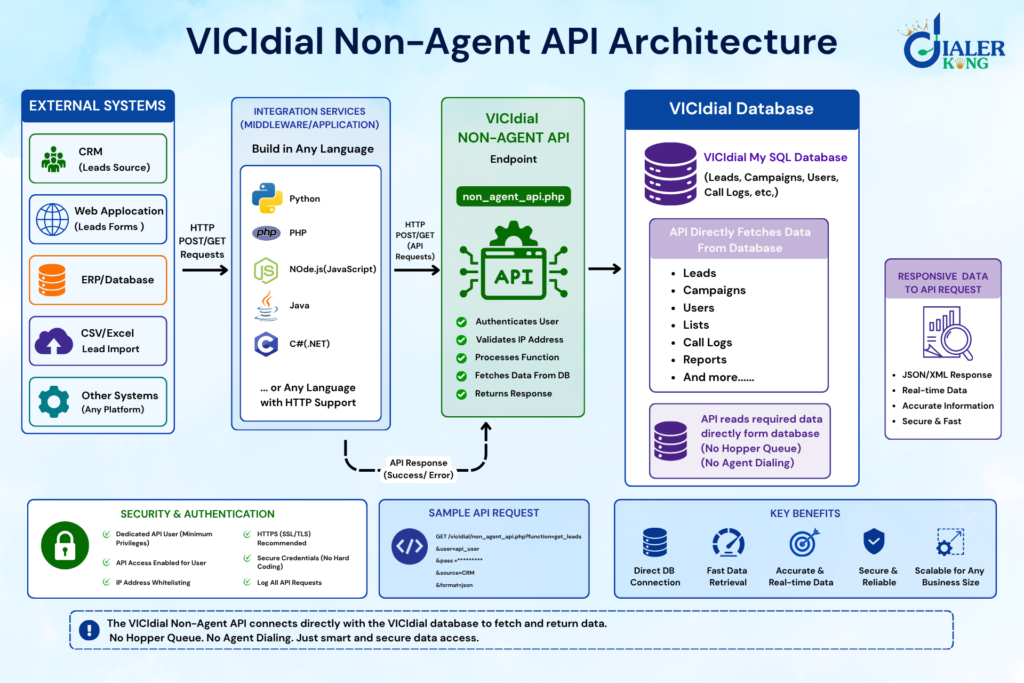
The VICIdial Non-Agent API is Integration a programmable backend interface built into every standard VICIdial installation. It exposes a single HTTP endpoint – non_agent_api.php – through which any authorized external system can interact with the VICIdial database to perform administrative, data management, and operational tasks that fall entirely outside the scope of an agent’s live session.
The default endpoint location is: http://your-server-ip/vicidial/non_agent_api.php
All requests to this endpoint are standard HTTP GET or POST calls. The server responds with plain-text status strings, making the API easy to consume from any HTTP-capable language or tool without needing a specialized SDK.
What It Manages
The Non-Agent API covers three broad functional domains:
Lead & Prospect Data Management – Insert individual prospects, bulk-load lead lists, update existing contact records, flag leads with custom statuses, and remove stale entries, all driven by your external system rather than manual GUI work.
Reporting & Data Retrieval – Query real-time list counts, download campaign performance metrics, retrieve lead status histories, and extract agent productivity data programmatically for downstream business intelligence systems.
Campaign & System Administration – Create and modify system user accounts, adjust campaign parameters, alter list properties, and inject high-priority prospects directly into the active dialer hopper so they are called on the next available dial cycle.
Non-Agent API vs. Agent API: Key Differences
Understanding where each API belongs prevents costly architectural mistakes. Both interfaces are part of the VICIdial suite, but they serve completely different purposes. The rule of thumb: if the action happens between calls or around the agent’s session, use the Non-Agent API. If the action happens during an active call inside an agent’s browser, use the Agent API.
Setting Up API Access in VICIdial
Before a single API call can succeed, three configuration steps must be completed inside the VICIdial admin panel.
Step 1: Create a Dedicated API User
Navigate to Admin → Users → Add User. Create a user account specifically for API access – never use an active agent or administrator account for this purpose. Set the user level to a minimum required privilege. Record the username and password; these become the user and pass parameters in every request.
Step 2: Enable the API for That User
In the user record, locate the “Allow API Access” field and set it to Y. Without this, all requests from that account will return an AUTH error regardless of correct credentials.
Step 3: Whitelist the Calling IP Address
Navigate to Admin → API → Allowed IP Addresses. Add the IP address of every server that will make API calls. VICIdial validates the source IP on every request. Requests from unlisted IPs are rejected at the server level before authentication is even checked.
Once these three steps are complete, you can verify access with a simple test call in your browser or with cURL:
curl
"http://your-server-ip/vicidial/non_agent_api.php?source=test&user=apiuser&pass=apipass&function=version"A successful response returns the VICIdial version string, confirming the endpoint, credentials, and IP allowlist are all correctly configured.
Anatomy of an API Request
Every Non-Agent API call shares the same parameter structure regardless of the function being invoked.
Required Parameters (Present in Every Call)
Source: A label identifying the calling application (e.g., my_crm, lead_importer). Used in server-side logging.
- User: The API-enabled VICIdial username.
- Pass: The corresponding password.
Function: The specific operation to execute (e.g., add_lead, update_lead, campaign_stats).
Function-Specific Parameters
Each function accepts its own set of additional parameters. For example, add_lead requires phone_number and list_id at a minimum, while campaign_stats requires campaign_id.
Request Format
Requests can be submitted as either HTTP GET (parameters in the query string) or HTTP POST (parameters in the request body). For data containing special characters, names with accents, addresses with ampersands, always use POST with proper URL encoding to avoid parsing errors on the server.
Response Format
All responses are plain-text strings. A successful operation returns a result beginning with the function name followed by status data. Failed operations return strings beginning with ERROR followed by an error code and description.
SUCCESS: add_lead: 1234567 ← lead ID assigned by VICIdial
ERROR: no match on user and pass
Parse responses by checking whether the string begins with your expected success prefix, or falls through to an error handler.
Core Functions and Their Parameters
Lead Management Functions
add_lead: Inserts a new prospect into a specified list.
Key parameters: phone_number, list_id, first_name, last_name, address1, city, state, email, comments, entry_date, status.
update_lead: Modifies fields on an existing lead record using its lead_id.
Key parameters: lead_id, plus any fields to update (same set as add_lead).
lead_status: Retrieves the full call-history and status log for a specific lead.
Key parameter: lead_id.
search_leads: Queries leads matching specific criteria across one or more lists.
Key parameters: list_id, phone_number, vendor_lead_code.
List & Campaign Management Functions
list_count_status – Returns the count of leads in a list, broken down by status code. Essential for monitoring campaign progress programmatically.
Key parameters: list_id, status.
add_to_hopper – Places a specific lead directly into the active dialer hopper with an optional priority level. Leads added this way jump the standard queue and are dialed on the next available cycle.
Key parameters: lead_id, campaign_id, hopper_priority.
campaign_stats – Returns real-time performance metrics for a specified campaign without requiring GUI access.
Key parameter: campaign_id
add_user – Dynamically creates a new VICIdial user account from an external system. Useful for onboarding integrations that provision agent accounts automatically.
Key parameters: user, pass, full_name, user_level, campaign_id.
DialerKing integrates VICIdial with any technology stack.
Real-World Use Case: CRM-to-Dialer Lead Injection Pipeline
Consider a financial services firm running outbound sales campaigns. Their internal CRM qualifies new prospects throughout the business day, dozens of form submissions per hour. Previously, a data team would export a CSV at noon and again at 5 PM, then manually upload it through the VICIdial GUI. Leads generated at 9 AM would not reach an agent until the afternoon upload cycle.
After implementing a VICIdial Non-Agent API integration, the workflow changed entirely. A lightweight background service, written in Python, monitors the CRM’s prospect table. Every time a new record is marked “qualified,” the service immediately fires an add_lead call to the Non-Agent API. The lead is in the dialer’s active list within seconds of the form submission.
For priority prospects, someone who specifically requested a callback, the service follows the add_lead call with an add_to_hopper call, placing the contact at the front of the dial queue. The average time-to-contact dropped from four hours to under three minutes.
The same integration queries list_count_status every fifteen minutes and writes the results to the company’s internal dashboard. Supervisors see live list penetration data without ever opening the VICIdial admin GUI.
This is precisely the kind of operational improvement the Non-Agent API is designed to enable.
Error Handling and Response Codes
Robust integrations always handle API errors explicitly. The Non-Agent API returns descriptive plain-text error strings.
Retry Logic Recommendation: For transient network errors (timeouts, connection resets), implement an exponential backoff retry, three attempts maximum with a 2-second delay between each. Never retry on authentication errors (no match on user and pass) without first verifying credentials; repeated failed attempts can trigger server-side IP blocking on some configurations.
Security Best Practices: The Non-Agent API exposes powerful database operations. These practices protect the integration against misuse:
Use a Dedicated API User – Never share the API user account with a human administrator or agent. Give it the minimum privilege level needed for the operations your integration performs.
Restrict by IP at the VICIdial Level – The built-in IP allowlist is your first line of defence. Keep it to the specific IP addresses of your integration servers. Avoid using wide CIDR ranges.
Use HTTPS – Configure an SSL certificate on your VICIdial server and call the API over HTTPS. Plain HTTP transmits credentials in clear text, which is unacceptable for any production environment.
Store Credentials Securely – Never hard-code the API username and password in application source code or commit them to version control. Use environment variables, a secrets manager, or encrypted configuration files.
Log Every API Call – Maintain server-side logs of every request your integration makes, function name, parameters, timestamp, and response. When something goes wrong in a production campaign, these logs are invaluable for diagnosis.
Frequently Asked Questions
How is the Non-Agent API different from the VICIdial Agent API❓
The Agent API requires an active, logged-in agent session and handles real-time in-call actions like pausing, transferring, or disposing a call within the agent’s browser. The Non-Agent API is stateless and requires no active session; it is designed for backend systems interacting with the VICIdial database for administrative and data management tasks outside of live agent sessions.
Can I use the VICIdial Non-Agent API with Python❓
Yes. Python integrates cleanly with the Non-Agent API using the requests library. Send parameters as a POST body with requests.post(), check whether the response text starts with ERROR, and parse the returned lead ID or status string accordingly. DialerKing has deployed Python-based integrations ranging from simple lead injection scripts to full ETL pipelines processing tens of thousands of records per day.
Where can I find official VICIdial API documentation❓
The official VICIdial API documentation is maintained on the VICIdial wiki at https://vicidial.org/docs. The Non-Agent API reference lists every available function, its required and optional parameters, and example response strings. DialerKing also provides client-specific API integration guides as part of its implementation services.
Is there a VICIdial API wrapper or library available❓
Several community-developed wrappers exist on GitHub for languages including Python, PHP, and Ruby – search GitHub for “vicidial non agent api” to find current repositories. However, given the API’s simplicity (HTTP POST with plain-text responses), most production teams find it more reliable to build a thin wrapper themselves using nothing more than their language’s standard HTTP client. DialerKing can deliver a custom, production-hardened wrapper in your chosen language as part of an integration engagement.
Conclusion
VICIdial Non-Agent API integration gives contact center operations teams a direct programmatic bridge to their dialer platform’s core data and configuration layer. Whether the goal is automating lead injection from a CRM, building a real-time performance dashboard, or provisioning agent accounts without touching the admin GUI, the Non-Agent API handles all of it through a single, well-structured HTTP endpoint that any backend language can consume in hours, not weeks.
The key steps are consistent regardless of language: configure a dedicated API user with IP restrictions, structure every request with the required source, user, pass, and function parameters, handle both success and error responses explicitly, and keep credentials out of source code. From there, the API’s breadth of functions covers virtually every non-real-time operational need your contact center platform has.
DialerKing has delivered VICIdial API integrations across Python, PHP, Java, Node.js, .NET, Ruby, and custom legacy stacks for contact centers globally. If you are ready to connect your systems to VICIdial, or need a custom wrapper, a full CRM integration, or an end-to-end data pipeline – contact the DialerKing team today to discuss your requirements with an engineer who has done this before.