- What Is a Custom CRM System – and Why It Differs from Generic Platforms
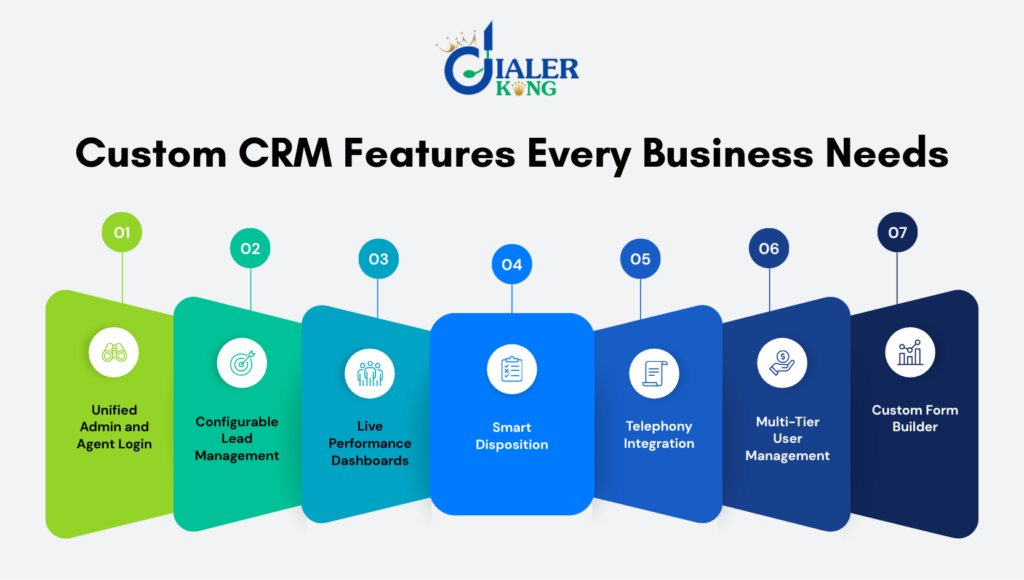
- Unified Admin and Agent Login from a Single Screen
- Configurable Lead and Contact Management
- Real-Time Reports and Live Performance Dashboards
- Smart Disposition and Follow-Up Workflow Engine
- Deep Dialer and Telephony Integration
- Role-Based Access Control and Multi-Tier User Management
- Custom Form Builder and Dynamic Script Interface
- The 4 Types of CRM – and Where Custom Fits
- Frequently Asked Questions
- Conclusion
The right custom CRM features can be the single biggest factor separating a high-performing contact center from one that is constantly firefighting. Off-the-shelf CRM platforms are built to satisfy the broadest possible market – which means they are optimized for nobody in particular. Businesses that handle high-volume outbound campaigns, complex inbound queuing, or multi-tier agent hierarchies need a CRM designed from the ground up to match their exact operational reality.
This article breaks down the seven features that consistently define a genuinely effective custom CRM in 2026, with practical context on why each one matters for contact center environments specifically.
What Is a Custom CRM System – and Why It Differs from Generic Platforms
A custom CRM system is purpose-built software that manages customer relationships, interactions, and data according to a specific business’s workflows – rather than adapting the business to fit a vendor’s prebuilt template. The custom CRM meaning goes beyond branding or a reskinned SaaS product. It covers the data model, the user interface, the integration layer, and the automation logic – all designed around how your teams actually work.
For contact centers, this distinction is especially consequential. A standard sales CRM might handle pipeline stages and email threads well. But it will not natively understand predictive dialer campaigns, AMD results, SIP leg disposition codes, or ACD queue transfers. A purpose-built contact center CRM does – because it was constructed with that operational context baked in from day one.
Custom CRM development in this context is not just a technical exercise. It is an operational strategy that directly influences agent productivity, supervisor visibility, and ultimately, conversion rates.
Unified Admin and Agent Login from a Single Screen
One of the most underrated quality-of-life improvements in modern CRM design is the unification of Admin and Agent access behind a single login screen. In many legacy systems, supervisors use a separate portal, agents use a different URL, and IT manages a third console. The result is fragmented session management, duplicated credentials, and unnecessary support tickets every time a password resets or a role changes.
A well-designed custom CRM presents one login interface that intelligently routes the user to the correct workspace based on their assigned role. An agent logs in and sees their queue, their scripts, and their disposition panel. An admin logs in with the same screen and lands in the configuration dashboard, reporting suite, and user management panel.
Why This Matters in Real Deployments
Consider a mid-sized outbound operation running two shifts. Supervisors frequently need to jump between agent-view and admin-view to troubleshoot or monitor live calls. A unified login removes the need to maintain separate browser sessions, use different devices, or share admin credentials with floor managers. It also simplifies compliance auditing, because every session – regardless of role – is captured in a single authentication log.
This feature is not cosmetic. For multi-campaign contact centers, it cuts onboarding time, reduces credential-related support load, and gives IT a cleaner access control model to maintain.
Configurable Lead and Contact Management
Generic CRMs assume your lead data follows a standard pattern: name, company, email, phone, deal stage. Contact centers rarely work that way. A debt recovery operation tracks account numbers and balance buckets. A healthcare outreach team tracks appointment slots, consent flags, and callback compliance windows. An insurance sales floor tracks policy types, renewal dates, and lead source quality scores.
A custom CRM’s lead management module is configurable at the field level. Administrators define the data schema – adding, removing, or restructuring fields – without requiring a developer each time. Custom picklists, conditional field visibility, and lead scoring formulas can all be adjusted through configuration rather than code. This flexibility is a core reason businesses choose CRM development services over off-the-shelf tools.
Beyond field configuration, lead routing logic should be equally flexible. Leads can be distributed by geography, by agent skill group, by campaign priority, or by time-since-last-contact – all controlled through the admin panel rather than hard-coded business rules.
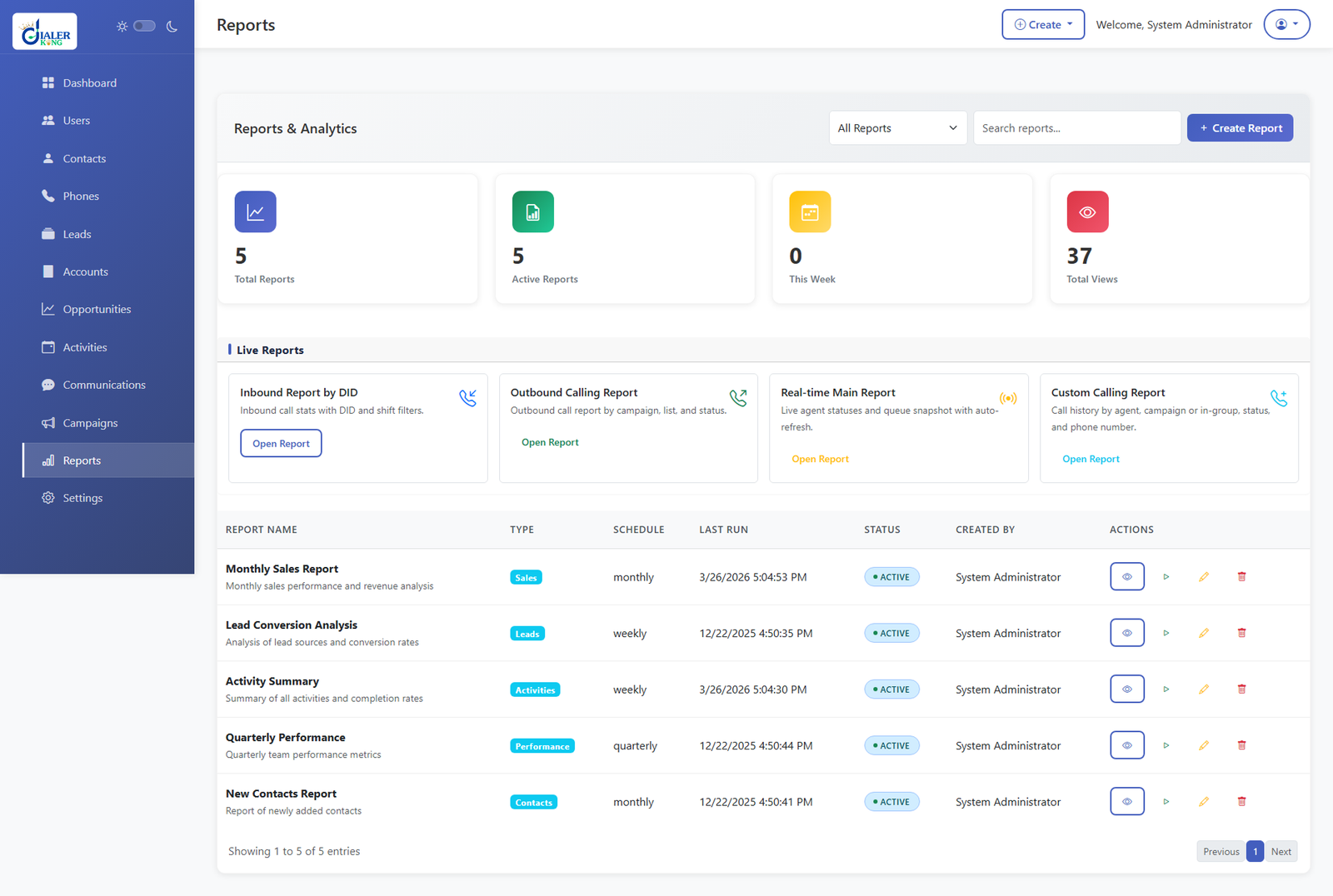
Real-Time Reports and Live Performance Dashboards
Reporting in a contact center CRM is not a back-office function – it is an operational tool that supervisors use mid-shift to make decisions. Dial rate dropping? A supervisor needs to see that in real time, not in a report pulled the next morning. Agent occupancy spiking on one campaign while another runs cold? That imbalance needs to surface immediately so resources can be rebalanced.
Effective custom CRM features in the reporting layer include live wallboard views, per-agent productivity metrics, campaign-level contact rate tracking, and disposition distribution charts – all updating in near real-time. Historical reporting covers call outcomes by disposition, lead conversion funnel analysis, and agent performance trending over configurable date ranges.
One crucial detail that generic platforms miss: contact center reporting must account for telephony events, not just CRM record changes.
A CRM that only logs when a record is updated misses the story. A properly integrated custom CRM captures when the call was dialed, when it connected, how long the agent was in the conversation, what disposition was set, and when the follow-up was scheduled – giving supervisors a complete picture of each interaction.
Smart Disposition and Follow-Up Workflow Engine
Disposition management is how contact centers categorize the outcome of every interaction. A customer answered and purchased – that is a sale. A line was busy – that is a retry candidate. A contact requested a callback for next Tuesday at 3 PM – that is a scheduled follow-up that needs to surface in the right agent’s queue at the right time.
A custom CRM’s disposition engine should be configurable by campaign and by role. Admins define the disposition codes relevant to each campaign. Some outcomes trigger automatic follow-up scheduling. Others flag the record for supervisor review. Others remove the contact from further dialing permanently.
A Practical Use Case
A utility services outbound team runs three concurrent campaigns: contract renewals, new service upsell, and delinquent account outreach. Each campaign requires completely different disposition logic. Renewal calls that reach voicemail should retry after 48 hours. Upsell calls where the customer says ‘call me next week’ should schedule a manual callback.
Delinquent account calls require supervisor-reviewed dispositions before any further contact. One unified custom CRM handles all three with campaign-specific workflow rules – no workarounds, no manual tracking in spreadsheets alongside the system.
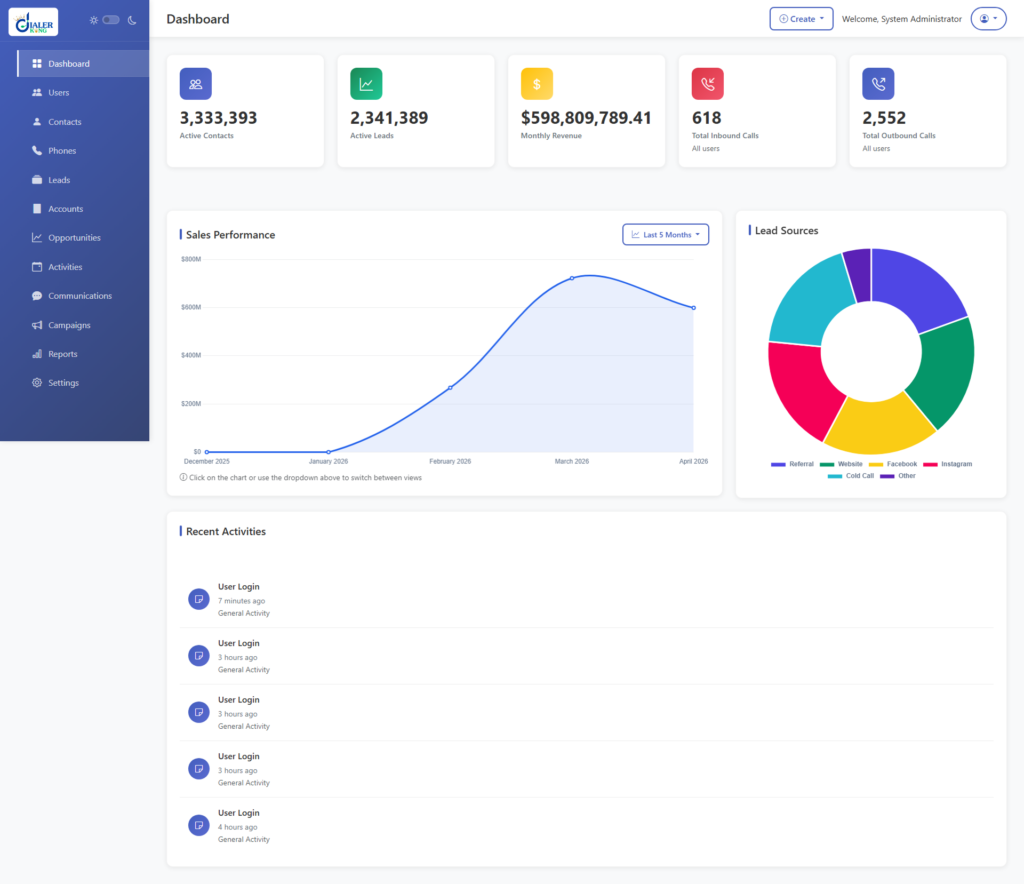
Deep Dialer and Telephony Integration
A CRM that operates in a contact center environment and cannot directly communicate with the underlying telephony infrastructure is only doing half the job. This is where custom CRM development diverges most sharply from generic platforms. Purpose-built contact center CRMs integrate at the protocol level – via AMI events from Asterisk, SIP signaling from the dialer, or direct database linkage with VICIdial’s campaign engine.
This integration unlocks screen-pop functionality: when an inbound call arrives, the CRM instantly retrieves the caller’s record and presents it to the agent before the call is answered. For outbound campaigns, the CRM displays the lead record the moment the dialer bridges the connection – no manual searching, no wasted seconds at the start of every conversation.
IVR data also flows into the CRM. If a caller pressed 2 for billing, that information is already visible in the record when the agent connects. If an automated pre-qualification IVR captures a customer’s postal code or account number, that data populates the CRM record automatically – reducing the repetitive questioning that frustrates customers and slows handle time.
Role-Based Access Control and Multi-Tier User Management
Contact centers have layered organizational structures: agents, team leads, floor supervisors, campaign managers, QA analysts, IT administrators. Each role needs a different set of permissions – and a well-designed custom CRM enforces those boundaries precisely.
Role-based access control in a CRM solutions company context means that an agent cannot see leads outside their assigned list, a team lead can view their team’s activity but not edit campaign settings, a supervisor can pull reports but not modify disposition codes, and an administrator has full configuration access. These rules are enforced at the application layer – not just through UI hiding – so no role can access data or functions outside their defined scope, even through direct API calls.
Multi-tier user management also matters for enterprise clients running multiple business units through the same CRM instance. A single-pane-of-glass approach with segregated data partitions allows different departments or client accounts to operate in isolation within one system – reducing infrastructure overhead while maintaining strict data separation.
Custom Form Builder and Dynamic Script Interface
Agent scripts and data capture forms are the daily working surface of a contact center. Hardcoded scripts and fixed forms mean that every campaign change requires a developer. A custom CRM with a built-in form builder and script editor allows operations managers to design and deploy new forms, update compliance disclosures, or revise conversation guides without raising a development ticket.
Dynamic scripting goes further. Scripts can branch based on customer responses. If a customer confirms they are the account holder, the script advances to the offer. If they say they are not, the script routes to a message-taking flow. These conditional paths are configured visually by operations staff, not coded by developers – dramatically reducing campaign launch time.
From a compliance standpoint, version-controlled scripts also provide an audit trail. Supervisors can confirm exactly which script version an agent was following during any recorded call – a significant advantage during regulatory reviews.
The 4 Types of CRM – and Where Custom Fits
Operational CRM
Operational CRM focuses on automating customer-facing processes – sales, service, and marketing workflows. Most contact center CRMs fall primarily into this category.
Analytical CRM
Analytical CRM focuses on mining customer data for insights – identifying patterns in purchase behavior, churn risk, or campaign response rates. Advanced reporting modules in custom CRMs provide this layer.
Collaborative CRM
Collaborative CRM focuses on sharing customer information across departments – connecting sales, support, and operations so that every team has the same view of a customer’s history.
Strategic CRM focuses on long-term customer relationship development, placing customer lifetime value at the center of business decisions.
A custom CRM for a contact center environment is typically a hybrid of operational and analytical types – automating interactions at scale while continuously surfacing performance data to guide campaign strategy. The difference is that a custom build allows you to weigh these capabilities according to your specific priorities, rather than accepting whatever balance a vendor has pre-decided.
Frequently Asked Questions
What is a custom CRM system exactly❓
A custom CRM system is software that is designed and developed to match a specific organization’s workflows, data structures, and operational requirements – rather than being a generic off-the-shelf product. Custom CRM meaning, in practice, is a system where every module, field, integration, and automation rule reflects how your business actually operates, not how a vendor assumes most businesses operate.
What are the 7 elements of CRM that drive performance❓
The seven elements most commonly cited are: customer data management, interaction tracking, workflow automation, reporting and analytics, integration with external systems, user access management, and customer communication tools. In a contact center deployment, each of these maps to a specific operational requirement – from dialer integration to disposition management to live performance dashboards.
Is custom CRM development worth the investment compared to off-the-shelf tools❓
For contact centers running high volumes or managing complex multi-campaign operations, custom CRM development typically delivers a faster return on investment than adapting a generic platform. Off-the-shelf tools require workarounds that consume supervisor time and introduce error risk. A custom-built system eliminates those workarounds by design – resulting in faster onboarding, fewer errors, and cleaner data that directly improves campaign performance.
How do I find a reliable CRM development company in India❓
Look for a provider with documented experience in contact center environments specifically – not just general software development. Verify that they understand telephony integration, have built multi-role user systems, and can demonstrate real deployments with measurable outcomes. A credible CRM development company in India will offer references, architecture documentation, and a clear post-deployment support structure rather than just a feature list.
Conclusion
Choosing the right custom CRM features is not a technical decision – it is a business one. A CRM that was built around your workflow removes friction at every level of the operation: agents move faster, supervisors see more clearly, and administrators spend less time managing workarounds.
The seven capabilities covered here – unified login, configurable lead management, real-time reporting, smart disposition workflows, telephony integration, role-based access, and dynamic scripting – form the foundation of a CRM that genuinely serves a contact center environment rather than one it was never designed for.
At DialerKing, our CRM development team builds from that foundation – then extends it to match the specific requirements of your campaigns, your compliance obligations, and your team structure. Whether you are looking to replace a legacy system, integrate a new CRM with an existing dialer infrastructure, or build from scratch, our engineers bring hands-on deployment experience to every project.
Ready to discuss your CRM requirements? Contact the DialerKing team today and let us map out what a purpose-built solution would look like for your operation.
Written by the DialerKing Engineering Team – based on hands-on deployment experience with VICIdial, Asterisk, and enterprise contact center environments across global markets.