- What VICIdial's Default Agent Interface Actually Looks Like
- Why the Agent Screen Matters More Than Most Managers Realize
- What a Modern VICIdial Agent Theme Includes
- How VICIdial Theming Works Technically
- Adding Custom Fields to the VICIdial Agent Interface
- Remote Agents and What the Theme Needs to Support
- How to Optimize VICIdial Performance Alongside a Theme Upgrade
- Evaluating a VICIdial Agent Theme Download: What to Actually Check
- DialerKing's Custom VICIdial Themes: Architecture and Access
- Real-World Use Case: A 120-Agent Outbound Operation
- Controlling Who Sees What: Report Access Restrictions
- Frequently Asked Questions
- Conclusion
A well-designed VICIdial agent theme is not simply a cosmetic upgrade, it is an operational decision that directly affects how fast agents work, how accurately supervisors monitor queues, and how efficiently your entire contact center runs. The default VICIdial interface, while powerful under the hood, was designed for function over form. For operations running high call volumes across multi-campaign environments, that default screen quickly becomes a bottleneck.
This guide walks through what a modern agent dashboard should include, how VICIdial theming works at a technical level, what to look for when evaluating a custom theme, and how DialerKing’s purpose-built themes are deployed in live production environments.
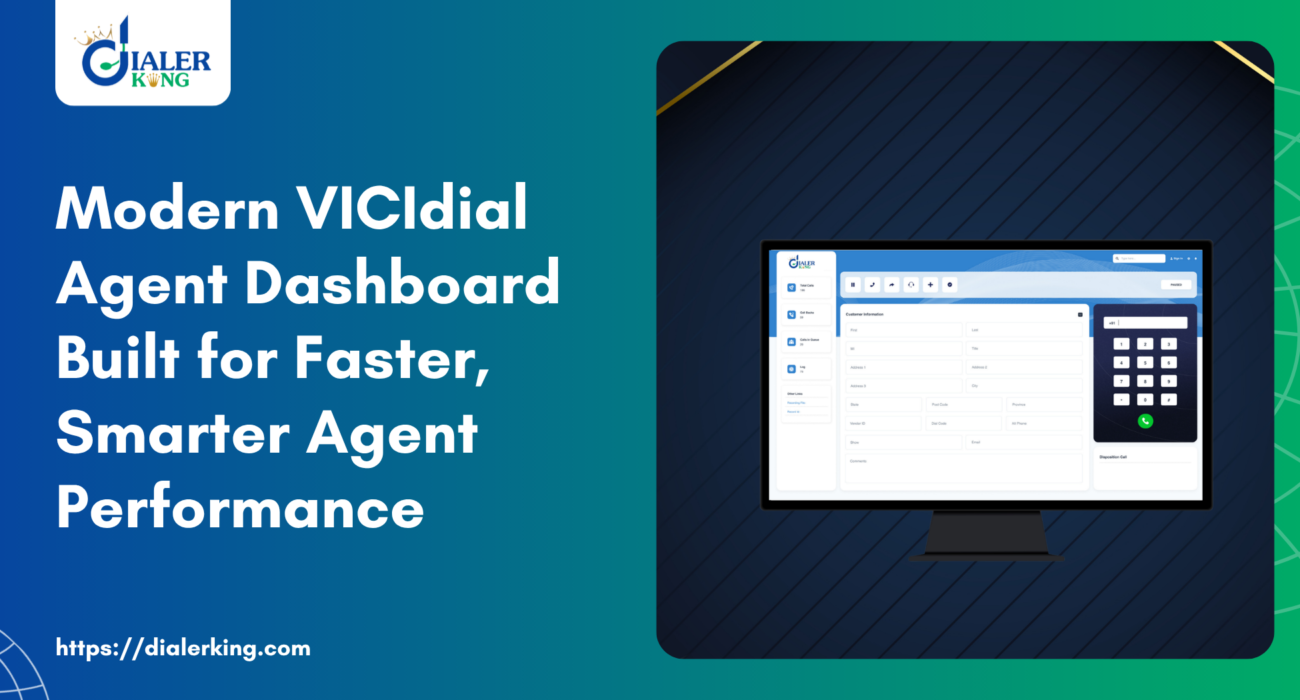
What VICIdial’s Default Agent Interface Actually Looks Like
VICIdial’s native agent screen – served from /vicidial/vicidial.php – is a single-page PHP application that loads call controls, lead data, disposition buttons, and script fields in a largely static HTML layout. It functions reliably across browser sessions and handles everything from predictive dialing callbacks to inbound ACD queue delivery. But the visual design reflects an era when browser rendering was inconsistent and lightweight HTML was a necessity, not a choice.
The practical result is that agents navigating this interface in 2026 are working with a screen architecture that looks noticeably dated next to the tools they use in every other part of their workflow. That gap between the dialer UI and modern expectations creates real friction – slower dispositions, more training time for new agents, and supervisors spending extra effort reading cluttered monitoring panels.
Why the Agent Screen Matters More Than Most Managers Realize
Every second an agent spends searching for a disposition button, re-reading a cluttered script panel, or waiting for a screen pop that loads below the fold is a second not spent on the conversation. Multiply that across 50 agents, 300 calls per day, and you have a measurable throughput problem that has nothing to do with dialing ratios or lead quality.
The agent dashboard is also the primary point of contact between the dialer and any external system. CRM screen pops, callback scheduling prompts, compliance notices, and custom data fields all surface through the agent interface. A poorly organized theme buries these inputs. A well-structured one puts them exactly where agents need them, in the right visual hierarchy, at the right moment in the call.
What a Modern VICIdial Agent Theme Includes
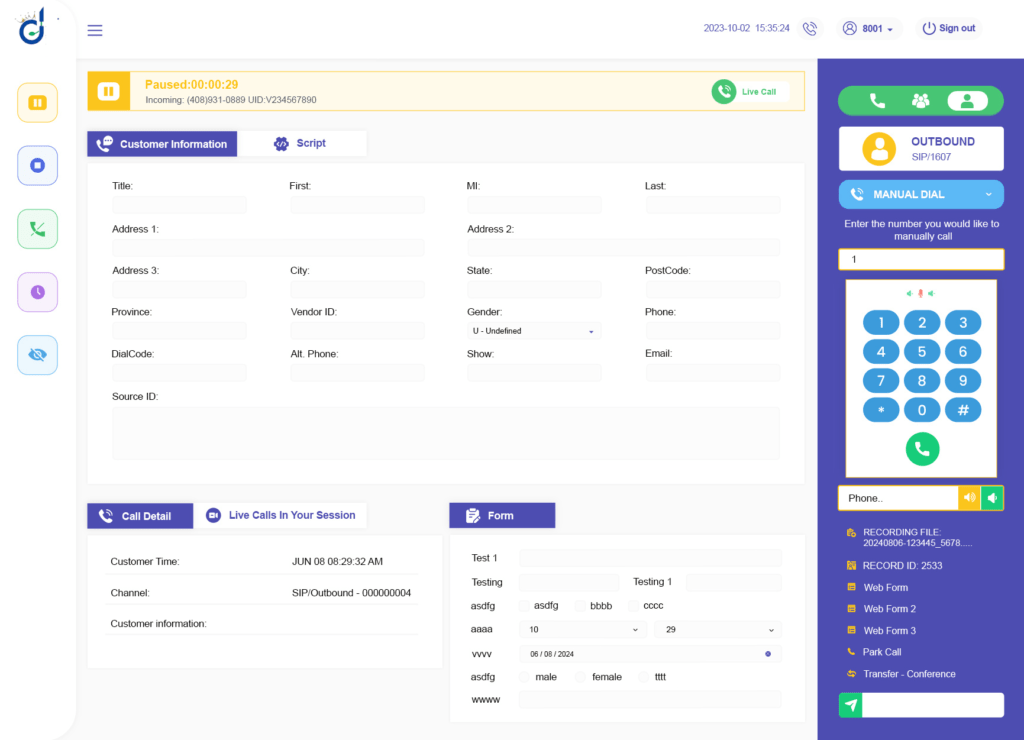
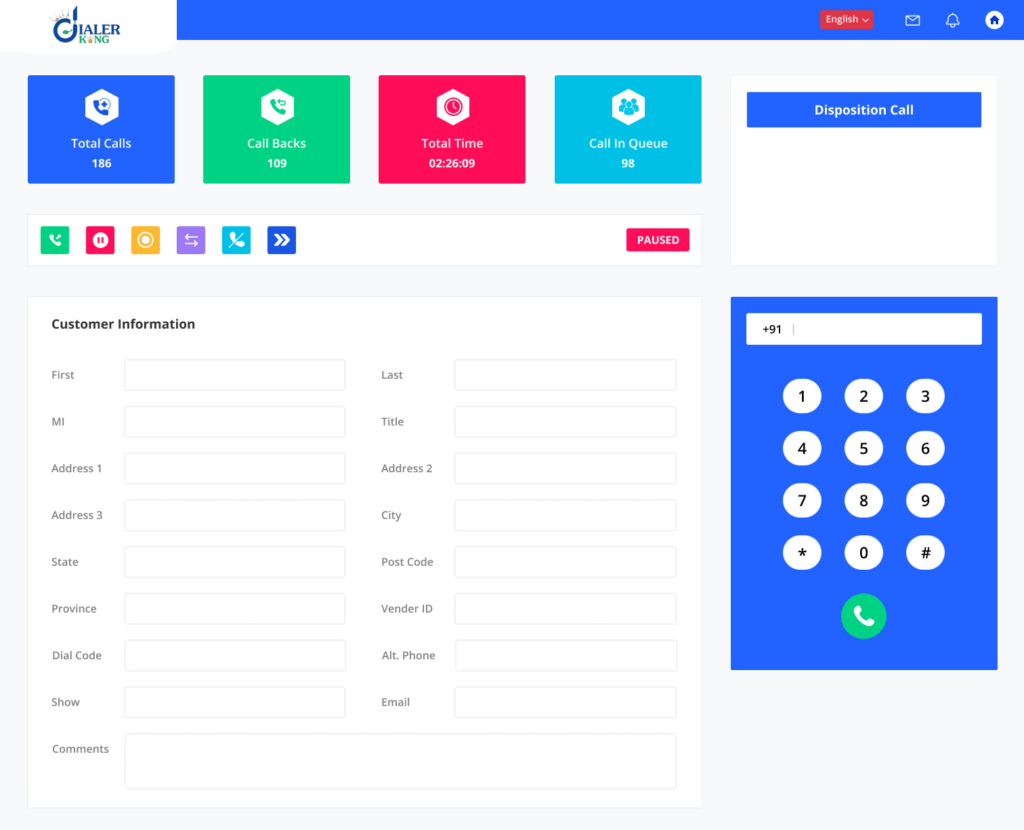
A production-grade VICIdial agent theme redesigns the interface layer without modifying the underlying dialer logic. Here is what separates a capable theme from a purely aesthetic reskin:
Reorganized Call Control Layout
Hold, transfer, mute, and hangup controls should be immediately visible and consistently positioned. A modern layout groups these controls in a fixed header or sidebar so agents never have to scroll to reach them during an active call. Blind transfer and attended (warm) transfer options are clearly labeled, reducing misdirected calls.
Lead Data and Script Panels with Clear Visual Hierarchy
Lead information – name, phone, address, custom fields, history – should render in a structured card layout rather than a flat form dump. Script content should be separated from data fields with clear typography distinctions. Agents reading a script while tracking lead data should never have to visually decode which text belongs to which section.
Disposition Buttons as Priority UI Elements
Disposition selection is the last action in every call. The theme should render disposition buttons prominently, with enough visual differentiation between outcomes (sale, callback, no answer, DNC) that agents can select accurately under time pressure. Color coding by outcome category is standard in high-performing themes.
Real-Time Performance Indicators
Session call count, average handle time, pause code status, and current campaign name should be visible to agents without requiring them to open a separate report. When agents can see their own live metrics, self-correction happens faster than through supervisor intervention alone.
Supervisor Monitoring Integration
A modern theme separates the supervisor view from the agent view while keeping them on the same architectural foundation. Supervisors see queue depth, agent status across campaigns, real-time call counts, and pause reason distribution in a dashboard panel designed for scanning rather than reading.
How VICIdial Theming Works Technically
Understanding the technical architecture of VICIdial theming helps avoid the most common deployment errors. The agent interface is served by vicidial.php, which is a PHP file that generates the HTML, JavaScript, and inline styles for the agent screen. A custom theme does not replace this file – it layers over it using:
- Custom CSS stylesheets that override default element styling
- JavaScript modifications that restructure DOM elements and event handling
- Additional PHP include files that inject custom data fields and panel layouts
- Configuration-level changes that activate custom scripts and disable legacy display elements
DialerKing’s custom themes, for example, are delivered with a separate folder structure – /dialer/admin.php for the admin panel and /agent/agent.php for the agent interface – keeping the custom files cleanly separated from the original /vicidial/ directory. This means theme updates can be applied without touching the core VICIdial codebase, and rollbacks are straightforward if needed.
Theme compatibility is tied to two version-specific factors: the ViciBox version and the SVN (subversion) codebase version of VICIdial. A theme built for SVN 3578 may have rendering issues on SVN 3612 due to JavaScript API changes in the agent interface. Before any theme deployment, the correct approach is to confirm both version numbers and build or validate the theme against that exact codebase.
Adding Custom Fields to the VICIdial Agent Interface
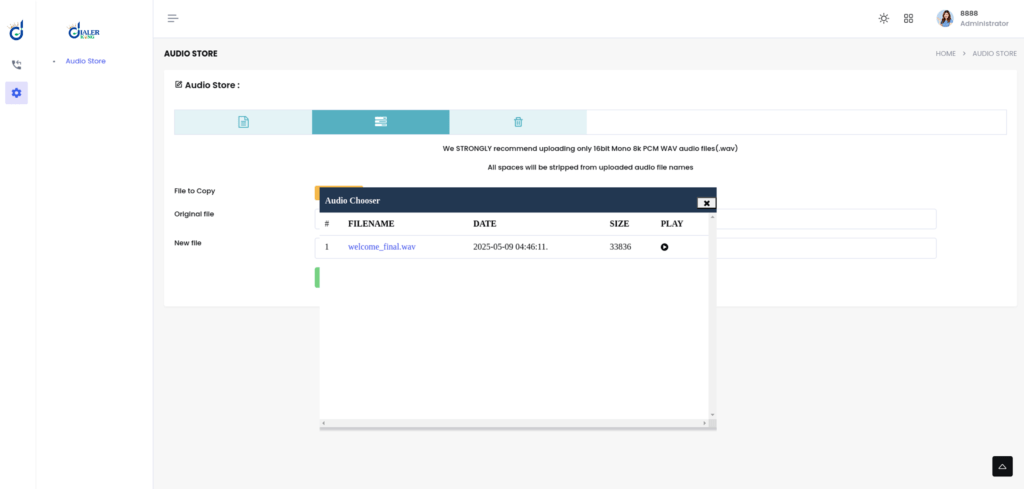
One of the most frequently requested customizations is adding custom fields to the agent screen – fields that capture data points not covered by VICIdial’s standard lead form (first name, last name, phone, address, etc.). The standard pathway for this is through the List Custom Fields feature in the VICIdial admin panel.
Configuring Custom Fields Through the Admin Panel
Navigate to Admin – Lists, select the relevant list, and locate the Custom Fields section. From here, you can define new fields with data types (text, select, checkbox, date, area), set their display labels, and control whether they are required at disposition. These fields then appear on the agent screen as additional input areas within the lead data section.
When using a custom theme, these dynamically generated fields need to be mapped into the new layout. A properly built theme accounts for the presence of custom fields and renders them within the structured card layout described earlier, rather than appending them below the static lead form where agents may miss them.
Remote Agents and What the Theme Needs to Support
A remote agent in VICIdial is an agent who logs into the system from a location outside the central server environment, typically using a SIP softphone or WebRTC browser phone rather than a physical desk phone on the same network. The agent accesses the VICIdial interface over an internet connection and receives calls through a registered SIP endpoint or WebRTC session.
For themes deployed in remote agent environments, several design considerations become critical. The interface must load efficiently on variable bandwidth connections – heavy CSS frameworks or unoptimized JavaScript assets that add load time in an office environment become serious usability problems when agents are connecting remotely.
WebRTC-integrated themes that include a built-in browser phone eliminate the need for agents to manage a separate softphone application, reducing setup complexity and support overhead.
DialerKing’s modern theme development includes WebRTC integration options, allowing agents in distributed environments to handle calls directly from the browser interface without additional software installation.
How to Optimize VICIdial Performance Alongside a Theme Upgrade
Theme deployment is an appropriate moment to review the broader performance configuration of the VICIdial environment. A faster, more responsive system makes the new interface feel noticeably better – and a slow underlying system will undercut even the best theme design.
Database Layer
MariaDB query performance degrades over time as lead tables grow into millions of records. Index optimization on the vicidial_list table – particularly on status, called_count, and list_id columns – has a direct impact on how quickly the dialer populates the hopper and how fast agent screens load lead data. Table maintenance routines should be scheduled during off-peak hours.
MySQL/MariaDB Connection Errors
A common disruption during deployments or server migrations is a MySQL connection failure that prevents VICIdial from loading the agent interface entirely. The diagnostic sequence is straightforward: SSH into the database server and check service status with systemctl status mariadb. If the service is stopped or in a failed state, systemctl start mariadb restores it. Connection errors that persist after the service is running typically indicate a misconfigured DB host entry in the VICIdial configuration files.
Server Resource Allocation
For operations running 50 or more concurrent agents, the VICIdial server should be reviewed for CPU, RAM, and disk I/O allocation before introducing a theme with additional JavaScript overhead. Theme assets should be minified and served with appropriate cache headers. Contact DialerKing for hardware recommendations based on your specific agent count and campaign configuration.
Evaluating a VICIdial Agent Theme Download: What to Actually Check
There are a number of VICIdial agent theme downloads and free themes circulating across forums and GitHub repositories. Before deploying any third-party theme in a production environment, evaluate it against these criteria:
SVN version compatibility
Confirm the theme was built against the SVN version you are running. Mismatched themes can break call controls or fail to load agent session variables correctly.
Custom field rendering
Test whether the theme correctly displays custom list fields. Many free themes hardcode the standard lead fields and simply do not render dynamic additions.
Browser compatibility
The agent interface needs to function reliably across Chrome, Firefox, and Edge. Validate on all three before wider rollout.
Mobile and remote accessibility
If any agents access the interface from laptops on non-office networks, test load time and layout responsiveness under those conditions.
CRM integration surface
If you use screen pops or API-driven field population, verify that the theme does not override the JavaScript events that handle incoming data.
A VICIdial agent theme free download can be a useful starting point for smaller operations with in-house development capability. For production environments where agent uptime directly affects revenue, a professionally built and version-matched theme with deployment support is the more reliable path.
DialerKing’s Custom VICIdial Themes: Architecture and Access
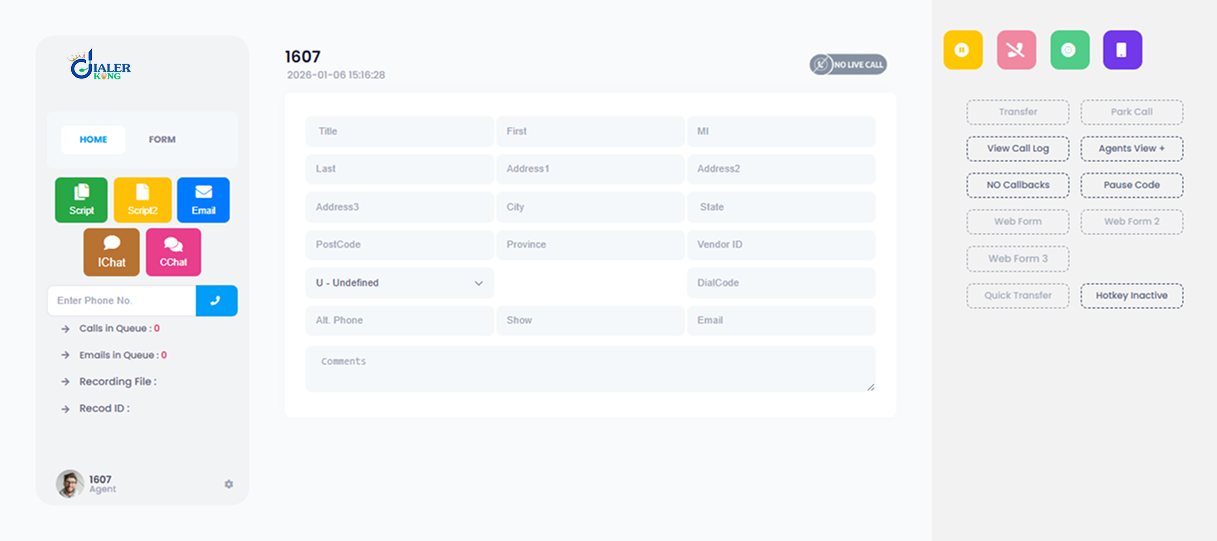
DialerKing develops and maintains multiple custom VICIdial themes, built on modern frontend stacks including React-based interfaces and Tailwind CSS implementations. Each theme is designed to preserve the full functional capability of the VICIdial platform – all campaign management, user administration, list management, reporting, and carrier configuration features remain accessible – while delivering a significantly improved interface for both agents and administrators.
The admin panel in DialerKing’s themes is accessible at /dialer/admin.php (as opposed to the original /vicidial/admin.php), and includes an expanded set of management views for:
- Campaign and inbound group management
- User and agent administration with granular permission controls
- Lead list management and custom field configuration
- Real-time reporting dashboards
- Trunk and carrier configuration
- Call recording settings and CRM integration management
Accessing the Live Demo
DialerKing’s demo environment allows you to explore multiple theme layouts before committing to a deployment.
Theme 5, for example, provides a clean dark-mode admin panel with a sidebar navigation structure and color-coded campaign status indicators.
The demo login gives full access to the admin interface so you can evaluate the layout against your operational requirements.
| Live Demo | demo.dialerking.com |
| Username | 6666 |
| Password | M1a2n3t4r5a6 |
Deployment Requirements
DialerKing’s themes require an AlmaLinux server with a dedicated IP address. Theme development is version-matched to your specific ViciBox and SVN versions. After confirming these details, DialerKing can either deliver the source code with installation documentation, or complete the installation and configuration directly on your server with appropriate access credentials provided.
Real-World Use Case: A 120-Agent Outbound Operation
Consider a 120-agent outbound operation running three simultaneous campaigns – insurance lead qualification, debt settlement outreach, and appointment scheduling for a home services company. Each campaign has different custom fields, different compliance requirements, and different disposition structures. On the default VICIdial interface, agents switching between campaigns during the same shift face a screen that looks identical regardless of campaign context, with no visual differentiation between which custom fields belong to which workflow.
After deploying a custom VICIdial agent theme, the operation configured campaign-specific color schemes and custom field layouts that render differently based on the active campaign. Disposition buttons are grouped and color-coded by outcome category. The supervisor dashboard displays a live grid of all 120 agents with status, current campaign, call duration, and pause code – readable at a glance from across a room.
The reported outcomes after theme deployment included a reduction in average disposition time (agents could identify and click the correct disposition 30–40% faster), shorter new agent training time (the structured layout was easier to explain and memorize), and a significant decrease in supervisor intervention calls related to interface confusion. These are not unusual results for a well-executed theme deployment in an environment of this scale.
Controlling Who Sees What: Report Access Restrictions
A properly built admin theme also makes it easier to implement VICIdial’s user permission architecture. One common operational requirement is giving team leaders or QA managers access to agent time reports without granting them full administrative privileges.
This is handled through User Groups and the Allowed Reports configuration. Create a dedicated User Group (for example, REPORT_USERS), restrict its Allowed Reports to Agent Time Detail only, and assign users to that group with User Level 7 or 8. Set View Reports to 1 and all other admin modification permissions to 0. Users in this group can pull agent time reports but cannot modify campaigns, users, or lists.
A modern admin theme surfaces these permission settings in a cleaner interface – making what is otherwise a multi-tab configuration process in the default admin panel into a single organized permissions view.
Frequently Asked Questions
How do I add a custom field in VICIdial❓
Navigate to Admin – Lists in the VICIdial admin panel and select the target list. Locate the Custom Fields section and define new fields by specifying the field name, data type (text, select, checkbox, date), display label, and whether the field is required at disposition. Once saved, these fields appear on the agent screen during active calls and are stored against each lead record in the database.
What is a remote agent in VICIdial❓
A remote agent in VICIdial is an agent who logs into the dialer interface and handles calls from a location outside the central server network. They access the web-based agent screen over an internet connection and use a SIP softphone or a WebRTC browser phone registered to the VICIdial server to receive calls. Remote agent setups require proper SIP configuration, firewall rules, and a stable internet connection on the agent side.
How to optimize VICIdial for high-volume operations❓
VICIdial performance optimization involves several layers: indexing the vicidial_list database table on frequently queried columns, tuning MariaDB memory allocation for the volume of concurrent queries, scheduling maintenance routines during low-traffic periods, reviewing Asterisk dialplan efficiency, and ensuring adequate CPU and RAM allocation for the agent and server count. For environments with 50+ agents, a multi-server architecture with database replication and NFS-shared recording storage provides the best throughput and redundancy.
Where can I find a VICIdial agent theme download or free theme❓
Free VICIdial agent themes are available through community forums and open-source repositories, but they require careful version compatibility checks before any production deployment. DialerKing provides professionally developed themes that are version-matched to your ViciBox and SVN codebase. You can explore multiple theme layouts in the live demo environment at demo.dialerking.com before deciding on a deployment approach.
Conclusion
A custom VICIdial agent theme addresses a real operational gap between what the platform can do and how efficiently agents and supervisors can actually use it. The underlying dialing engine, campaign logic, and reporting infrastructure of VICIdial are mature and capable – the interface layer is where modern operations consistently find friction.
Redesigning that layer with purpose-built layouts, clear information hierarchy, integrated supervisor monitoring, and remote agent compatibility translates directly into faster call handling, shorter training cycles, and better oversight.
The key decisions in a theme deployment are version compatibility (ViciBox and SVN), custom field integration, remote agent requirements, and whether you want a free theme requiring in-house development work or a production-ready theme with deployment support. DialerKing’s custom VICIdial themes are built to handle all of these considerations with the added benefit of a live demo environment so you can validate the interface before any server-side work begins.
To discuss a custom VICIdial theme for your specific environment – including version requirements, agent count, CRM integration needs, and deployment timeline – contact the DialerKing team directly through kingasterisk.com