- Why the default VICIdial theme creates workflow friction
- What VICIdial theme customization from DialerKing covers
- The development approach: how we build custom VICIdial themes
- Custom reporting inside the VICIdial theme
- CRM and third-party integration within the custom theme
- Multi-tenant and enterprise VICIdial theme configurations
- FAQ – People also ask
- Why DialerKing for VICIdial theme customization
DialerKing provides VICIdial theme customization services that go beyond cosmetic changes. Every second an agent spends navigating a confusing screen is a second not spent on the conversation that matters. The standard VICIdial interface does the job, but it was built for function, not for the kind of fast, focused work that high-volume contact operations demand.
When your team runs hundreds or thousands of calls a day, the gap between a default interface and a properly customized one shows up directly in performance numbers.
We rebuild agent and supervisor interfaces around how your teams actually work – reducing click paths, surfacing the right data at the right moment, and making the platform feel like it was built for your operation specifically.
Why the default VICIdial theme creates workflow friction
VICIdial is a mature, powerful platform. Its default interface, though, was designed to serve a wide range of deployments rather than any one operation’s specific workflow. That generality creates friction.
Agents switching between disposition panels, customer data, and call controls lose time on every interaction. Supervisors monitoring live floors often work from dashboards that require manual refresh or lack the visual clarity needed for quick decisions. The layout logic of a standard VICIdial theme does not change to match whether you are running an inbound queue, an outbound predictive campaign, or a blended operation.
The result is an interface that works against the grain of efficient contact center work rather than with it.
Custom VICIdial theme development addresses this directly. It is not a reskin – it is a structural rework of how the platform presents information and how users move through their tasks.
What VICIdial theme customization from DialerKing covers
Custom agent interfaces built around the call flow
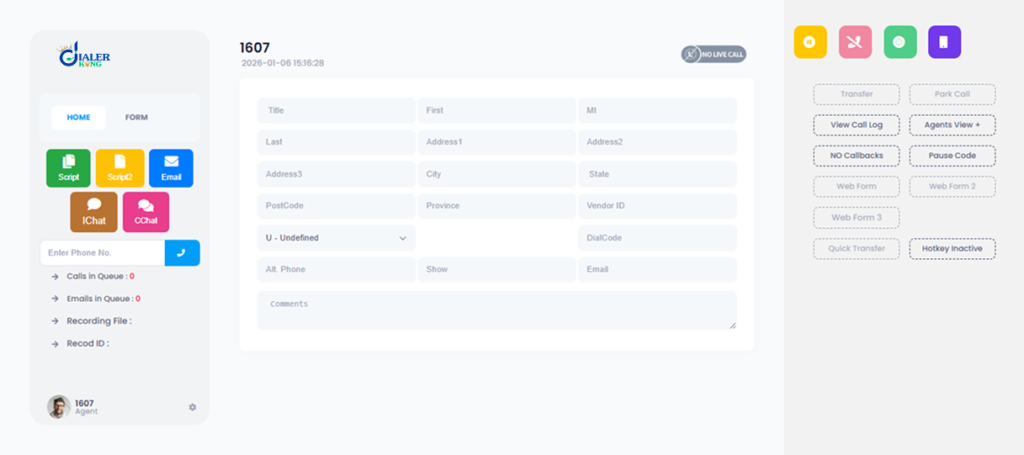
The agent view is where customization pays off most. We redesign the agent panel so that call controls, disposition options, lead data, and customer history appear in an order and layout that matches your campaign structure.
For outbound operations, that might mean lead details front and center with a one-click disposition flow. For inbound queues, it could mean visible SLA timers and queue position data alongside the customer record. The VICIdial theme is configured to your workflow, not the other way around.
We implement these interfaces which keeps rendering fast and allows the interface to scale cleanly across different screen sizes and resolutions – including the kind of multi-monitor setups common in busy contact operations.
Supervisor dashboards with real-time visibility
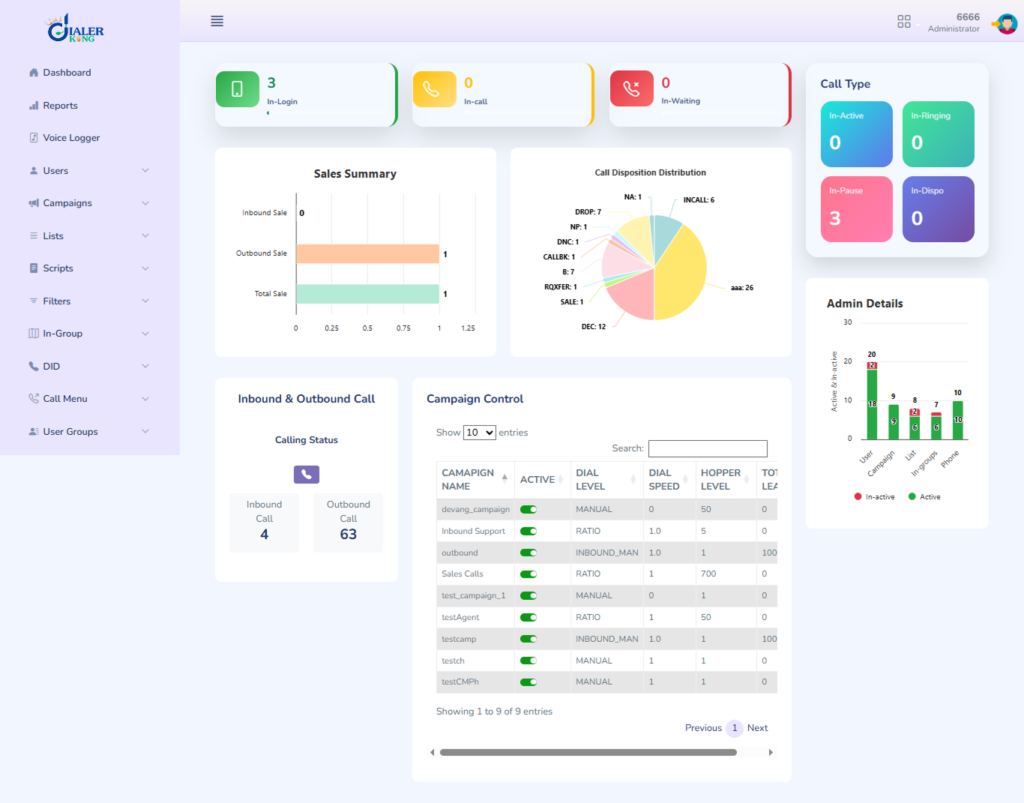
A supervisor managing a live floor needs information at a glance. Our custom supervisor dashboards within the VICIdial theme give team leads a live view of agent states, queue depth, active call data, and campaign performance without the need to navigate between multiple screens.
We build real-time monitoring panels with auto-refreshing data, color-coded status indicators, and configurable layout blocks so supervisors can prioritize what they see based on what their role demands. These are not standard VICIdial reports moved to a new page – they are purpose-built monitoring surfaces.
Campaign management and lead flow tools
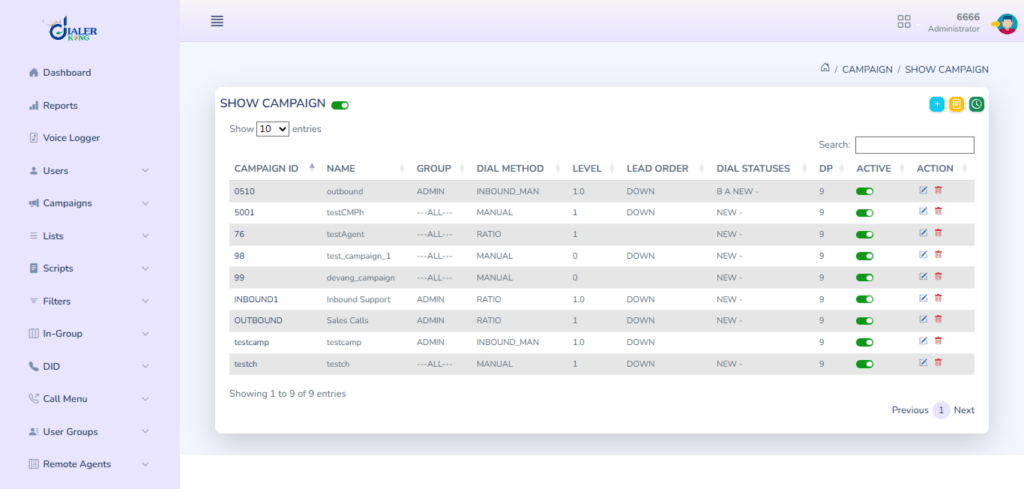
For operations running multiple simultaneous campaigns, the standard VICIdial theme forces a lot of back-and-forth between management screens. We develop custom campaign management interfaces that bring list status, dialing ratio controls, lead penetration visibility, and filter tools into a single cohesive workspace.
Managers can see which lists are running hot, which are exhausted, and where to redistribute agent capacity – all without leaving the view they are working in.
Custom branding and visual design
The VICIdial theme can be fully branded to match your organization’s visual standards. This matters more than it might seem – a branded, visually clean interface communicates professionalism to agents who work in it every day and to clients who observe floor operations.
We handle typography, color systems, logo placement, icon sets, and overall visual language. If you have brand guidelines, we work from them. If you need a new visual direction, we can develop one. Some operations ask about vicidial theme free download options available online; those pre-built templates are a starting point, but they are built for generic deployments and cannot accommodate the layout logic or branding depth that custom development provides.
The development approach: how we build custom VICIdial themes
Starting with workflow analysis
Before writing a line of frontend code, we map the actual workflows your agents and supervisors follow. This means understanding what information agents need at each stage of a call, what supervisors check most frequently during a shift, and where the current interface creates unnecessary steps.
This analysis shapes every decision in the VICIdial theme build – from panel layout to button placement to what data surfaces automatically versus on demand.
Performance optimization for large-scale deployments
A custom VICIdial theme in a large deployment has to perform under load. We optimize frontend rendering, database query structure, and data-fetch timing so that custom dashboards and agent panels stay responsive when call volume spikes and agent counts are high.
This is a part of custom theme development that pre-built VICIdial theme free options generally do not address – performance characteristics depend entirely on your infrastructure, your data volumes, and your call patterns.
Testing and rollout
We test custom VICIdial themes in staging environments that mirror your production setup before any go-live. That includes load testing on dashboards, UAT with actual agents and supervisors, and a structured rollout process that minimizes disruption to live operations.
Custom reporting inside the VICIdial theme
One area where a standard VICIdial theme falls significantly short is reporting depth. The default reports cover the basics, but operations that need to track agent performance in detail, monitor campaign health in real time, or export data for external analysis need more.
We develop custom reporting modules that sit inside the VICIdial theme – not as separate tools agents have to navigate to, but as embedded analytics available within the same interface.
What the custom reporting layer covers
| Report Type | What It Tracks |
|---|---|
| Agent Productivity Reports | Talk time, pause codes, disposition rates, login/logout patterns |
| Campaign Performance Reports | Lead penetration, contact rates, hourly call volume, conversion tracking |
| Inbound Queue Reports | Service level, average handle time, queue abandonment, wait time |
| Executive Dashboards | KPI summaries, revenue tracking, historical trends, forecasting views |
| Agent Scorecard Reports | Performance ranking, attendance, conversion benchmarks |
| Real-Time Operational Dashboards | Live agent states, active calls, queue depth, campaign health |
These reports are built to your data model and your KPIs – not to a generic template. Managers get the numbers they actually make decisions from, displayed in a format that makes those numbers easy to read.
CRM and third-party integration within the custom theme
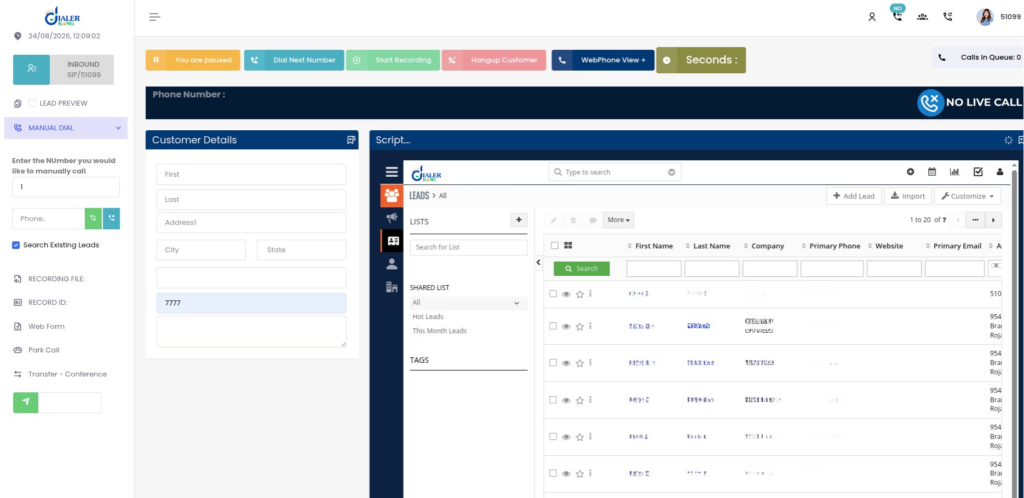
A major usability gain in custom VICIdial theme development comes from embedding CRM data directly into the agent view. When agents can see customer history, previous interactions, and account context without leaving the interface, handling times drop and conversation quality improves.
We integrate the custom VICIdial theme with CRM platforms and custom-built internal CRM systems. The integration layer handles bidirectional data exchange – lead data populates the agent view automatically on call connect, and dispositions or notes push back to the CRM without manual entry.
Screen popups, click-to-call, automatic lead synchronization, and webhook-based contact updates are standard components of these integrations.
Multi-tenant and enterprise VICIdial theme configurations
Operations that run multiple client accounts or business units on a shared VICIdial deployment have specific theme requirements. Each tenant may need distinct branding, different agent interface configurations, and isolated supervisor dashboards – all on the same underlying platform.
We build multi-tenant VICIdial theme configurations that handle this cleanly, with tenant-level branding controls and permission structures that keep each business unit’s agents and supervisors working within their own visual environment.
For enterprise deployments, we also design the theme architecture to support high-availability configurations, multi-server setups, and failover scenarios – so the custom interface remains accessible even under infrastructure stress.
FAQ – People also ask
Is there a VICIdial theme free download available❓
Some pre-built VICIdial themes are available as free downloads from community repositories. These cover basic visual changes but are not designed for specific workflow requirements, do not handle custom reporting or CRM integration, and may not perform reliably at scale. A custom-developed VICIdial theme is built to your operation’s specific needs.
How long does VICIdial theme development take❓
Development timelines depend on the scope of the project. A standard agent interface and supervisor dashboard build typically runs four to eight weeks including testing and staging rollout. Larger projects with multi-tenant configurations, embedded CRM data, and custom reporting modules may take longer.
Will the custom VICIdial theme work on our existing server setup❓
Custom VICIdial themes are built to run on your existing server infrastructure. We optimize the frontend and backend layers to your hardware and deployment configuration, including multi-server and high-availability setups.
Why DialerKing for VICIdial theme customization
DialerKing brings deep VICIdial and Asterisk expertise to every theme development project. Our team has worked across contact center operations of different sizes and structures – BPOs, lead generation agencies, appointment-setting firms, inbound customer support operations, and enterprise communication environments.
We handle the full development cycle: workflow analysis, frontend development, backend integration, CRM connectivity, reporting module development, testing, and post-launch support. If your requirements change after launch – a new campaign structure, an additional CRM integration, a new supervisor dashboard – we can extend the custom VICIdial theme without rebuilding from scratch.
Whether you are running a modest outbound operation or a large multi-site contact center, the investment in a properly built VICIdial theme returns in agent efficiency, supervisor effectiveness, and operational clarity from the first week of use.
Ready to redesign your VICIdial agent and supervisor experience? Contact DialerKing to discuss your custom VICIdial theme requirements and see what a purpose-built interface can do for your operation.